



This is an archived tutorial from the kirupa.com legacy collection. It covers software that may no longer be available, but it is kept online because the ideas still hold up.
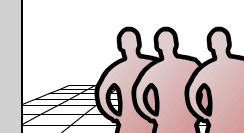
Here there are 3 movieclips, all human figures, being moved back and forth in 3D space being scaled and transposed according to their positions in that space. This scaling and movement is based on their respective z values assigned to each figure's movieclip in actionscript.
[ static view with moving figures ]
                                            origin = new Object();
origin.x = 150;
origin.y = 150;

focalLength = 300;
                                            figureA.x = -50;
figureA.y = 0;
figureA.z = 0;
figureA.dir = 1;

figureB.x = 0;
figureB.y = 0;
figureB.z = 250;
figureB.dir = 1;

figureC.x = 50;
figureC.y = 0;
figureC.z = 500;
figureC.dir = 1;

speed = 20;
                                            backAndForth = function(){
 this.z += speed*this.dir;
 if (this.z > 500){
  this.z = 500;
  this.dir = -1;
 }else if (this.z < 0){
  this.z = 0;
  this.dir = 1;
 }

 var scaleRatio = focalLength/(focalLength + this.z);
 this._x = origin.x + this.x * scaleRatio;
 this._y = origin.y + this.y * scaleRatio;
 this._xscale = this._yscale = 100 * scaleRatio;
 this.swapDepths(-this.z);
};
The first portion of the function just moves a figure's z value using speed and the dir variables. Following that, starting with the definition of scaleRatio is where the 3D starts to come into play.
The scaleRatio variable is derived from the figure's current z value and the focal length using the perspective formula. This is then used to correctly move and scale the figure for it's appearance on the 2D screen. Position (_x and _y) is based around the origin's position along with scaled x and y values for that figure and size (_xscale and _yscale) is based on 100% times the value of scaleRatio. With that, you have a correctly positioned and scaled clip on your 2D screen that appears to be in 3D.
The only remaining code is the swapDepths. As mentioned before, the swapDepths is based on z. Setting the depth of the figure to a negative z value assures that if its closer to view its on top of other figures in the scene.
                                            figureA.onEnterFrame = backAndForth;
figureB.onEnterFrame = backAndForth;
figureC.onEnterFrame = backAndForth;
And that's about it. The whole idea is to have your own values for 3D positioning in x, y and z and use the scaleRatio (based on the focalLength variable) to determine the actual _x and _y positions on the screen so that on the screen, in 2D, they appear to be in 3D.
There are numerous pages and many more examples for you to go through, so feel free to take a quick break and proceed to the other tutorials.
That wraps up this tutorial. A huge thank you to all of you who buy kirupa's books, became a paid subscriber, watch the videos, and/or interact on the forums. Your support is what keeps writing like this online! 😇
This tutorial was written by senocular, also known as Trevor McCauley. He has been one of this community's most generous teachers since the early Flash days, and he is still around: find him on senocular.com and on the forums.

:: Copyright KIRUPA 2026 //--