
07 / EXAMPLES & DEMOS
Examples & Demos
How to highlight and explain live demos and examples: the Example guide, readable text inside demos, and the sentence that always comes before Onwards.

Agent Instructions / examples
Present a live demo or example on kirupa.com. Read /design/sections/examples.md. Wrap the iframe and its guide in one .exampleFrame, point the iframe's aria-describedby at the guide, and use the Example guide component (/design/components/example-guide.htm): the Try it label with the 1f3af bullseye site icon, then one to three numbered steps in reading order, each starting with a verb and under about ten words (one unnumbered line for a single action). Controls are exampleGuide__control chips with their exact labels; keys are kbd keycaps. The sentence before the demo says what it is, the guide says what to do, and the paragraph after says what the reader saw; never repeat the steps. Static figures get no guide. Never put small gray instructions or explanations under or inside an example: changing text inside a demo uses readout chips (muted label, bold tabular value, 15px or more, embed-theme colors), and special-case notices are readable callouts hidden when empty. Always put a full sentence between an example, image, figure, or code block and "Onwards!"; python3 tools/site_metadata.py --check fails otherwise. Mirror the guide in the Markdown and text twins as a Try it line and a numbered list. Check every style, light and dark, desktop and phone. Follow WCAG 2.2 AA for new or changed content: semantic HTML, keyboard access, visible focus, readable contrast in every theme, text alternatives, labeled controls, and explicit errors. Support zoom/reflow, respect reduced motion, and keep sound optional. Read /design/sections/accessibility.md for acceptance checks. Report unresolved barriers; automated checks alone do not establish conformance.
A live example is often the best part of an explainer. Readers poke at it, break it, and finally see the idea move. That only works when they know what to try, and when the words around the example are as easy to read as the rest of the article. This page covers how kirupa.com presents demos and examples: the Example guide that tells readers what to do, how text inside a demo should look, and the sentence that always comes before "Onwards!".
The Example guide
Every embedded demo gets an Example guide, attached right under its frame. It's the TL;DR's sibling: a thin accent rule, the pixel TRY IT label with a bullseye, and a few short steps at the article's body size. The demo and its guide share one .exampleFrame, and the iframe's aria-describedby points at the guide, so a screen reader hears the steps when it reaches the demo. Here's a live specimen to try in every style, in light and dark:
Example guide
LOCAL PREVIEWActivate this specimen to load its real styles. No saved preferences change.
Steps, controls, and keys
Write the guide as steps, not a paragraph. Use one to three numbered steps, stacked one per line in the order a reader does them, each starting with a verb (Click, Press, Drag, Uncheck) and staying under about ten words. A single action is one line with no number. Anything the reader presses or toggles in the demo is a bold control chip with the control's exact label, like Back to all fruit, and keyboard keys are keycaps, like Tab and the arrow keys.
Guide, caption, or nothing?
The guide says what to do. The sentence before the demo says what the demo is, and the paragraph after it says what the reader just saw, so don't repeat the steps in either one. Static figures don't get a guide: their setup sentence (usually ending in a colon) introduces them, and the paragraph after explains them. A demo with nothing to press, like an animation that just plays, can still get a one-line guide that says what to watch for.
No tiny text
Never put small gray instructions or explanations under or inside an example. Instructions move to the Example guide. Text that changes as readers play, like a count, the current setting, or a measured frame rate, stays inside the demo as compact readout chips: a muted label, a bold value with tabular numerals, at 15px or more, colored from the embed theme so it works in every style and in dark mode. A notice that only appears in a special case, like an unsupported browser or reduced motion, is a readable callout with an icon, and it's hidden when there's nothing to say.
A sentence before Onwards
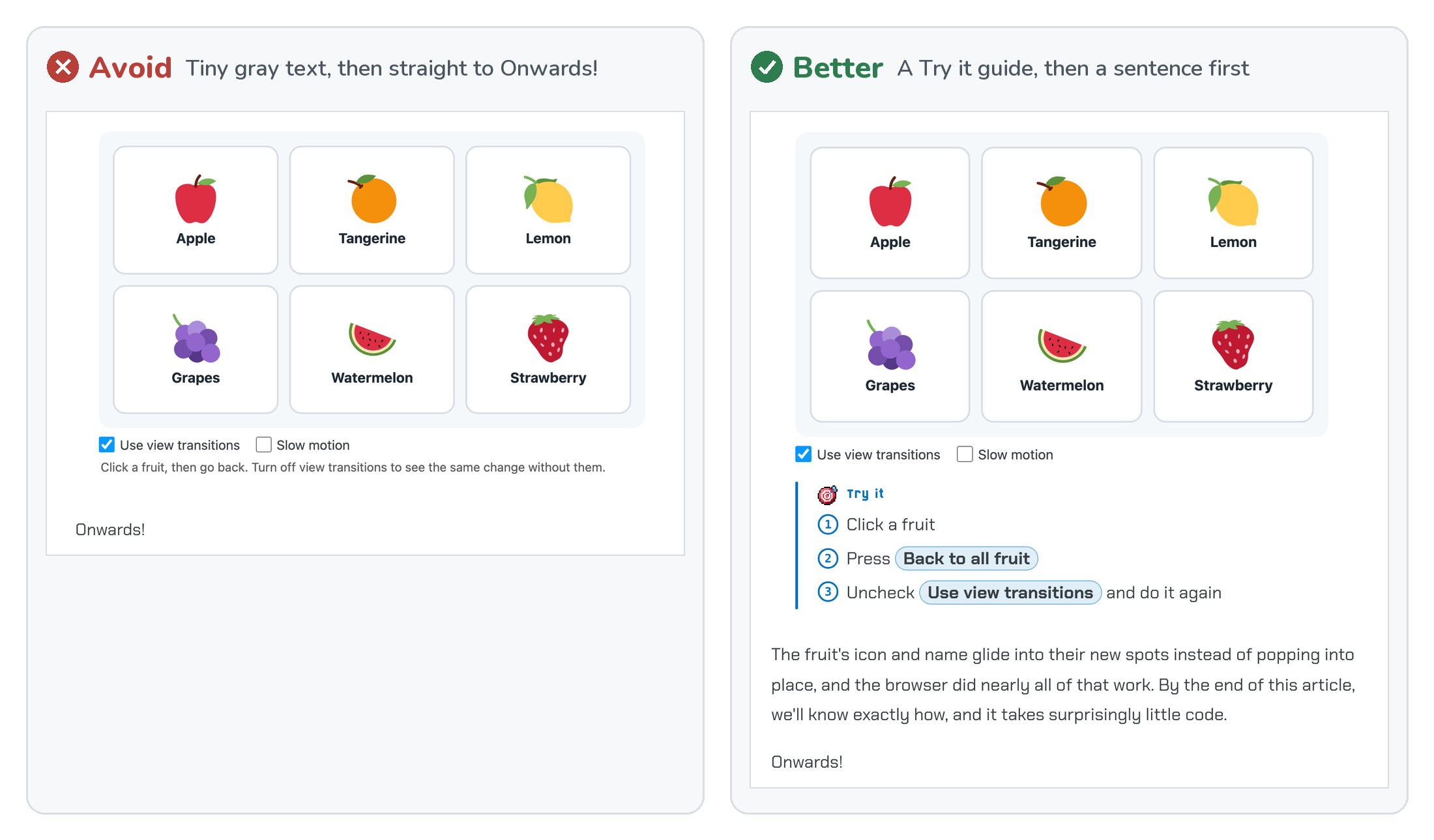
An intro never jumps from an image, demo, figure, or code block straight to "Onwards!". There's always a full sentence between them, usually one that says what the reader just saw and what the article will do with it. python3 tools/site_metadata.py --check fails when "Onwards!" directly follows content with no words of its own. Here's the opening demo from the view transitions article before and after both fixes:
Before vs. after. Bad: the instructions are a tiny gray line under the demo, and the intro jumps from the demo straight to Onwards!. Better: an Example guide attached under the demo gives three short steps at body size with the controls as bold chips, and a sentence about what the reader just saw comes before Onwards!.
Tiny instructions under a demo vs. an Example guide
LOCAL PREVIEWActivate this specimen to load its real styles. No saved preferences change.
Accessibility
The guide is real text in the page rather than part of the demo, so it's searchable, translatable, and readable even if the demo never loads. Live readouts inside a demo announce meaningful changes politely instead of reading every frame. Control chips and keycaps are styled text, not buttons, so they never look clickable outside the demo, and every color in the guide comes from theme tokens, so contrast holds in all nine styles and both modes.
Twins
In the Markdown and plain-text twins, the guide follows the demo's link as a **Try it:** line (plain Try it: in text) and a numbered list, with control labels in bold. Keep the twins' steps identical to the page's.
- Every embedded demo gets an Example guide attached under it, inside one .exampleFrame, with the iframe's aria-describedby pointing at the guide.
- Guides are one to three numbered steps (one line with no number for a single action), each starting with a verb and under about ten words, at the article's body size.
- Name controls with bold chips using their exact labels, and keys with keycaps; never repeat the steps in the sentences around the demo.
- Never put small gray instructions or explanations under or inside an example; changing text inside a demo uses readout chips at 15px or more.
- Always put a full sentence between an example, image, figure, or code block and "Onwards!"; site_metadata.py --check enforces it.
- Static figures don't get guides; their setup sentence and the paragraph after them do the explaining.
