
05 / LAYOUTS / CURRENT SHELL
Homepage
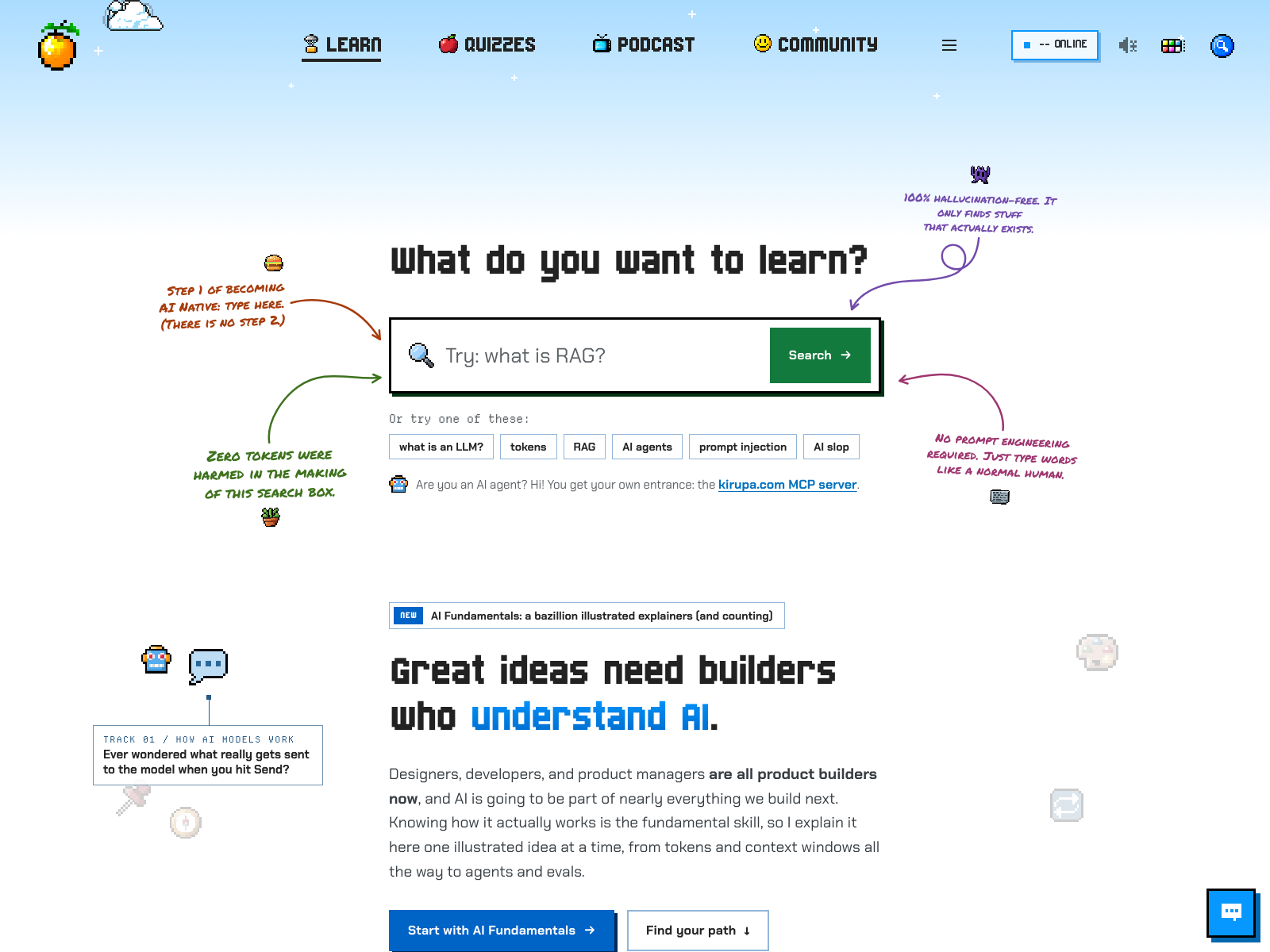
The front door: a What do you want to learn? search ringed by handwritten captions, then a headline over a field of theme icons with the Ever wondered tour, the site's purpose, its track record, a map of every section, learning paths, quizzes, the latest content, community, and common questions.
Current shellfamily / homeHome and learning
Earlier version: Homepage (before Nov 15, 2026), archived with its original captures.
The screenshot could not load. Open the live example or the full-size image below.
Anatomy
- Regions
- Shared site header and theme controls; Search opening with suggested searches, the MCP note, and handwritten captions whose arrows point at the box; Headline, calls to action, and the Ever wondered tour over theme icons; Purpose statement and track-record stats; Map of every section, with the AI Fundamentals tracks; Learning paths and the quiz comparison; Latest articles, newsletter issues, interviews, and forum posts; Newsletter and MCP cards, common questions, and the shared footer.
- Reuse
- Use only for the site front door. Its search opening, icon field, tour, and section reveal belong to this page; other pages get Background icons and Content reveals from the shared footer, and section indexes use the topic or reference-directory layout.
- Responsive
- Section backgrounds bleed past the column while content stays in it. Above 1200px the search opening sets its four captions beside the box; at 1200px and narrower two sit above it, and at 680px and narrower only Step 1 remains. The headline's field shows 12 icons, or 8 when it is under 700px wide. Above 1200px the tour gathers its tracks beside the column with the label under each; narrower windows gather them above the words with the label beside each. Every grid stacks into one column once the column is 540px or narrower.
Sources
- index.html
- home_proposal/home.css
- home_proposal/variants.css
- home_proposal/preview.css
- home_proposal/icons.js
- home_proposal/search.js
- home_proposal/home.js
- ssi/newDesign/src/kirupa.css
- ssi/newDesign/src/footer.shtml
Captures
- Desktop / Captured page / Pixel / Blue / Light / 1600 x 1200 CSS px / page top / 2026-11-20
- Phone / Captured page / Pixel / Blue / Light / 390 x 844 CSS px / page top / 2026-11-20
- Headline and tour / Captured page / Pixel / Blue / Light / 1600 x 1200 CSS px / scrolled 663px / 2026-11-20
- Learning paths / Captured page / Pixel / Blue / Light / 1600 x 1200 CSS px / scrolled 6205px / 2026-11-20
- Shared footer / Captured page / Pixel / Blue / Light / 1600 x 1200 CSS px / scrolled 12600px / 2026-11-20
Agent Instructions / layouts
You are choosing or extending a kirupa.com page layout. Read /design/layouts.json and the relevant record in /design/sections/layouts.md. Reuse its real source page, regions, navigation, shared includes, and responsive rules; subject or color changes do not create a new layout family. Current articles use the native tutorial shell. Specialized tools and spatial applications have separate requirements. Archived content may use the current shell; legacy shells and the Discourse/Substack companion sites are explicitly labeled and are not new-page templates. Archived layouts keep the original captures of a replaced page; never recapture them or build from them. Screenshots are fixed captures with recorded appearance, viewport, date, URL, and scroll state. Never pretend to restyle them with CSS filters. Keep capture selection local and preserve full-size image access. Update design/layouts.source.json, run tools/capture_design_layouts.mjs for changed capture definitions, then build the design system. Do not submit forms, quiz answers, chat messages, subscriptions, or plot claims during capture, and never capture private account or visitor data. Deployment requires separate authorization. Follow WCAG 2.2 AA for new or changed content: semantic HTML, keyboard access, visible focus, readable contrast in every theme, text alternatives, labeled controls, and explicit errors. Support zoom/reflow, respect reduced motion, and keep sound optional. Read /design/sections/accessibility.md for acceptance checks. Report unresolved barriers; automated checks alone do not establish conformance.


