# KIRUPA DESIGN SYSTEM
Reference documentation for kirupa.com typography, themes, components, illustrations, assets, sound, and content.
Start small: [instruction index](/design/index.md). Generated from system.source.json and actual site sources; do not hand-edit.
# Foundations
## Agent Instructions
You are extending kirupa.com, not replacing its design. Keep the shared header/footer and main navigation unchanged. Include the actual head.shtml, header.shtml, and footer.shtml at request time, retaining native chat, search, theme controls, and optional link sounds on the outer page. Treat this as a tutorial section: native title typography, prose, a Design System left-nav item, and Filed under metadata. Keep sections on separate pages with previous/next links and a compact index. Do not add an orange hero. Read head.shtml and kirupa.css in ssi/newDesign/src/. Reuse semantic custom properties, font roles, and source spacing, including style overrides. Keep display, body, code, and utility typography distinct. Choose foreground/background pairs by purpose. Fetch tokens.json only for exact declarations.
Follow WCAG 2.2 AA for new or changed content: semantic HTML, keyboard access, visible focus, readable contrast in every theme, text alternatives, labeled controls, and explicit errors. Support zoom/reflow, respect reduced motion, and keep sound optional. Read /design/sections/accessibility.md for acceptance checks. Report unresolved barriers; automated checks alone do not establish conformance.
## Reference
Shared colors, typography, spacing, layout, and CSS source files.
Edit the readable shared sources in ssi/newDesign/src/; node .github/tools/build-assets.mjs produces the minified files served from ssi/newDesign/. Base blue and generic dark properties are in src/head.shtml; other presets and their dark variants are in src/kirupa.css. Smooooth/Nature has its own src/styles/nature.css. Commit source and output, but deploy only output. themes.css and kirupa_html5.css belong to older surfaces.
The design system is a tutorial section, not a separate branded landing page. Keep the shared site header and footer, with no Design System entry in the site header. Put Design System in the dedicated left navigation and show Filed under Design System beneath the article title using .tutorialInfo. Give each section its own page, connected by that navigation and previous/next links; /design/ is the section index. Reuse the native article grid and content margins, including its empty right gutter. Use the tutorial heading and prose styles, without a second orange logo or oversized hero illustration in the content.
Include head.shtml, header.shtml, and footer.shtml from ssi/newDesign/ at request time, just as the tutorials do. The outer page keeps the normal theme picker, chat widget, search, and optional link sounds. Only isolated specimens omit production services. Article titles inherit .authorText h1 and its theme and responsive rules; do not add a compact title class or a separate mobile font size.
Use the tutorial's `.leftNavContainer`, `.leftNav`, and `.leftNavContents` markup with grouped h3 headings and `.articleList` links from `ssi/newDesign/left_js.shtml`. Keep the shared rail styling and responsive breakpoint; change the links for this section. Here is the actual shell on [Building Your First Interactive Web Page](https://www.kirupa.com/html5/building_your_first_web_page.htm):
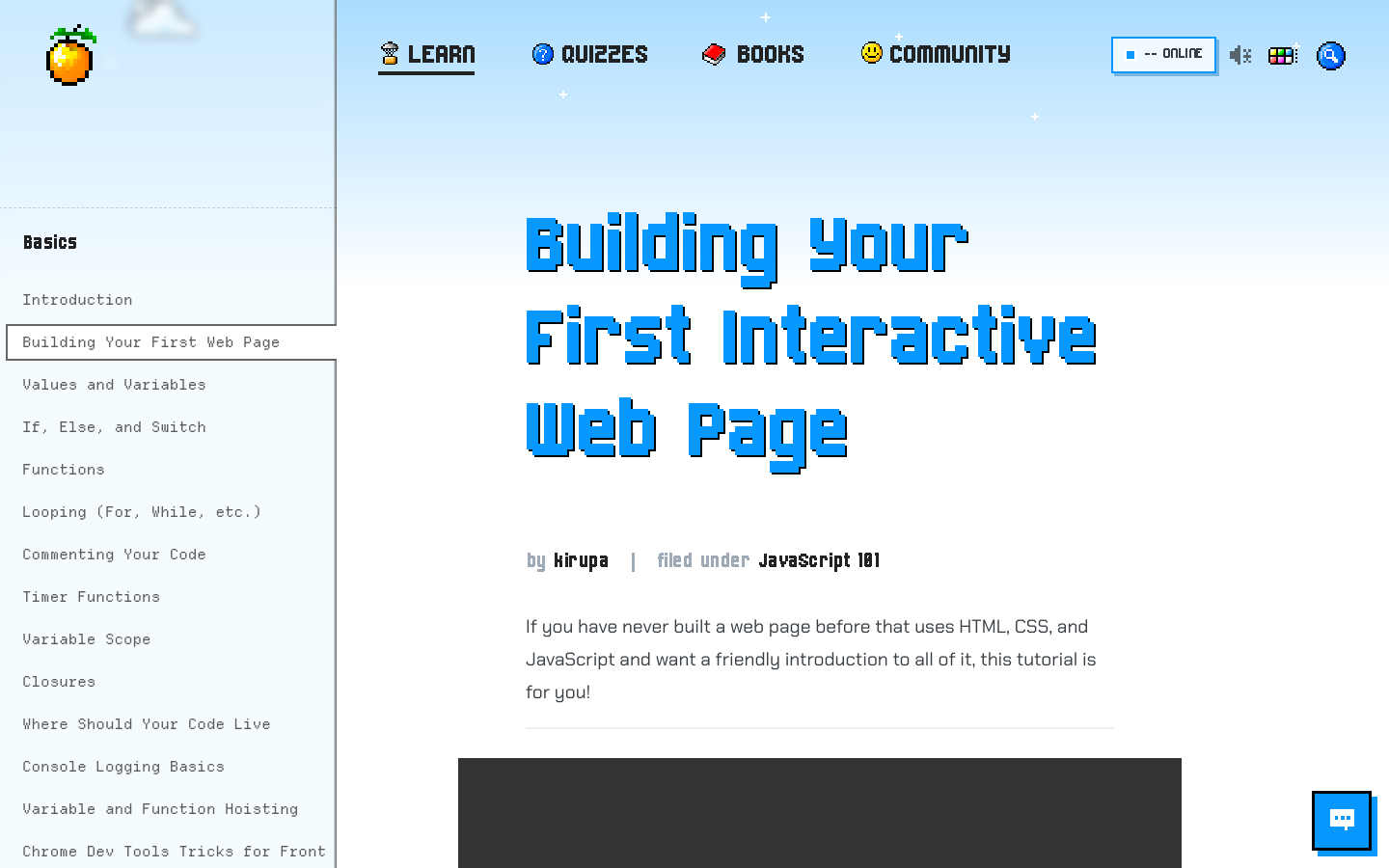
[The native tutorial shell](https://www.kirupa.com/html5/building_your_first_web_page.htm). Fixed capture from 2026-10-19.
Use --pageBackground for the page, --bodyText for prose, --headerText for headings, --primary for the accent, --textOnPrimary for text on that accent, --structureBorder for quiet separation, and the --linkForeground/--linkBackground pair for links. Hover has its own --linkHoverForeground/--linkHoverBackground pair. An accent is not automatically an accessible foreground.
[Semantic colors, resolved by the browser](/design/foundations.htm#specimen-tokens)
The slightly surprising --serifFonts name is the existing body-font role, not a promise that the font is a serif. Pixel uses Chakra Petch for body text, kirupaPixel (Born2bSporty v2) for display, and kirupaCode (Departure Mono) for code. Smooooth uses Nunito and Fraunces; Sci-Fi uses Michroma and Share Tech Mono; Minimal uses Inter; Ukiyo-e uses Yuji Syuku and Zen Old Mincho; Platformer uses Press Start 2P and Nunito.
[Type, rhythm, and inline code](/design/foundations.htm#specimen-type)
The source has measured values, not a universal spacing scale. Article headings use 35px top margin and 25px top padding; list items use a 1.75 line height and 1em bottom space; inline code uses 2px 5px padding and a 3px radius. Pixel media uses a 5px frame. Other styles deliberately override these values. Reuse selectors before extracting a new shared spacing token.
The type example uses the actual cascade. Keep pixel artwork on whole-pixel multiples with image-rendering: pixelated. Small utility labels must still be readable; do not use a display face for long paragraphs. The token ledger records selector scope and source locations, including style-specific implementation properties.
- Do pair foreground and background roles and verify contrast in every supported mode.
- Do preserve the orange and the source style's treatment; do not recolor a fixed-color asset merely because a palette changed.
- Do not create a parallel --brand-blue/--brand-text universe when the existing roles already do the job.
## Sources
- [ssi/newDesign/src/head.shtml](https://github.com/kirupa/kirupaWWW/blob/main/ssi/newDesign/src/head.shtml)
- [ssi/newDesign/src/header.shtml](https://github.com/kirupa/kirupaWWW/blob/main/ssi/newDesign/src/header.shtml)
- [ssi/newDesign/src/footer.shtml](https://github.com/kirupa/kirupaWWW/blob/main/ssi/newDesign/src/footer.shtml)
- [ssi/newDesign/left_js.shtml](https://github.com/kirupa/kirupaWWW/blob/main/ssi/newDesign/left_js.shtml)
- [ssi/newDesign/src/kirupa.css](https://github.com/kirupa/kirupaWWW/blob/main/ssi/newDesign/src/kirupa.css)
- [ssi/newDesign/src/kirupabot-widget.css](https://github.com/kirupa/kirupaWWW/blob/main/ssi/newDesign/src/kirupabot-widget.css)
- [fonts/departure-mono-OFL.txt](https://github.com/kirupa/kirupaWWW/blob/main/fonts/departure-mono-OFL.txt)
[Section page and specimens](/design/foundations.htm) | [Instruction index](/design/index.md) | [Plain prompt](/design/agent/foundations.txt)
# Themes
## Agent Instructions
You are implementing a theme-aware KIRUPA surface. Preserve the independent style, palette, and mode dimensions. Use the enabled styles and presets from header.shtml and kirupa.js; nature is displayed as Smooooth. Use the actual custom-color generator and the exact production class composition. Keep preview state inside its document; never persist it, dispatch a site-wide theme change, or change another specimen. Reuse the style CSS and asset mappings rather than simulating a theme with a background color. Mark fixed-color artwork honestly. Verify all preset combinations and a custom color, plus Auto and reduced motion.
Follow WCAG 2.2 AA for new or changed content: semantic HTML, keyboard access, visible focus, readable contrast in every theme, text alternatives, labeled controls, and explicit errors. Support zoom/reflow, respect reduced motion, and keep sound optional. Read /design/sections/accessibility.md for acceptance checks. Report unresolved barriers; automated checks alone do not establish conformance.
## Reference
Six visual styles, eight color palettes, and Light, Dark, and Auto modes.
Pixel is the classic retro shell: chunky type, pixel icons, hard shadows, drifting clouds, and stars at night. Smooooth is stored as nature: rounded controls, leafy masks, soft hills, and warmer, quieter typography.
Sci-Fi is a starship console: a sun-orange mark, wide-tracked titles, technical type, thin rules, and a moving geographic atlas. Minimal gives the words room, uses hairlines and Inter, and adds a reading-progress line only to articles.
Ukiyo-e uses woodblock waves, ink, paper, a seal, sails, birds, and mist. Platformer uses a dithered sky, CC0 tiles, gold buttons, coins, and a question block. Their artwork contains intentional fixed hues as well as theme-colored layers. Here is the [actual homepage](https://www.kirupa.com/) in every style. Each window has its own Light/Dark selector; these fixed captures use the Blue palette:
- Pixel: [Light screenshot](/design/screenshots/home-pixel-light.png?v=13e2d6b85c42) / [Dark screenshot](/design/screenshots/home-pixel-dark.png?v=3b221b032943)
- Smooooth: [Light screenshot](/design/screenshots/home-nature-light.png?v=c8b2a964eebf) / [Dark screenshot](/design/screenshots/home-nature-dark.png?v=8fba7ffdf2a7)
- Sci-Fi: [Light screenshot](/design/screenshots/home-scifi-light.png?v=ae0e5c5b3e3e) / [Dark screenshot](/design/screenshots/home-scifi-dark.png?v=4ddea47ff911)
- Minimal: [Light screenshot](/design/screenshots/home-minimal-light.png?v=e903cba23a34) / [Dark screenshot](/design/screenshots/home-minimal-dark.png?v=6e3d1f0ce574)
- Ukiyo-e: [Light screenshot](/design/screenshots/home-ukiyoe-light.png?v=9264384c730e) / [Dark screenshot](/design/screenshots/home-ukiyoe-dark.png?v=bd42b9ed2d12)
- Platformer: [Light screenshot](/design/screenshots/home-platformer-light.png?v=a9ba87e01577) / [Dark screenshot](/design/screenshots/home-platformer-dark.png?v=8ea88a8b1342)
These are fixed homepage captures in the Blue palette. [Live homepage](https://www.kirupa.com/) / [Capture metadata](/design/screenshots/manifest.json).
There are eight preset palettes: Blue, Yellow, Pink, Green, Purple, PICO-8, Black, and Brown. Custom color uses the site's existing OKLCH generator. Light, Dark, and Auto are modes. Auto follows the device; a preview never reads or writes the site's saved choices.
Production selection is owned by header.shtml and kirupa.js. Pixel has no style class. Other styles use html.style_NAME. A dark preset uses theme_NAME_dark plus theme_dark, not the light palette class at the same time. The feature switches in header.shtml determine which styles are offered.
Each preview is a separate document using the real CSS and, where needed, the real visual renderer. Controls change only that document. Asset previews identify fixed artwork, themed masks, and sprite cells explicitly. The outer tutorial shell uses the actual site theme customizer and saved preferences; choosing a specimen's style never calls that customizer or changes its stored state.
[The actual navigation and sky](/design/themes.htm#specimen-header)
- Do exercise style x palette x mode; dark mode alone is not a visual style.
- Do use buildCustomThemeCSS for a custom color, not a hand-tinted approximation.
- Do not call the production preference or onboarding APIs from a specimen.
## Sources
- [ssi/newDesign/src/header.shtml](https://github.com/kirupa/kirupaWWW/blob/main/ssi/newDesign/src/header.shtml)
- [ssi/newDesign/src/kirupa.js](https://github.com/kirupa/kirupaWWW/blob/main/ssi/newDesign/src/kirupa.js)
- [ssi/newDesign/src/styles/nature.css](https://github.com/kirupa/kirupaWWW/blob/main/ssi/newDesign/src/styles/nature.css)
- [ssi/newDesign/src/styles/scifi.css](https://github.com/kirupa/kirupaWWW/blob/main/ssi/newDesign/src/styles/scifi.css)
- [ssi/newDesign/src/styles/minimal.css](https://github.com/kirupa/kirupaWWW/blob/main/ssi/newDesign/src/styles/minimal.css)
- [ssi/newDesign/src/styles/ukiyoe.css](https://github.com/kirupa/kirupaWWW/blob/main/ssi/newDesign/src/styles/ukiyoe.css)
- [ssi/newDesign/src/styles/platformer.css](https://github.com/kirupa/kirupaWWW/blob/main/ssi/newDesign/src/styles/platformer.css)
[Section page and specimens](/design/themes.htm) | [Instruction index](/design/index.md) | [Plain prompt](/design/agent/themes.txt)
# Components
## Agent Instructions
You are composing a current-shell KIRUPA page. Read /design/components.json and the relevant entry in /design/sections/components.md for selectors, variants, source files, and usage. Start from an adjacent working page and reuse its SSI structure and named component classes. When a link needs to look like a link inside the tutorial body, add the blueEmphasis class to its anchor, including in component examples. Style class names, IDs, and code identifiers in explanatory prose with inlineCode. Choose semantic HTML before adding JavaScript. Use visible labels, keyboard-operable controls, clear focus, and explicit loading/error/empty states. Keep forms inert in documentation specimens and label demo output. Preserve the article's reading rhythm and code overflow containment. Verify the component in each visual style and both modes. Do not initialize onboarding, tracking, a live chat request, or a subscription in a preview. Keep reference and navigation descriptions short and factual.
Follow WCAG 2.2 AA for new or changed content: semantic HTML, keyboard access, visible focus, readable contrast in every theme, text alternatives, labeled controls, and explicit errors. Support zoom/reflow, respect reduced motion, and keep sound optional. Read /design/sections/accessibility.md for acceptance checks. Report unresolved barriers; automated checks alone do not establish conformance.
## Reference
Native interface elements with independent theme previews, markup, selectors, and source references.
Current articles use `#mainBody`, `#mainContent`, `#tutorialInformation`, `.authorText`, `.tutorialInfo`, and the shared shell includes. Reuse `.kirupaButton`, `.kirupaInput`, `.inlineCode`, `.blueEmphasis`, `.callout`, `.articleList`, and `.embed-container` instead of drawing near-duplicates.
Use `.blueEmphasis` on anchors that need the standard link treatment inside tutorial body content, including links in component examples. Keep their text descriptive. Use `.inlineCode` when naming CSS classes, IDs, or code identifiers in the explanation.
> **Example: Use the reading classes directly**
> Give the identifier its inline-code treatment and the destination its link treatment.
```html
```
Use real buttons for actions, anchors for destinations, visible input labels, scope on table headers, and a caption or accessible name for tables. Focus is a state, not an optional decoration. Label disabled controls and empty states so readers understand what can happen next.
[Buttons and form states](/design/components.htm#specimen-components)
Tutorial content has a title and byline, a reason to care, an example, and a clear progression. Code and illustrations must agree. Long examples can scroll inside their own container; the whole page must not become a sideways adventure. Here is a reading detail from [Building Your First Interactive Web Page](https://www.kirupa.com/html5/building_your_first_web_page.htm):
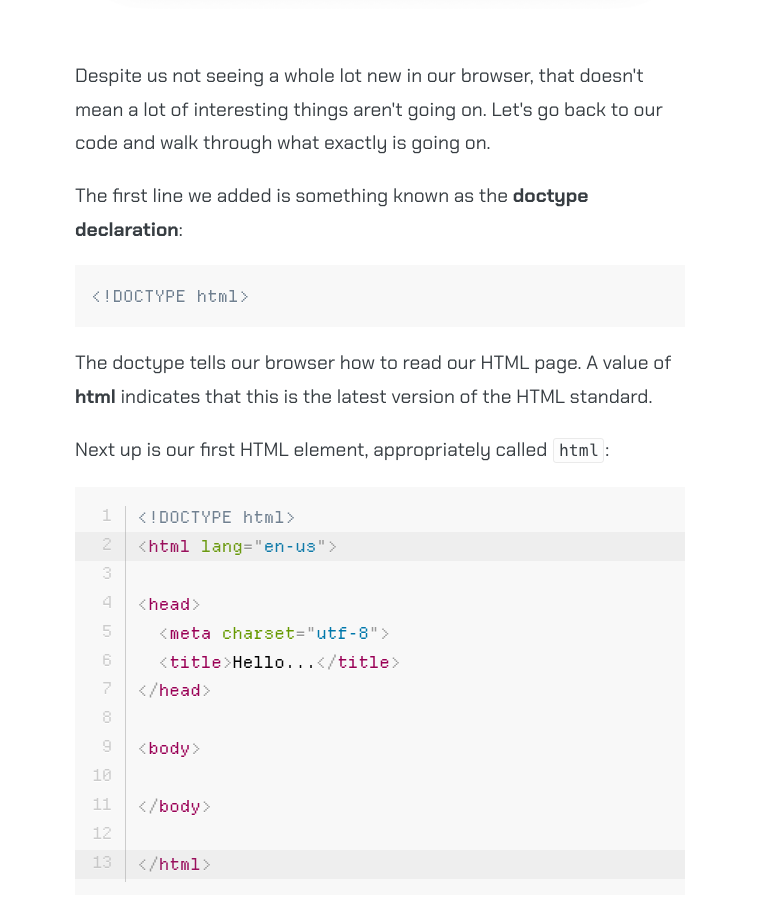
[Reading patterns in a real tutorial](https://www.kirupa.com/html5/building_your_first_web_page.htm). Fixed capture from 2026-10-19.
The theme picker is a dialog with color swatches, a custom color, mode choices, and style cards. Onboarding is a separate once-only interaction that can record choices. These are production behaviors, not things to initialize when showing an innocent design preview.
The catalog below covers shared article patterns, navigation, book and newsletter promotions, theme controls, search, chat, media, and the visitor globe. Each entry identifies its implementation and any preview limitations. Tutorial-specific games and visualizers, legacy Flash interfaces, and third-party Discourse internals are outside this shared-component catalog. Preview actions stay local; they never submit a subscription, chat message, search query, or presence event to production.
## Component catalog
Current shared tutorial elements, homepage and podcast cards, promotions, navigation, theme controls, and signature widgets. Examples reuse native CSS and extracted source markup. Lesson-specific demos, legacy Flash layouts, and the unversioned Discourse theme are not a shared component library.
[Download component metadata](/design/components.json).
### Article title and metadata
ID: `article-heading`. Native article title, author block, and Filed under metadata.
Selectors: `#tutorialInformation`, `.authorText`, `.tutorialInfo`.
Properties: `--headerText`, `--bodyText`.
Keep the shared title size and font. Do not introduce a separate hero or display treatment.
[Independent preview](/design/components.htm#component-article-heading).
**Article title and metadata.** Example composed with native selectors. [Rendered markup](/design/generated/components/article-heading-default.htm).
```html
```
Sources: [ssi/newDesign/src/kirupa.css](https://github.com/kirupa/kirupaWWW/blob/main/ssi/newDesign/src/kirupa.css), [design/template.htm](https://github.com/kirupa/kirupaWWW/blob/main/design/template.htm), [html5/building_your_first_web_page.htm](https://github.com/kirupa/kirupaWWW/blob/main/html5/building_your_first_web_page.htm).
### Headings, links, code, and emphasis
ID: `reading-type`. Article heading levels and inline treatments using the site's existing selectors.
Selectors: `#mainContent h2`, `#mainContent h3`, `#mainContent h4`, `.blueEmphasis`, `.inlineCode`, `strong`, `em`.
Properties: `--serifFonts`, `--monoFonts`, `--headerText`, `--linkForeground`, `--linkHoverBackground`.
Links that need to look like links in tutorial body content require blueEmphasis. Use inlineCode for identifiers; do not apply it to a whole code block.
[Independent preview](/design/components.htm#component-reading-type).
**Headings, links, code, and emphasis.** Example composed with native selectors. [Rendered markup](/design/generated/components/reading-type-default.htm).
```html
```
Sources: [ssi/newDesign/src/kirupa.css](https://github.com/kirupa/kirupaWWW/blob/main/ssi/newDesign/src/kirupa.css).
### Buttons and size variants
ID: `buttons`. Primary actions, the historical greenButton alias, and the compact button modifier.
Selectors: `.kirupaButton`, `.greenButton`, `.kirupaButtonSmall`.
Properties: `--primary`, `--primaryDarker`, `--textOnPrimary`.
Use buttons for actions and anchors for navigation. greenButton is a historical name; its color follows the palette. The compact modifier does not guarantee a 44px touch target. Check focus, disabled behavior, and hit area in the actual context.
[Independent preview](/design/components.htm#component-buttons).
**Buttons and size variants.** Example composed with native selectors. [Rendered markup](/design/generated/components/buttons-default.htm).
```html
Open reference
```
Sources: [ssi/newDesign/src/kirupa.css](https://github.com/kirupa/kirupaWWW/blob/main/ssi/newDesign/src/kirupa.css).
### Article lists and ordered steps
ID: `lists`. Native linked topic lists, ordinary bullet lists, and ordered instructions.
Selectors: `.articleList`, `#mainContent ul`, `#mainContent ol`.
Properties: `--bodyText`, `--primary`, `--linkForeground`.
articleList has its own link and icon treatment. Ordinary inline reading links still use blueEmphasis. Keep list semantics instead of imitating bullets with text.
[Independent preview](/design/components.htm#component-lists).
**Article lists and ordered steps.** Example composed with native selectors. [Rendered markup](/design/generated/components/lists-default.htm).
```html
```
Sources: [ssi/newDesign/src/kirupa.css](https://github.com/kirupa/kirupaWWW/blob/main/ssi/newDesign/src/kirupa.css), [javascript/learn_javascript.htm](https://github.com/kirupa/kirupaWWW/blob/main/javascript/learn_javascript.htm).
### Notes, downloads, and archive notices
ID: `notices`. Three existing callout patterns with different purposes.
Selectors: `.callout`, `.downloadCallout`, `.legacyArchiveNote`.
Properties: `--highlighter`, `--lighter`, `--darkTextSecondary`.
A note explains an exception; a download callout exposes a file; an archive notice prevents an old pattern being mistaken for current guidance.
[Independent preview](/design/components.htm#component-notices).
**Note.** Example composed with native selectors. [Rendered markup](/design/generated/components/notices-note.htm).
```html
```
**Download.** Example composed with native selectors. [Rendered markup](/design/generated/components/notices-download.htm).
```html
```
**Archive notice.** Example composed with native selectors. [Rendered markup](/design/generated/components/notices-archive.htm).
```html
```
Sources: [ssi/newDesign/src/kirupa.css](https://github.com/kirupa/kirupaWWW/blob/main/ssi/newDesign/src/kirupa.css), [design/archive.htm](https://github.com/kirupa/kirupaWWW/blob/main/design/archive.htm).
### Syntax-highlighted code
ID: `code`. Native Prism code presentation, including real highlighting and overflow behavior.
Selectors: `pre[class*="language-"]`, `code[class*="language-"]`, `.token`.
Properties: `--monoFonts`, `--codeFilter`.
Put the language on both pre and code so the unhighlighted block has stable geometry. The normal shell loads Prism near the viewport; the isolated example loads the same library explicitly.
[Independent preview](/design/components.htm#component-code).
**Syntax-highlighted code.** Example composed with native selectors. [Rendered markup](/design/generated/components/code-default.htm).
```html
const count = 3;
```
Sources: [ssi/newDesign/src/kirupa.css](https://github.com/kirupa/kirupaWWW/blob/main/ssi/newDesign/src/kirupa.css), [ssi/newDesign/src/kirupa.js](https://github.com/kirupa/kirupaWWW/blob/main/ssi/newDesign/src/kirupa.js), [js/prism_v1.js](https://github.com/kirupa/kirupaWWW/blob/main/js/prism_v1.js).
### Images and embedded-media frames
ID: `images`. Bordered images, borderless artwork, and the shared iframe frame.
Selectors: `.centerImage`, `.centerImageNoBorder`, `.centerIframe`, `.imageCaption`.
Properties: `--mediaBorder`.
Introduce figures in the surrounding prose. Preserve intrinsic dimensions and purposeful alt text. The embed preview only demonstrates the frame; it does not load a player or third-party service.
[Independent preview](/design/components.htm#component-images).
**Bordered image.** Example composed with native selectors. [Rendered markup](/design/generated/components/images-bordered.htm).
```html
```
**Borderless illustration.** Example composed with native selectors. [Rendered markup](/design/generated/components/images-borderless.htm).
```html
```
**Embedded-media frame.** Example composed with native selectors. [Rendered markup](/design/generated/components/images-embed.htm).
```html
```
Sources: [ssi/newDesign/src/kirupa.css](https://github.com/kirupa/kirupaWWW/blob/main/ssi/newDesign/src/kirupa.css), [data_structures_algorithms/understanding_merkle_trees.htm](https://github.com/kirupa/kirupaWWW/blob/main/data_structures_algorithms/understanding_merkle_trees.htm).
### Book promotions
ID: `books`. Inline book callouts and the older cover-and-copy book blocks.
Selectors: `#kbook_callout`, `.lightbulb_callout`, `.lightbulb`, `.bookContent`, `#bookImage`, `#bookContent`, `.greenButton`.
Properties: `--lighter`, `--light`, `--primaryLightest`, `--mediaBorder`.
Markup and inline styles are extracted from the real includes. Render one variant at a time because several share IDs. 3dBook.shtml currently repeats the animation promotion; it is not a separate 3D-book design. Older includes may need accessibility and mobile updates before reuse.
[Independent preview](/design/components.htm#component-books).
**Data Structures and Algorithms.** Source-extracted markup. [Rendered markup](/design/generated/components/books-algorithms.htm).
```html
```
**JavaScript.** Source-extracted markup. [Rendered markup](/design/generated/components/books-javascript.htm).
```html
```
**Canvas.** Source-extracted markup. [Rendered markup](/design/generated/components/books-canvas.htm).
```html
```
**Arrays.** Source-extracted markup. [Rendered markup](/design/generated/components/books-arrays.htm).
```html
```
**React.** Source-extracted markup. [Rendered markup](/design/generated/components/books-react.htm).
```html
```
**Web Animation.** Source-extracted markup. [Rendered markup](/design/generated/components/books-animation.htm).
```html
```
Sources: [ssi/newDesign/inline_algorithms.shtml](https://github.com/kirupa/kirupaWWW/blob/main/ssi/newDesign/inline_algorithms.shtml), [ssi/newDesign/jsBook.shtml](https://github.com/kirupa/kirupaWWW/blob/main/ssi/newDesign/jsBook.shtml), [ssi/newDesign/canvasBook.shtml](https://github.com/kirupa/kirupaWWW/blob/main/ssi/newDesign/canvasBook.shtml), [ssi/newDesign/arrayBook.shtml](https://github.com/kirupa/kirupaWWW/blob/main/ssi/newDesign/arrayBook.shtml), [ssi/newDesign/reactBook.shtml](https://github.com/kirupa/kirupaWWW/blob/main/ssi/newDesign/reactBook.shtml), [ssi/newDesign/animBook.shtml](https://github.com/kirupa/kirupaWWW/blob/main/ssi/newDesign/animBook.shtml), [ssi/newDesign/3dBook.shtml](https://github.com/kirupa/kirupaWWW/blob/main/ssi/newDesign/3dBook.shtml), [ssi/newDesign/src/kirupa.css](https://github.com/kirupa/kirupaWWW/blob/main/ssi/newDesign/src/kirupa.css).
### Inline newsletter callout
ID: `newsletter-inline`. Mail artwork, newsletter copy, and a linked action inside an article.
Selectors: `#newsletter_callout`.
Properties: `--lighter`, `--light`, `--mediaBorder`.
Reuse the include and its ID so style-specific artwork remains attached. The preview never subscribes or opens the newsletter service.
[Independent preview](/design/components.htm#component-newsletter-inline).
**Inline newsletter callout.** Source-extracted markup. [Rendered markup](/design/generated/components/newsletter-inline-default.htm).
```html
```
Sources: [ssi/newDesign/inline_newsletter.shtml](https://github.com/kirupa/kirupaWWW/blob/main/ssi/newDesign/inline_newsletter.shtml), [ssi/newDesign/src/kirupa.css](https://github.com/kirupa/kirupaWWW/blob/main/ssi/newDesign/src/kirupa.css).
### Footer newsletter block
ID: `newsletter-footer`. The shared newsletter heading, copy, and action above the site footer.
Selectors: `#sigNewsletter`, `.newsletterContainer`, `.greenButton`.
Properties: `--primary`, `--bodyText`, `--textOnPrimary`.
The specimen extracts only the visual block. In a real page, include the shared footer once; do not copy its service bootstraps into another widget.
[Independent preview](/design/components.htm#component-newsletter-footer).
**Footer newsletter block.** Source-extracted markup. [Rendered markup](/design/generated/components/newsletter-footer-default.htm).
```html
```
Sources: [ssi/newDesign/src/footer.shtml](https://github.com/kirupa/kirupaWWW/blob/main/ssi/newDesign/src/footer.shtml), [ssi/newDesign/src/kirupa.css](https://github.com/kirupa/kirupaWWW/blob/main/ssi/newDesign/src/kirupa.css).
### Header and utility controls
ID: `header`. KIRUPA branding, animated background, visitor count, and header controls.
Selectors: `#mainHeader`, `#backgroundHeader`, `#soundToggle`, `#onlineCountLink`.
Properties: `--headerBackground`, `--logoTextColor`, `--primary`.
The preview runs the real visual scripts with fictional visitor data. Navigation and sound actions are local demonstrations. The production include retains its normal behavior.
[Independent preview](/design/components.htm#component-header).
```html
```
Sources: [ssi/newDesign/src/header.shtml](https://github.com/kirupa/kirupaWWW/blob/main/ssi/newDesign/src/header.shtml), [ssi/newDesign/src/kirupa.css](https://github.com/kirupa/kirupaWWW/blob/main/ssi/newDesign/src/kirupa.css), [ssi/newDesign/styles/](https://github.com/kirupa/kirupaWWW/tree/main/ssi/newDesign/styles/).
### Tutorial left navigation
ID: `left-rail`. Native section headings, topic links, and current-article state.
Selectors: `.leftNavContainer`, `.leftNav`, `.leftNavContents`, `.currentArticle`.
Properties: `--leftNavLight`, `--structureBorder`, `--bodyText`.
The preview reveals the desktop rail inside a bounded scroll region even at a small iframe width. It preserves the real link formatting. The live shell hides the rail at its responsive breakpoint.
[Independent preview](/design/components.htm#component-left-rail).
**Tutorial left navigation.** Source-extracted markup. [Rendered markup](/design/generated/components/left-rail-default.htm).
```html
```
Sources: [ssi/newDesign/left_js.shtml](https://github.com/kirupa/kirupaWWW/blob/main/ssi/newDesign/left_js.shtml), [ssi/newDesign/src/kirupa.css](https://github.com/kirupa/kirupaWWW/blob/main/ssi/newDesign/src/kirupa.css), [design/template.htm](https://github.com/kirupa/kirupaWWW/blob/main/design/template.htm).
### Previous and next article links
ID: `article-navigation`. Native arrow artwork and labels at the end of an article.
Selectors: `.articleNavigation`, `#previousArticle`, `#nextArticle`, `.navText`.
Properties: `--linkForeground`, `--linkHoverBackground`.
Retain readable link labels, actual destinations, rel values, and the native SVG arrows. The shared runtime derives the sequence from the navigation.
[Independent preview](/design/components.htm#component-article-navigation).
**Previous and next article links.** Generated from the native source. [Rendered markup](/design/generated/components/article-navigation-default.htm).
```html
```
Sources: [ssi/kirupa_sig.shtml](https://github.com/kirupa/kirupaWWW/blob/main/ssi/kirupa_sig.shtml), [ssi/newDesign/src/kirupa.css](https://github.com/kirupa/kirupaWWW/blob/main/ssi/newDesign/src/kirupa.css), [tools/build_design_system.mjs](https://github.com/kirupa/kirupaWWW/blob/main/tools/build_design_system.mjs).
### Site footer
ID: `footer`. Branding, social icons, topic links, and site information.
Selectors: `#newFooter`, `.footerSocials`, `.popularTags`, `.aboutFooter`.
Properties: `--bodyText`, `--structureBorder`, `--primary`.
Only the visual footer is rendered here. Social destinations remain inert. Its native layout adapts to the iframe width; do not duplicate the shared footer's scripts.
[Independent preview](/design/components.htm#component-footer).
**Site footer.** Source-extracted markup. [Rendered markup](/design/generated/components/footer-default.htm).
```html
```
Sources: [ssi/newDesign/src/footer.shtml](https://github.com/kirupa/kirupaWWW/blob/main/ssi/newDesign/src/footer.shtml), [ssi/newDesign/src/kirupa.css](https://github.com/kirupa/kirupaWWW/blob/main/ssi/newDesign/src/kirupa.css).
### Homepage content cards
ID: `home-cards`. Latest-content cards for tutorials, the newsletter, podcasts, and forum discussions.
Selectors: `#latest`, `.latest-card`, `.latest-card-heading`, `.latest-art`, `.latest-posts`, `.latest-more`.
Properties: `--latest-panel`, `--latest-ink`, `--latest-radius`, `--latest-shadow`.
Each variant is an actual homepage card with the homepage's inline CSS. Text is the checked-in snapshot, not a live feed. The scoped latest-* tokens belong to this component, not the global token set.
[Independent preview](/design/components.htm#component-home-cards).
**Tutorials.** Source-extracted markup. [Rendered markup](/design/generated/components/home-cards-articles.htm).
```html
```
**Newsletter.** Source-extracted markup. [Rendered markup](/design/generated/components/home-cards-newsletter.htm).
```html
```
**Podcasts.** Source-extracted markup. [Rendered markup](/design/generated/components/home-cards-podcasts.htm).
```html
```
**Forum discussions.** Source-extracted markup. [Rendered markup](/design/generated/components/home-cards-forums.htm).
```html
```
Sources: [index.html](https://github.com/kirupa/kirupaWWW/blob/main/index.html).
### Theme customizer
ID: `theme-customizer`. Native style cards, palette swatches, custom-color input, and mode controls.
Selectors: `#themeWrapper`, `#themePanel`, `.themeStyles`, `.themeSwatches`, `.themeSegments`.
Properties: `--themeCardBg`, `--mediaBorder`, `--primary`.
Markup is generated by the native dialogMarkup function without running its persistence controller. Form controls demonstrate local selection only; the controls above the preview set its actual theme. Closing or resetting this example never changes saved site preferences.
[Independent preview](/design/components.htm#component-theme-customizer).
**Theme customizer.** Generated from the native source. [Rendered markup](/design/generated/components/theme-customizer-default.htm).
```html
```
Sources: [ssi/newDesign/src/kirupa.js](https://github.com/kirupa/kirupaWWW/blob/main/ssi/newDesign/src/kirupa.js), [ssi/newDesign/src/kirupa.css](https://github.com/kirupa/kirupaWWW/blob/main/ssi/newDesign/src/kirupa.css).
### Search dialog
ID: `search`. The real search interface with a local result provider and keyboard navigation.
Selectors: `.DocSearch-Button`, `.DocSearch-Modal`, `.DocSearch-Input`, `.DocSearch-Hit`.
Properties: `--pageBackground`, `--bodyText`, `--primary`, `--docsearch-muted-color`.
Open the dialog and search for grid or code. Results are local fixtures and search storage stays in memory within the preview; no query, analytics event, or saved-search entry is sent to production. Escape closes the example.
[Independent preview](/design/components.htm#component-search).
```html
```
Sources: [ssi/newDesign/src/footer.shtml](https://github.com/kirupa/kirupaWWW/blob/main/ssi/newDesign/src/footer.shtml), [ssi/newDesign/search.js](https://github.com/kirupa/kirupaWWW/blob/main/ssi/newDesign/search.js), [ssi/newDesign/src/docsearch.css](https://github.com/kirupa/kirupaWWW/blob/main/ssi/newDesign/src/docsearch.css).
### kirupaBot launcher and chat panel
ID: `chat`. Launcher, welcome message, composer, answer, loading, and error states.
Selectors: `#kirupabot-widget`, `.kbw-launcher`, `.kbw-panel`, `.kbw-message`, `.kbw-typing`.
Properties: `--primary`, `--bodyText`, `--inputBackground`.
Select each state in the example or type a local demo message. Responses are fixtures. No real question is sent and no chat history is persisted.
[Independent preview](/design/components.htm#component-chat).
```html
```
Sources: [ssi/newDesign/src/kirupabot-widget.js](https://github.com/kirupa/kirupaWWW/blob/main/ssi/newDesign/src/kirupabot-widget.js), [ssi/newDesign/src/kirupabot-widget.css](https://github.com/kirupa/kirupaWWW/blob/main/ssi/newDesign/src/kirupabot-widget.css).
### Visitor globe and table
ID: `online`. Real globe renderers with visitor markers and a semantic location table.
Selectors: `#clayGlobeStage`, `#clayGlobe`, `.clay-presence-table`, `.clay-table-location`.
Properties: `--pageBackground`, `--bodyText`, `--primary`, `--structureBorder`.
Uses the actual renderers with fictional locations and no presence service. Preserve an accessible text/table equivalent and honor reduced motion.
[Independent preview](/design/components.htm#component-online).
```html
```
Sources: [whos-online/index.php](https://github.com/kirupa/kirupaWWW/blob/main/whos-online/index.php), [whos-online/clay-globe.js](https://github.com/kirupa/kirupaWWW/blob/main/whos-online/clay-globe.js), [whos-online/clay-globe.css](https://github.com/kirupa/kirupaWWW/blob/main/whos-online/clay-globe.css).
### Podcast index card
ID: `podcast-card`. Episode artwork, guest name, title, date, and duration.
Selectors: `.podcastGrid`, `.podcastCard`, `.podcastCardCopy`, `.podcastGuest`, `.podcastRuntime`.
Properties: `--structureBorder`, `--pageBackground`, `--bodyText`, `--primaryLighter`.
The example extracts the actual first card and scoped CSS from the podcast index. A cover that repeats the neighboring title can use empty alt text.
[Independent preview](/design/components.htm#component-podcast-card).
**Podcast index card.** Source-extracted markup. [Rendered markup](/design/generated/components/podcast-card-default.htm).
```html
```
Sources: [podcast/index.htm](https://github.com/kirupa/kirupaWWW/blob/main/podcast/index.htm).
### Episode media
ID: `podcast`. A real interview cover in a locally themed media context.
Selectors: `.centerImage`, `.centerImageNoBorder`.
Properties: `--mediaBorder`, `--pageBackground`.
The photograph is fixed artwork. The example is a cover and episode link, not a working video player.
[Independent preview](/design/components.htm#component-podcast).
```html
```
Sources: [podcast/dave_thackeray_staying_human.htm](https://github.com/kirupa/kirupaWWW/blob/main/podcast/dave_thackeray_staying_human.htm), [ssi/newDesign/src/kirupa.css](https://github.com/kirupa/kirupaWWW/blob/main/ssi/newDesign/src/kirupa.css).
### Short-form video and captions
ID: `short`. Caption placement and real portrait or square video reference frames.
This is an export pattern, not a CSS component. The caption font is author-confirmed but not bundled; the layout diagram labels its fallback. No video or audio starts.
[Independent preview](/design/components.htm#component-short).
```html
```
Sources: [learn/videos.htm](https://github.com/kirupa/kirupaWWW/blob/main/learn/videos.htm), [.github/skills/kirupa-podcast/references/highlight-clips.md](https://github.com/kirupa/kirupaWWW/blob/main/.github/skills/kirupa-podcast/references/highlight-clips.md).
### Forum post structure
ID: `forum-post`. Author identity, post content, code, spacing, and visible bot labeling.
Explicitly a layout contract with fictional posts, not a copy of the live Discourse theme or a reusable Discourse plugin.
[Independent preview](/design/components.htm#component-forum-post).
```html
```
Sources: [design/system.source.json](https://github.com/kirupa/kirupaWWW/blob/main/design/system.source.json), [design/screenshots/manifest.json](https://github.com/kirupa/kirupaWWW/blob/main/design/screenshots/manifest.json).
### Agent Instructions disclosure
ID: `agent-instructions`. The design reference's collapsible, copyable prompt with direct Markdown and text downloads.
Selectors: `.agent-instructions`, `.action-row`, `[data-copy]`.
Properties: `--inputBorder`, `--primaryLightest`, `--darkTextSecondary`.
Use the generator's shared disclosure, not a separate copy of the prompt. The example supports native expand/collapse and local clipboard copying; the outer page's instructions remain independent.
[Independent preview](/design/components.htm#component-agent-instructions).
**Agent Instructions disclosure.** Generated from the native source. [Rendered markup](/design/generated/components/agent-instructions-default.htm).
```html
Agent Instructions / section-id
```
Sources: [tools/build_design_system.mjs](https://github.com/kirupa/kirupaWWW/blob/main/tools/build_design_system.mjs), [design/design.css](https://github.com/kirupa/kirupaWWW/blob/main/design/design.css), [design/design.js](https://github.com/kirupa/kirupaWWW/blob/main/design/design.js).
- Do keep labels short, specific, and verb-led: Play, Stop, Download, Copy instructions.
- Do distinguish loading, empty, success, and error states in text, not color alone.
- Do not turn every paragraph into a card or use arbitrary decorative separators.
## Sources
- [ssi/newDesign/src/kirupa.css](https://github.com/kirupa/kirupaWWW/blob/main/ssi/newDesign/src/kirupa.css)
- [ssi/newDesign/src/header.shtml](https://github.com/kirupa/kirupaWWW/blob/main/ssi/newDesign/src/header.shtml)
- [ssi/newDesign/src/onboarding.js](https://github.com/kirupa/kirupaWWW/blob/main/ssi/newDesign/src/onboarding.js)
- [ssi/newDesign/src/kirupa.js](https://github.com/kirupa/kirupaWWW/blob/main/ssi/newDesign/src/kirupa.js)
[Section page and specimens](/design/components.htm) | [Instruction index](/design/index.md) | [Plain prompt](/design/agent/components.txt)
# Icons & Artwork
## Agent Instructions
You are selecting or extending KIRUPA iconography. Query assets.json or a collection shard only for the needed role. Prefer current shared-shell assets; legacy directories are reference archives, not the default style. Reuse the source SVG, mask, symbol, or exact sprite cell and its layer semantics. Preserve fixed colors where intentional and use currentColor or existing custom properties only where supported. Keep whole-pixel scaling for pixel art. Provide an accessible action name and empty alt text for purely decorative duplicates. Record the source, role, theme behavior, and license; never assume redistribution rights.
Follow WCAG 2.2 AA for new or changed content: semantic HTML, keyboard access, visible focus, readable contrast in every theme, text alternatives, labeled controls, and explicit errors. Support zoom/reflow, respect reduced motion, and keep sound optional. Read /design/sections/accessibility.md for acceptance checks. Report unresolved barriers; automated checks alone do not establish conformance.
## Reference
Searchable current and archived assets, including SVGs, sprites, masks, and pixel icons.
The generated inventory includes every web-image file in the dedicated icon, icons, mini_icons, pixel_icons, large_icons, and svg_icons collections, plus current shared-shell/style artwork and locally referenced images from the documented source surfaces. Historical collections are labeled archive; their presence is not a recommendation to use them on a new page.
Inline SVGs and CSS SVG data URLs from the current shared shell, chat, and selected experience sources are cataloged with source locations. SVG symbols and every cell in the current packed style icon sheets have individual entries. Sprite cells remain linked to the original sheet and its viewBox; do not silently treat a mask column as finished full-color artwork.
The gallery shows all current assets together in one grid, with style, palette, and mode controls at the top. Those controls affect only this gallery, not the page or another example. Search filenames, IDs, source paths, and selectors; choose Archive for the much larger, separately paginated legacy collections. Images load as they come into view. A fixed bitmap keeps its original drawing and colors when the surrounding style changes. Agents can fetch [current-assets.json](/design/current-assets.json) without downloading the [full archive inventory](/design/assets.json).
The Explore links declare their decorative icons in system.source.json; manifest.sections[].icon exposes the same mappings. Pixel uses original bitmaps. Smooooth and Minimal use existing line-art masks, while Sci-Fi, Ukiyo-e, and Platformer use their native sprite layers. Keep the visible section label alongside the icon and hide the duplicate decoration from assistive technology.
External Twemoji belongs in the next section. General tutorial screenshots, article diagrams, downloads, Flash content, metadata files, old shell backups, and embedded raster data URLs are outside the icon inventory. See inventory.json for exact roots, scanned files, exclusions, extraction counts, and source hashes.
Licenses are asset-specific. Platformer tiles credit Kenney CC0; Ukiyo-e print derivatives credit the Metropolitan Museum of Art's CC0 images. Original site artwork and historical icon packs do not have a blanket redistribution license. Preserve upstream notices and confirm rights before reuse outside kirupa.com.
- Do reuse a semantic icon in its native style and keep the action's accessible name outside decorative SVG.
- Do retain source paths, sprite coordinates, attribution, and fixed/theme-sensitive status when adding an asset.
- Do not infer a license from a filename, an old directory, or this download button.
## Sources
- [ssi/newDesign/nature/icons.svg](https://github.com/kirupa/kirupaWWW/blob/main/ssi/newDesign/nature/icons.svg)
- [ssi/newDesign/styles/scifi/icons-color.svg](https://github.com/kirupa/kirupaWWW/blob/main/ssi/newDesign/styles/scifi/icons-color.svg)
- [ssi/newDesign/styles/platformer/icons.svg](https://github.com/kirupa/kirupaWWW/blob/main/ssi/newDesign/styles/platformer/icons.svg)
- [ssi/newDesign/styles/ukiyoe/icons-color.svg](https://github.com/kirupa/kirupaWWW/blob/main/ssi/newDesign/styles/ukiyoe/icons-color.svg)
- [ssi/newDesign/styles/platformer/LICENSES.txt](https://github.com/kirupa/kirupaWWW/blob/main/ssi/newDesign/styles/platformer/LICENSES.txt)
- [ssi/newDesign/styles/ukiyoe/LICENSES.txt](https://github.com/kirupa/kirupaWWW/blob/main/ssi/newDesign/styles/ukiyoe/LICENSES.txt)
[Section page and specimens](/design/icons.htm) | [Instruction index](/design/index.md) | [Plain prompt](/design/agent/icons.txt)
# Illustrations
## Agent Instructions
Create a KIRUPA teaching illustration. Read /design/sections/illustrations.md and inspect its actual BFS and Merkle Tree images before drawing. Use /design/illustrations.json for source images, sampled colors, the author-confirmed Permanent Marker font, and licensed resources. State the figure's teaching point. Show recognizable objects with consistent Twemoji or simple colorful flat artwork, quiet structural lines, restrained rounded containers, and generous spacing. Keep the same objects, coordinates, scale, and crop across states. Use pale role-based fills and stronger readable labels/arrows; never let color alone carry meaning. Use Permanent Marker only for short callouts, clean sans-serif for ordinary labels, and readable monospace for data. Do not replace physical objects with word-only boxes. Keep arrows, values, and directions consistent with the prose and code. Use a light artboard for fixed raster art; do not auto-invert or theme-tint its pixels. Preserve editable source, bundle or outline fonts correctly for SVG delivery, retain licenses, and supply purposeful alt text plus an introductory sentence. Check the final export at article and phone sizes, in Light and Dark, for clipping, missing fonts, readable contrast, and factual agreement. The listed artboard dimensions are recommendations, not site-wide CSS tokens.
Follow WCAG 2.2 AA for new or changed content: semantic HTML, keyboard access, visible focus, readable contrast in every theme, text alternatives, labeled controls, and explicit errors. Support zoom/reflow, respect reduced motion, and keep sound optional. Read /design/sections/accessibility.md for acceptance checks. Report unresolved barriers; automated checks alone do not establish conformance.
## Reference
Accepted and rejected examples, Permanent Marker callouts, color roles, shapes, and an illustration brief.
A KIRUPA teaching illustration shows the objects, relationships, and state that the explanation depends on. Readers should be able to locate the character, follow a connection, or see what changed before reading every label. The references here come from [Auto-navigating our Grid using BFS](https://www.kirupa.com/data_structures_algorithms/auto_navigating_grid_using_bfs.htm) and [Understanding Merkle Trees](https://www.kirupa.com/data_structures_algorithms/understanding_merkle_trees.htm). Their drawing style is separate from the surrounding site's theme.
### Rejected example
This supplied example is rejected as an illustration-style reference. Both panels are part of the rejected image; the lower organizer is not an approved example. Words stand in for the physical tools, and the comparison shows no recognizable objects or action. It already has rounded corners and restrained colors, so adding those features alone cannot fix it. A table can be useful when the data is the subject, but labeling two boxes does not illustrate a physical metaphor:
**Rejected: Word-only tool boxes.**
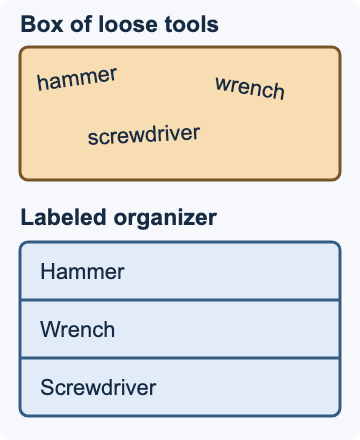
Rounded corners and pale fills do not make a physical metaphor visual. Show the tools and the relationship being explained.
User-supplied rejected illustration, 2026-10-19. Both panels are rejected style references. [Full-size image](/design/illustrations/rejected-tools.png) / [Local theme preview](/design/illustrations.htm#specimen-illustration-rejected-tools).
### Redrawing the same concept
For the same concept, draw the same hammer, wrench, and screwdriver in both states. Let their arrangement show the difference. Use a short handwritten instruction and a targeted highlight to identify the wrench. This new redraw applies the guidance; it is not an image taken from a tutorial. Its editable source and self-contained SVG are available below:
**New example: The same tools, visibly rearranged.**
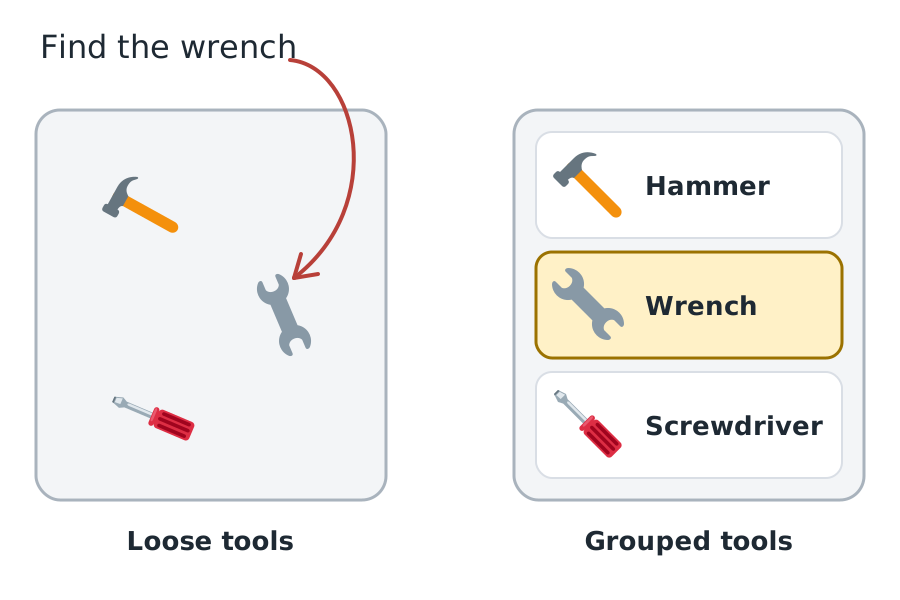
Keep object identity consistent, let arrangement show the comparison, and give the callout a specific target.
New illustration made for this reference, not a published tutorial figure. Twemoji tools, CC BY 4.0; Permanent Marker, Apache 2.0; Nunito, SIL OFL 1.1. [Source](https://github.com/kirupa/kirupaWWW/blob/main/design/illustrations/tool-redraw.source.svg). [Full-size image](/design/illustrations/tool-redraw.svg) / [Local theme preview](/design/illustrations.htm#specimen-illustration-tool-redraw).
### Objects and visual vocabulary
Use recognizable objects when the explanation involves objects. In the Merkle example, folders contain files, a monitor identifies the local copy, and a globe identifies the cloud copy. Repeated folder, image, settings, and lock symbols let us compare the same hierarchy without reading every filename. Use the site's [Twemoji Browser](/design/emoji.htm) for consistent colorful SVG artwork, or draw simple flat objects that belong to the same visual family. Do not mix platform-native emoji renderings, glossy stock illustrations, and unrelated icon packs in one sequence:
**Good reference: Recognizable objects and matching structures.**
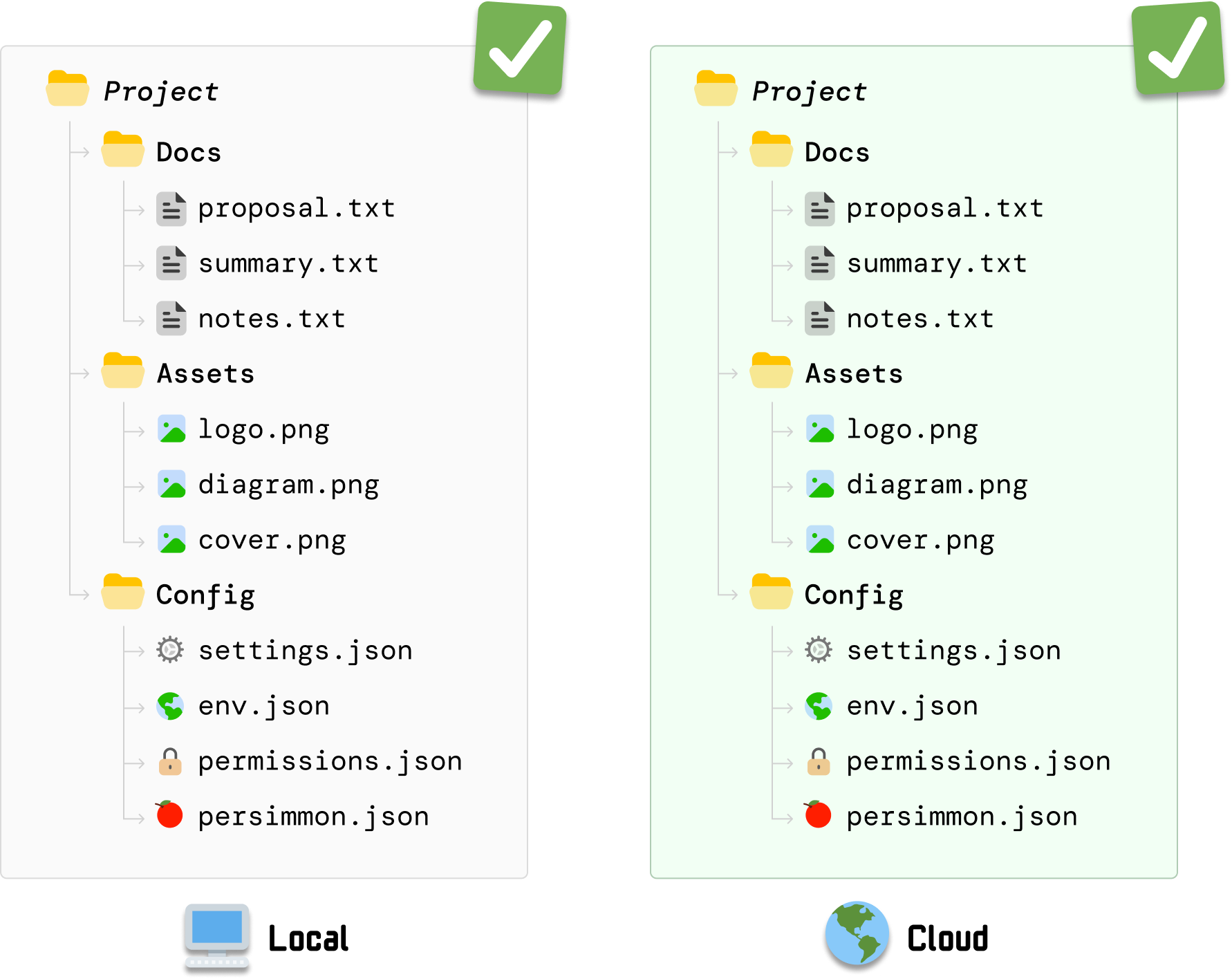
Repeat the same symbols and layout so the reader can compare state without decoding a new picture.
Unmodified Merkle Tree tutorial illustration; reference copy. [Source](https://www.kirupa.com/data_structures_algorithms/understanding_merkle_trees.htm). [Full-size image](/design/illustrations/merkle-sync.png) / [Local theme preview](/design/illustrations.htm#specimen-illustration-merkle-sync).
### Shapes, lines, and spacing
Draw clean flat geometry with rounded corners on objects that benefit from them: obstacle tiles, containers, buttons, and annotation boxes. Keep structural geometry accurate. The BFS grid has square cells and straight shared boundaries; its rock containers are rounded. Use round line caps and joins on arrows, a consistent stroke weight, and enough space that pointers do not cross labels. Avoid making every element a heavy bordered card, or adding perspective, glass effects, and shadows that do not explain a relationship:
**Good reference: Rounded objects in a precise grid.**
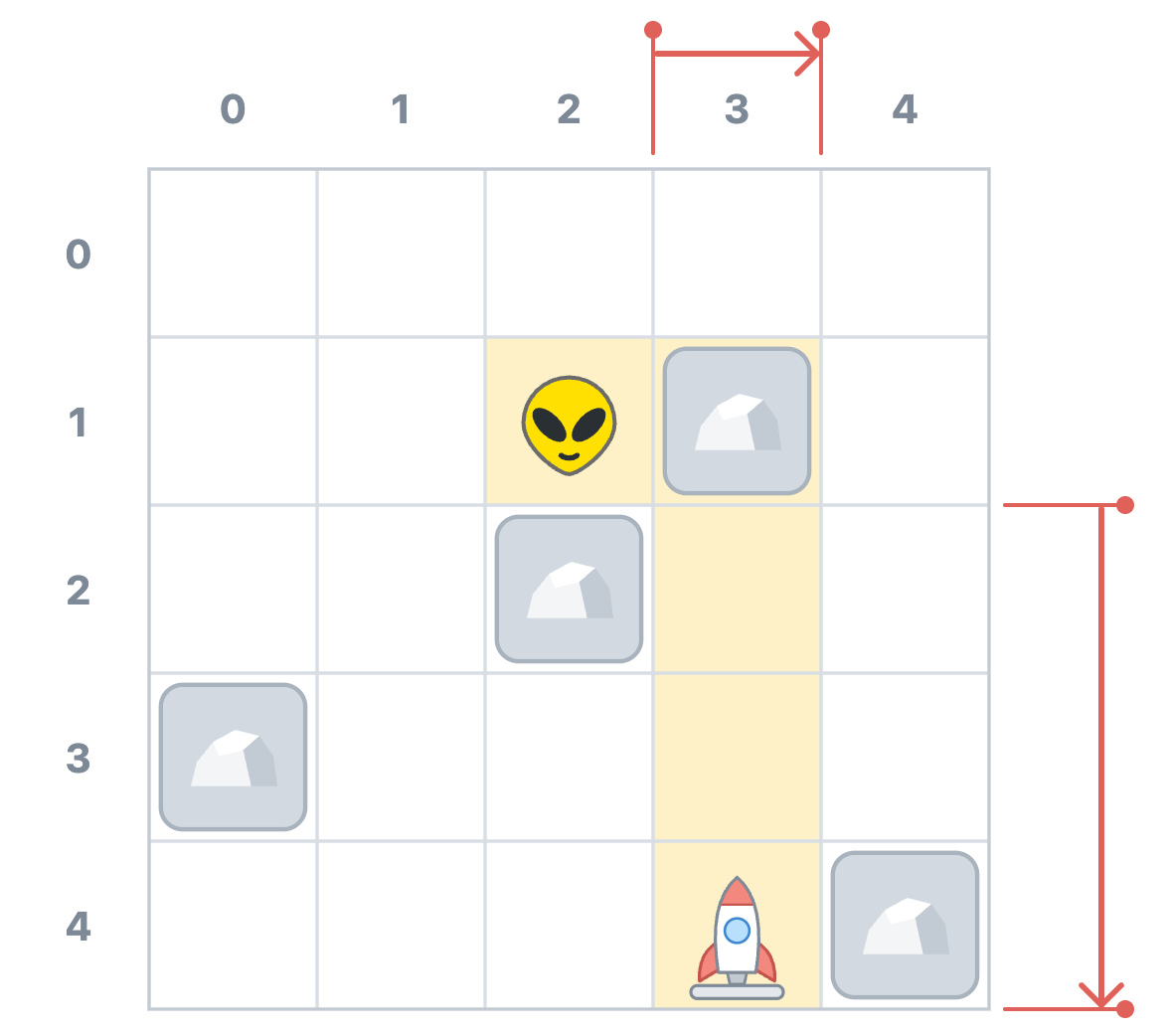
Use friendly object geometry without distorting the coordinate system. Reserve stronger color for the relationship being measured.
Unmodified published BFS figure retrieved 2026-10-19; this tutorial is not yet in this checkout. [Source](https://www.kirupa.com/data_structures_algorithms/auto_navigating_grid_using_bfs.htm). [Full-size image](/design/illustrations/bfs-distance.png) / [Local theme preview](/design/illustrations.htm#specimen-illustration-bfs-distance).
### Color and emphasis
Keep the canvas white or near-white, with quiet gray structure and dark readable labels. Use pale blue, yellow, green, or lavender fills to mark a region, then stronger color for its boundary, number, arrow, or changed value. The sampled palette below records the BFS artwork, not new global CSS tokens. Assign colors to explicit roles within an explanation and keep those meanings stable. Do not recolor a diagram with the page palette or assume a sampled accent is safe for small text. Here, blue marks reached cells, dashed outlines identify the newly reached cells, and lavender distinguishes the adjacent rocks:
**Good reference: First search ring.**
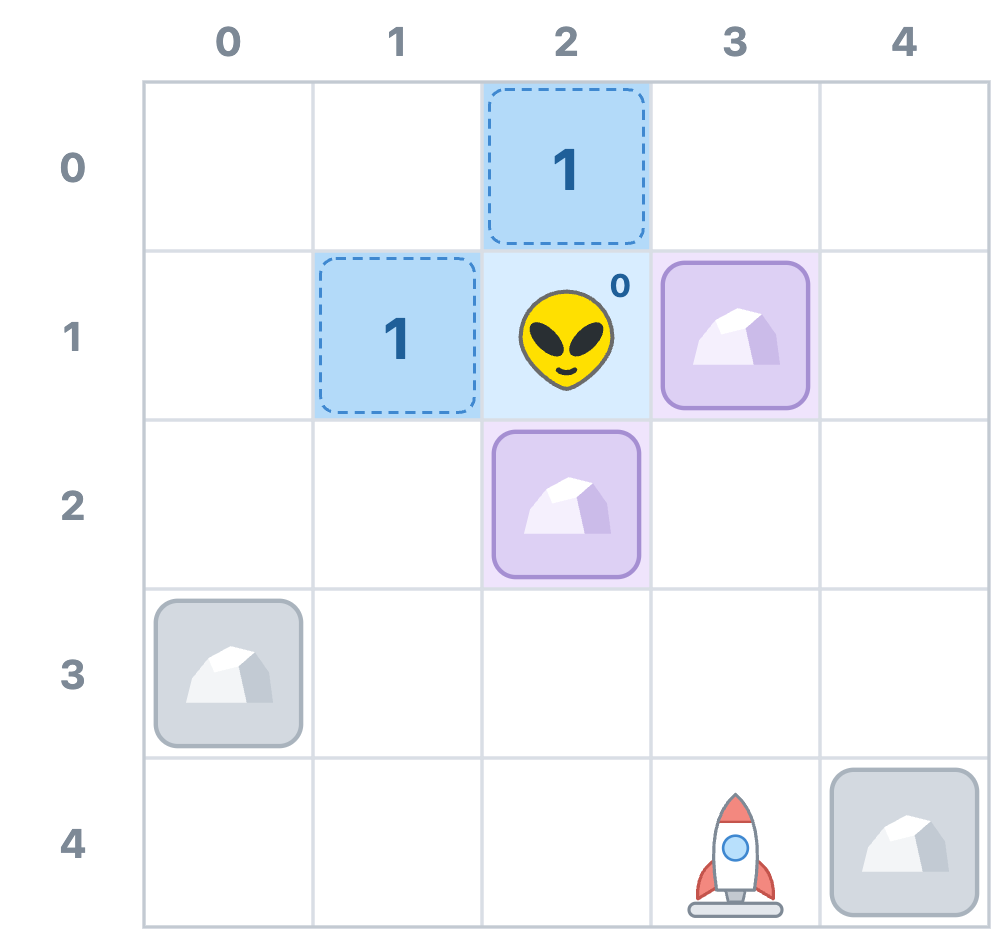
Use fill, number, and outline together to distinguish the new search frontier from blocked cells.
Unmodified published BFS figure retrieved 2026-10-19. [Source](https://www.kirupa.com/data_structures_algorithms/auto_navigating_grid_using_bfs.htm). [Full-size image](/design/illustrations/bfs-one.png) / [Local theme preview](/design/illustrations.htm#specimen-illustration-bfs-one).
#### Sampled BFS palette
- `#FFFFFF`: Drawing surface.
- `#D9DEE5`: Quiet grid structure.
- `#D3D9E0`: Obstacle tile fill.
- `#A9B3BD`: Obstacle tile outline.
- `#D8EDFF`: Previously reached area.
- `#B3DAF9`: Newly reached cells.
- `#DDD0F4`: Adjacent blocked cells.
- `#FFF1C7`: Destination alignment.
- `#DDF3CF`: Selected route region.
- `#E0605A`: Distance annotation.
Sampled fills and accents are not automatically accessible text colors. Check new normal text at 4.5:1 and essential graphical distinctions at 3:1, with labels, numbers, outlines, or patterns as additional cues.
### Consistent sequences
When showing an algorithm, reuse the same coordinate system, object positions, scale, labels, and crop. Change only the state being explained. The next BFS frame keeps Zorb, the rocket, and all four rocks in place while adding the cells reached in two steps. Moving a rock or shifting the grid between frames would make the reader solve a different problem:
**Good reference: Second search ring.**
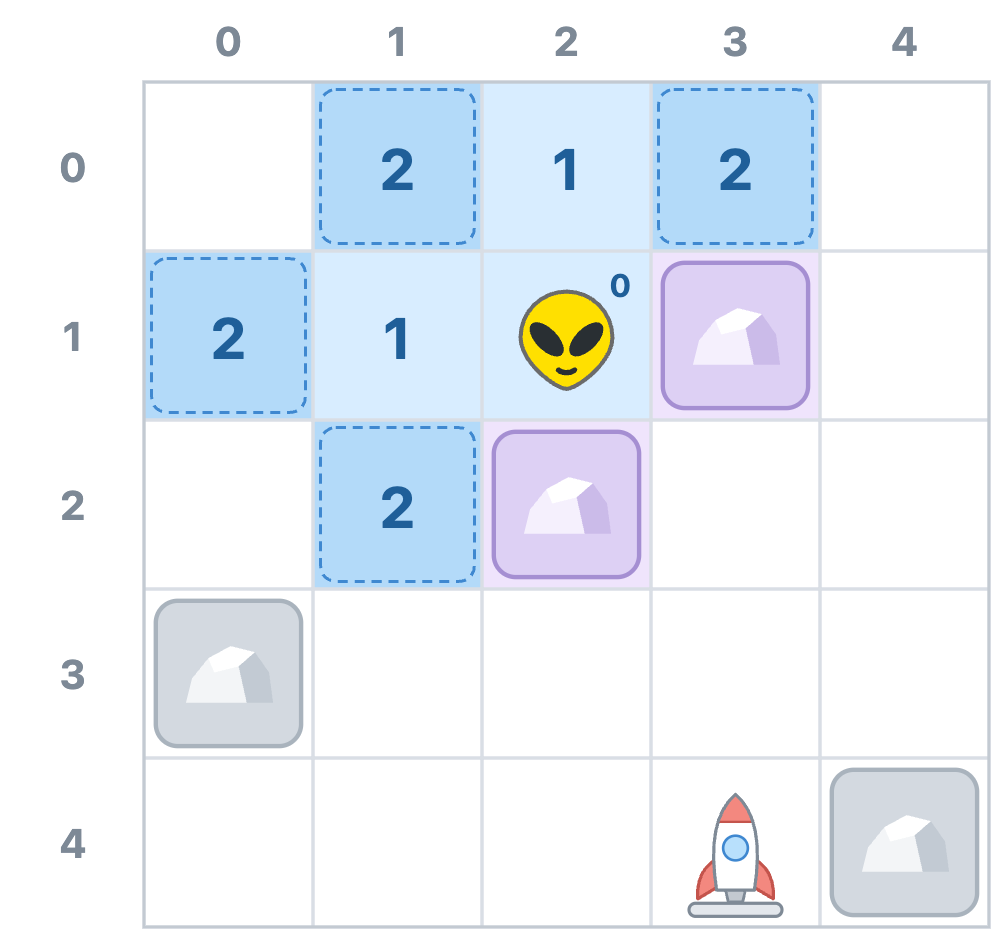
Hold the scene still while the algorithm's state changes.
Unmodified published BFS figure retrieved 2026-10-19. [Source](https://www.kirupa.com/data_structures_algorithms/auto_navigating_grid_using_bfs.htm). [Full-size image](/design/illustrations/bfs-two.png) / [Local theme preview](/design/illustrations.htm#specimen-illustration-bfs-two).
### Focus and detail
Reduce detail when it competes with the current explanation. This BFS frame keeps Zorb and his immediate neighbors clear while fading the surrounding grid. The faded content still provides context. Do not fade the subject, a necessary label, or an error until it becomes unreadable, and explain what the change in emphasis means:
**Good reference: Local visibility.**
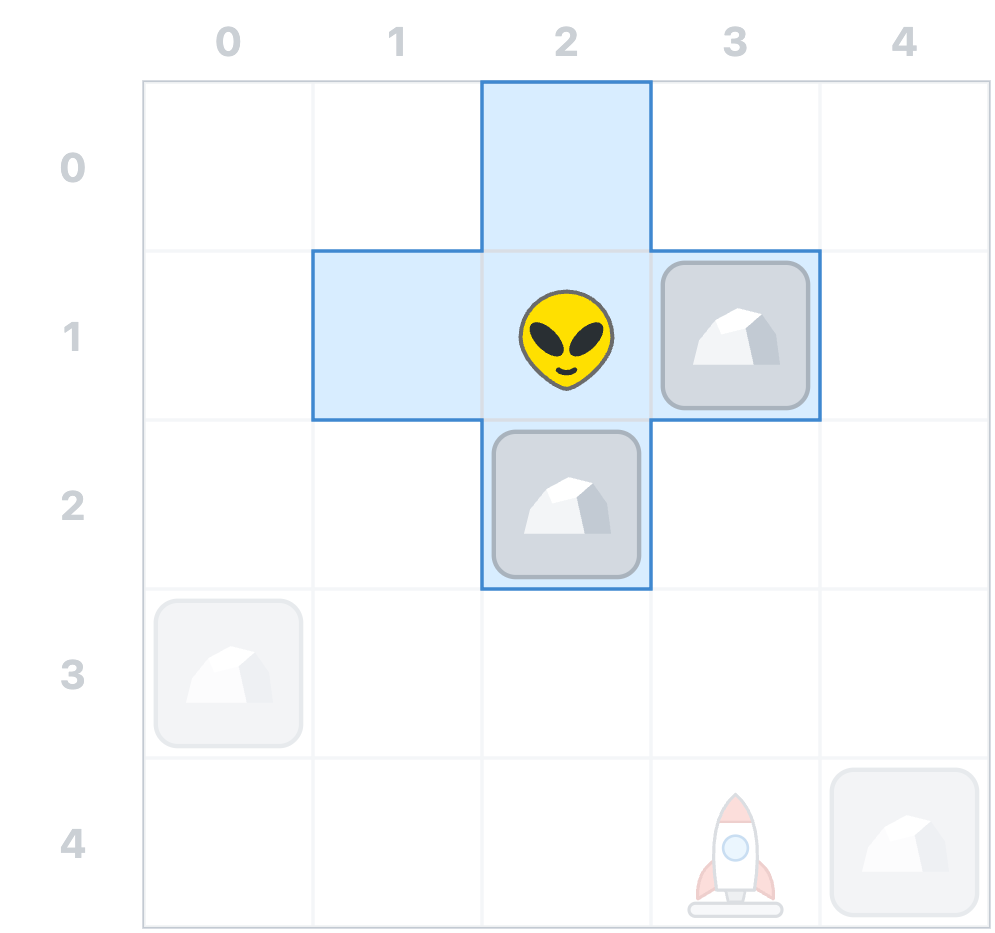
Use selective emphasis to distinguish what the actor can inspect from what the reader can see.
Unmodified published BFS figure retrieved 2026-10-19. [Source](https://www.kirupa.com/data_structures_algorithms/auto_navigating_grid_using_bfs.htm). [Full-size image](/design/illustrations/bfs-focus.png) / [Local theme preview](/design/illustrations.htm#specimen-illustration-bfs-focus).
### Arrows and technical accuracy
Use arrows for a specific relationship, with unambiguous endpoints. Showing every breadcrumb is useful when explaining predecessor links, but it is a poor choice when the task is to identify one route. Compare the unfiltered frame with the focused version below. Its green arrows point from discovered cells back toward Zorb; they are breadcrumbs, not the forward walking direction. Match every arrow, coordinate, count, and label to the accompanying explanation and code:
**Avoid for a single-route explanation: All breadcrumbs at equal priority.**
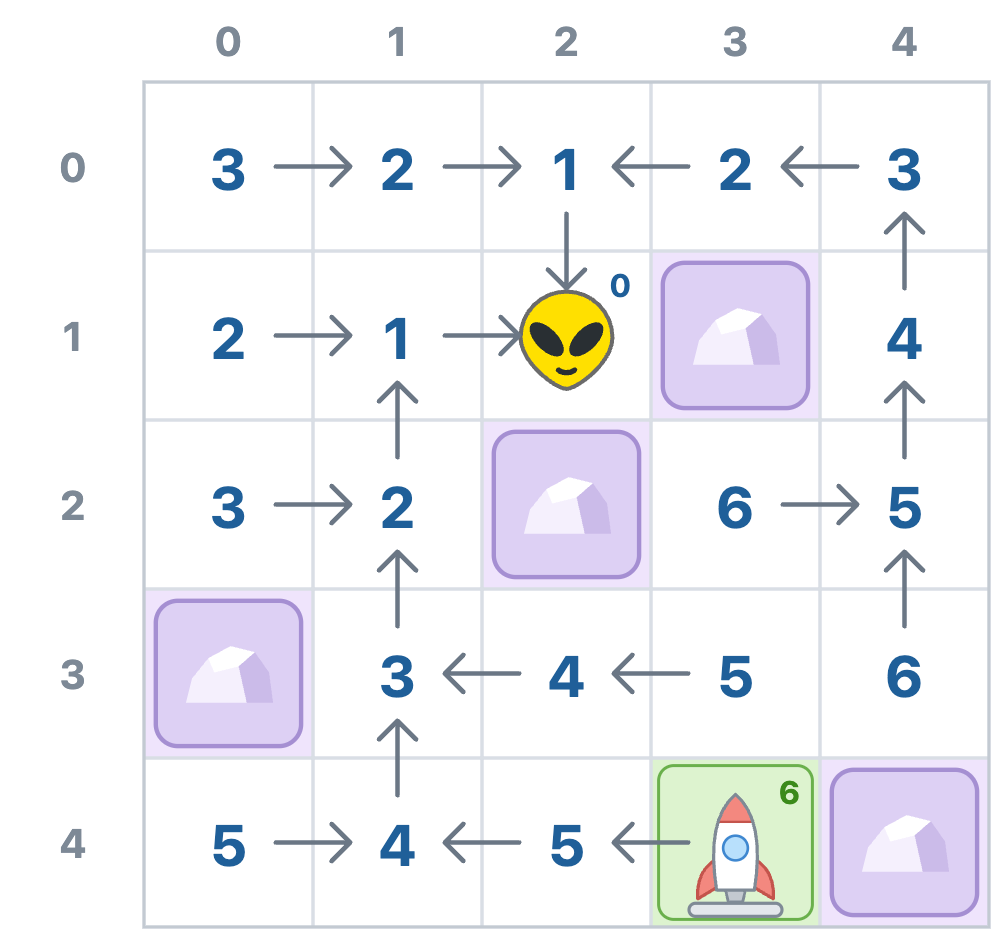
This is not inherently an incorrect diagram. It becomes a poor choice when the explanation needs the reader to follow just one route.
Unmodified intermediate BFS figure. Valid for teaching the full predecessor map; the tutorial then simplifies it for the route explanation. [Source](https://www.kirupa.com/data_structures_algorithms/auto_navigating_grid_using_bfs.htm). [Full-size image](/design/illustrations/bfs-busy.png) / [Local theme preview](/design/illustrations.htm#specimen-illustration-bfs-busy).
**Good reference: One route emphasized.**
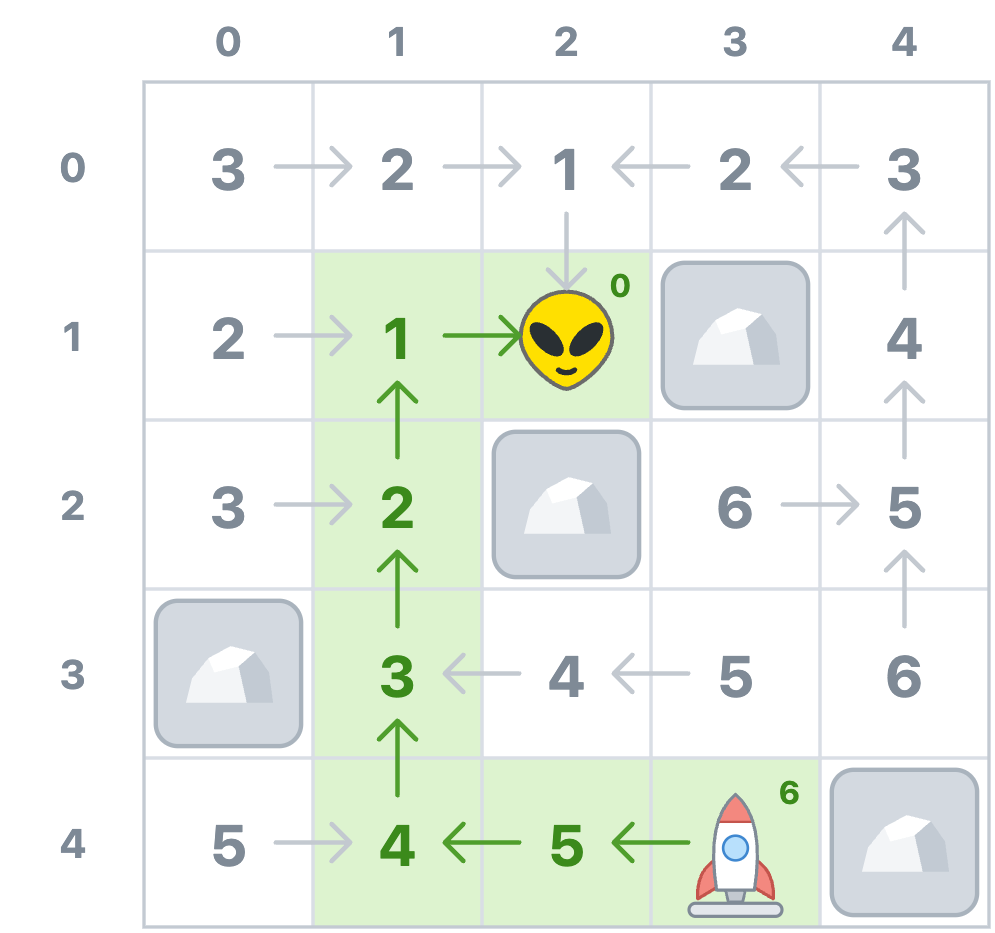
Make the relevant route easy to follow without changing the underlying scene or reversing the breadcrumbs.
Unmodified published BFS figure retrieved 2026-10-19. [Source](https://www.kirupa.com/data_structures_algorithms/auto_navigating_grid_using_bfs.htm). [Full-size image](/design/illustrations/bfs-route.png) / [Local theme preview](/design/illustrations.htm#specimen-illustration-bfs-route).
### Handwritten callouts
Use Permanent Marker for short handwritten callouts. This is the author's confirmed font, not an identification guessed from a raster image. The Merkle reference uses the handwritten 'Not equal!' label above a bracket joining the two root hashes. Reserve this face for a few words that direct attention: 'Only this branch changes', 'Start here', or 'Not equal!'. Keep longer explanations in HTML. Do not set paragraphs, filenames, code, coordinates, or hash values in a marker font, and do not simulate handwriting by rotating ordinary sans-serif words:
**Good reference: A short handwritten callout.**
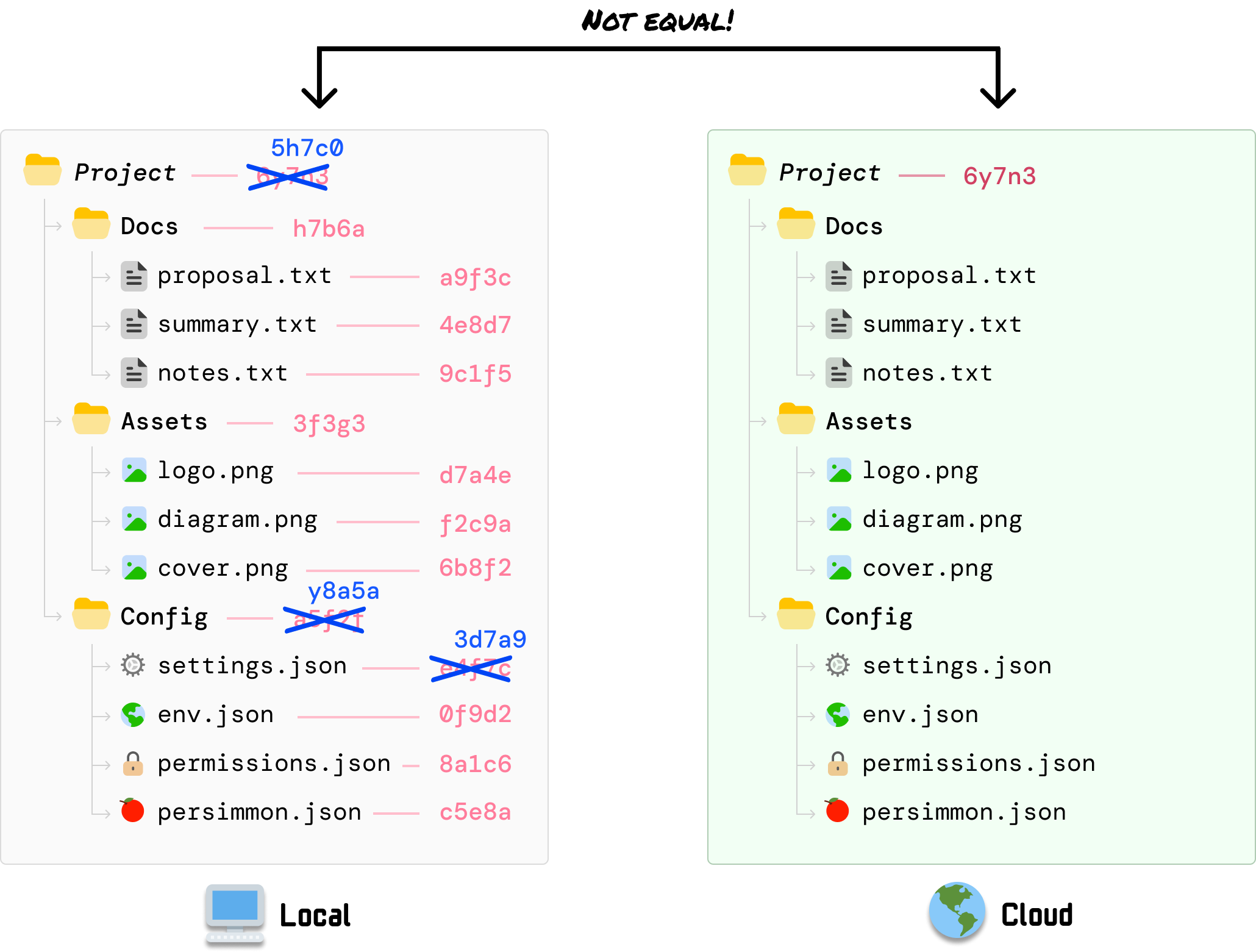
Use Permanent Marker to direct attention to one relationship, keeping filenames and values in a separate data face.
Unmodified Merkle Tree tutorial illustration. Permanent Marker callout font confirmed by the author. [Source](https://www.kirupa.com/data_structures_algorithms/understanding_merkle_trees.htm). [Full-size image](/design/illustrations/merkle-callout.png) / [Local theme preview](/design/illustrations.htm#specimen-illustration-merkle-callout).
### Data labels
Give data labels a separate readable type role. Filenames and hash-like values need a clear monospace face; coordinates and ordinary object labels need a clean sans-serif. The exact families of all rasterized data labels cannot be recovered from these PNGs. Bundled Nunito and kirupaCode/Departure Mono are available options for new drawings, not claims about the original files. Keep labels beside their objects. In this Merkle state, blue replacement values and visible cross-outs identify the changed file, Config folder, and Project root; the other entries retain their previous values:
**Good reference: Changed values within a stable hierarchy.**
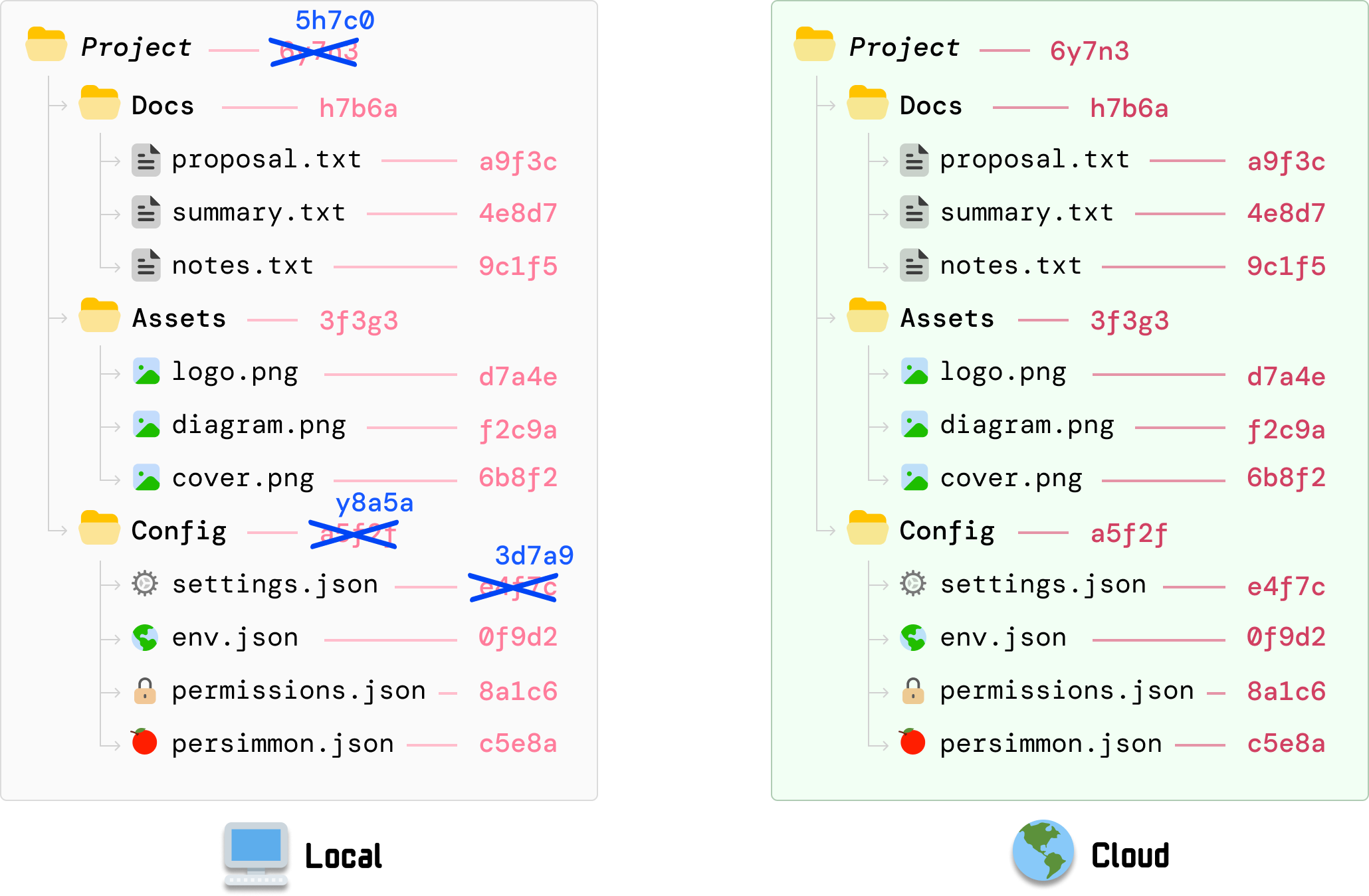
Use position, replacement labels, and cross-outs alongside color to make the changed dependency chain visible.
Unmodified Merkle Tree tutorial illustration; original colors are evidence, not an accessible-text palette for new work. [Source](https://www.kirupa.com/data_structures_algorithms/understanding_merkle_trees.htm). [Full-size image](/design/illustrations/merkle-change.png) / [Local theme preview](/design/illustrations.htm#specimen-illustration-merkle-change).
### Alternative representations
A second representation should preserve the objects and relationships from the first. The Merkle tree view uses the same folder and file symbols as the earlier directory view. Its highlighted path runs from settings through Config to Project, while the unaffected branches recede. Avoid replacing concrete objects with identical anonymous boxes when their identity helps explain the relationship:
**Good reference: The same objects in a tree view.**
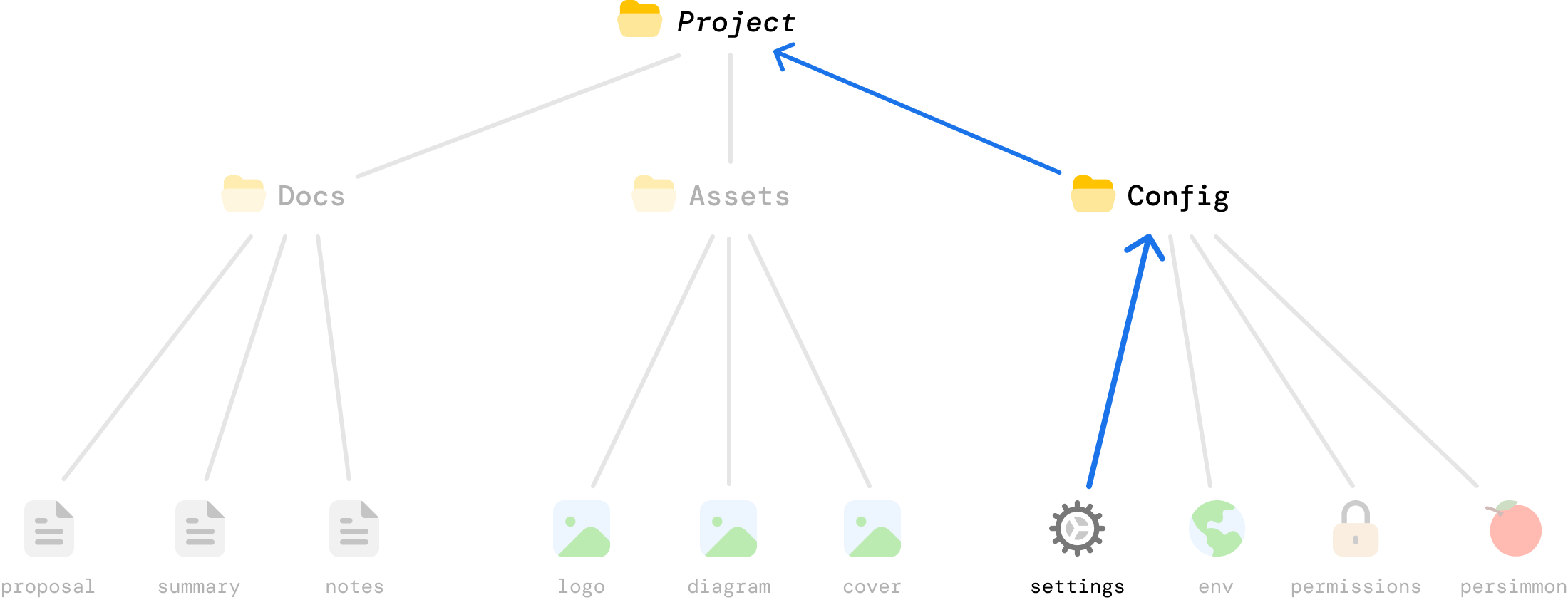
Keep visual vocabulary consistent when changing representations, and emphasize only the relevant dependency path.
Unmodified Merkle Tree tutorial illustration; reference copy. [Source](https://www.kirupa.com/data_structures_algorithms/understanding_merkle_trees.htm). [Full-size image](/design/illustrations/merkle-path.png) / [Local theme preview](/design/illustrations.htm#specimen-illustration-merkle-path).
### Drawing dimensions
For new vector drawings, a useful starting point is a 900px-wide artboard, roughly 32px outer padding, 2-4px structural strokes, 12-24px object corner radii, 24-28px ordinary labels, and 28-36px handwritten callouts. These are working recommendations at that artboard size, not measurements required by every existing illustration. Scale the stroke and type together. Keep arrowheads proportionate, allow a clear gap between a pointer and its label, and check the result at the actual article width before exporting.
### Export and theme behavior
Keep an editable SVG or the original authoring file. When exporting SVG, make font and icon dependencies portable: embed permitted resources or outline a delivery copy of the text while retaining an editable text source. A font-family declaration alone does not bundle a font, and an SVG loaded through an img element cannot be assumed to fetch external fonts. For PNG, export enough pixels for the intended display size, normally 2x; keep lines and lettering sharp. Do not use CSS filters to invert a flattened drawing for dark mode. Retain a light artboard or create a separately checked dark version.
### Mobile and accessibility
On narrow screens, do not shrink a dense diagram until its labels are unreadable. Provide a full-size image link, a focused crop, a stacked version, or a keyboard-scrollable region for a genuinely two-dimensional drawing. Every example here has a full-size link and a local surrounding-theme preview. The original image colors and fonts remain fixed. A source image can be a useful composition reference without being an accessibility template: new essential text still needs 4.5:1 contrast, and essential graphical distinctions need 3:1 or another equally clear visual cue.
### Agent checklist
Before delivery, introduce the figure in the preceding paragraph and write alt text describing its point, not just its contents. Check the image against the exact prose and code: the same objects, coordinates, direction, counts, and state. Inspect Light and Dark presentation, mobile readability, clipping, font loading, and color-independent cues. Reject decorative arrows with no target, random emoji, tiny labels, unrelated changes between frames, and word-only boxes pretending to be the objects in the example. Read [illustrations.json](/design/illustrations.json) for the palette, font files, example provenance, and production checklist.
## Fonts, artwork, and reusable source
[Download the self-contained editable SVG](/design/illustrations/tool-redraw.svg). Its build template is design/illustrations/tool-redraw.source.svg; the design builder embeds the fonts and original Twemoji SVGs. [Permanent Marker font](/design/illustrations/permanent-marker.ttf) / [Apache 2.0 license](/design/illustrations/permanent-marker-LICENSE.txt). [Twemoji 17.0.3](https://github.com/jdecked/twemoji/tree/v17.0.3): graphics by Twitter and contributors, [CC BY 4.0](/design/illustrations/twemoji-LICENSE.txt). The new redraw also embeds the site's Nunito font, [SIL OFL 1.1](/fonts/nunito-OFL.txt). [Illustration metadata and checklist](/design/illustrations.json).
- Use meaningful colorful objects, restrained rounded geometry, stable visual roles, and short Permanent Marker callouts.
- Keep new illustrations technically consistent with their prose and code; preserve scene geometry across a sequence.
- Do not treat an illustration palette as a replacement for site tokens, use marker lettering for data, or claim an unverified font match.
## Sources
- [https://www.kirupa.com/data_structures_algorithms/auto_navigating_grid_using_bfs.htm](https://www.kirupa.com/data_structures_algorithms/auto_navigating_grid_using_bfs.htm)
- [data_structures_algorithms/understanding_merkle_trees.htm](https://github.com/kirupa/kirupaWWW/blob/main/data_structures_algorithms/understanding_merkle_trees.htm)
- [design/illustrations.source.json](https://github.com/kirupa/kirupaWWW/blob/main/design/illustrations.source.json)
- [design/illustrations/tool-redraw.source.svg](https://github.com/kirupa/kirupaWWW/blob/main/design/illustrations/tool-redraw.source.svg)
- [https://github.com/google/fonts/tree/main/apache/permanentmarker](https://github.com/google/fonts/tree/main/apache/permanentmarker)
- [https://github.com/jdecked/twemoji](https://github.com/jdecked/twemoji)
- [tools/twemoji_browser.htm](https://github.com/kirupa/kirupaWWW/blob/main/tools/twemoji_browser.htm)
[Section page and specimens](/design/illustrations.htm) | [Instruction index](/design/index.md) | [Plain prompt](/design/agent/illustrations.txt)
# Twemoji
## Agent Instructions
You are using Twemoji on kirupa.com. Reuse the pinned catalog and browser in tools/twemoji_browser.htm; do not fork its search data or substitute a different emoji version. Keep search, multi-category filters, Copy SVG, and SVG/PNG downloads working. Twemoji artwork is invariant: theme only its surrounding UI. Preserve CC-BY 4.0 graphics attribution and MIT code notices. Give meaningful images purposeful alt text and hide decorative duplicates. Surface network and clipboard failures rather than showing false success. Keep embedded theme state local and do not write site preferences.
Follow WCAG 2.2 AA for new or changed content: semantic HTML, keyboard access, visible focus, readable contrast in every theme, text alternatives, labeled controls, and explicit errors. Support zoom/reflow, respect reduced motion, and keep sound optional. Read /design/sections/accessibility.md for acceptance checks. Report unresolved barriers; automated checks alone do not establish conformance.
## Reference
Embedded emoji search, category filters, SVG copy, downloads, and attribution.
The embedded tool is generated directly from the [standalone Twemoji Browser](https://www.kirupa.com/tools/twemoji_browser.htm) and uses tools/cleanedUpTwemoji.js, not a second emoji dataset or hand-maintained fork. The embed omits the shared head include that starts live presence tracking; the standalone utility is unchanged. The pinned catalog is Twemoji v17.0.3 / Emoji 17. Search accepts names, multiple keywords, emoji, and Unicode code points; categories can be combined.
[The working Twemoji Browser](/design/emoji.htm#specimen-twemoji)
Twemoji artwork is fixed-color. The local preview controls adapt only the browser's surrounding surface and typography, not the emoji drawing. The standalone utility keeps its existing appearance. SVG and PNG assets come from the tool's existing CDN endpoints, so offline or blocked requests must remain visible failures.
Twemoji graphics are CC-BY 4.0; its code is MIT. Keep the attribution to Twemoji contributors and the license links when publishing derived graphics. Copy SVG copies markup, while the asset links retrieve the actual SVG or PNG.
- Do choose an emoji that carries meaning, not five decorative emojis standing in for a heading.
- Do keep useful alt text; hide an emoji from assistive technology if adjacent text already says the same thing.
- Do not recolor Twemoji to imitate a site theme or remove attribution.
## Sources
- [tools/twemoji_browser.htm](https://github.com/kirupa/kirupaWWW/blob/main/tools/twemoji_browser.htm)
- [tools/cleanedUpTwemoji.js](https://github.com/kirupa/kirupaWWW/blob/main/tools/cleanedUpTwemoji.js)
- [https://github.com/jdecked/twemoji](https://github.com/jdecked/twemoji)
- [https://creativecommons.org/licenses/by/4.0/](https://creativecommons.org/licenses/by/4.0/)
[Section page and specimens](/design/emoji.htm) | [Instruction index](/design/index.md) | [Plain prompt](/design/agent/emoji.txt)
# Sounds
## Agent Instructions
You are extending KIRUPA sound feedback. Reuse the existing link/content/kirupabot role registry and its production gain. Read sounds.json for file cues or the actual style synth function; never invent an MP3 URL for a synthesized cue. Keep sound optional and user-initiated, with visual equivalents. In a catalog, serialize playback, support Stop during loading, expose accessible status, and report load/download failures. A synthesized WAV must record sample rate, PCM format, baked gain, source function, and disabled variation. Do not write kirupaSoundEnabled from a specimen or treat archive recordings as approved UI cues.
Follow WCAG 2.2 AA for new or changed content: semantic HTML, keyboard access, visible focus, readable contrast in every theme, text alternatives, labeled controls, and explicit errors. Support zoom/reflow, respect reduced motion, and keep sound optional. Read /design/sections/accessibility.md for acceptance checks. Report unresolved barriers; automated checks alone do not establish conformance.
## Reference
Recorded and synthesized sound cues with playback, downloads, source mappings, and licensing.
The production sound system maps three roles, link, content, and kirupabot, to the active style. Pixel and Smooooth use the MP3 cues registered in kirupa.js. Sci-Fi, Minimal, Ukiyo-e, and Platformer register synthesized AudioBuffers in window.kirupaStyleSounds. The outer design pages retain those optional link sounds, just like the [homepage](https://www.kirupa.com/); the sample shelf below never auto-starts.
Pixel mixes different short UI textures for content links. Smooooth uses organic hover/press/release/snap and a soft focus cue for kirupaBot. Sci-Fi has blips, a relay, chirps, a scan, readout, beep, and ping. Minimal is paper taps and typing dots. Ukiyo-e uses six koto notes, a clapper, and a rin bell. Platformer has blip/blop, bump, jump, ping, tick, spring, and powerup.
Every tracked audio file is included, including the three historical chat cues and tutorial recordings. Those archive recordings are not current UI sound recommendations, and their rights are not established by their presence in the repository.
MP3 playback uses the production cue gain; Download returns the unmodified original file. Synthesized downloads are deterministic mono, 48kHz, 16-bit PCM WAV renders of the actual registered functions with their production gain baked in. They are reference renders, not nonexistent original recordings. Playback-rate and gain variation are deliberately disabled for comparison.
Production hover sounds require an enabled preference, a fine pointer, and an unlocked audio context. A preview must not toggle that preference. Keep visual and textual feedback complete when sound is muted or unavailable.
- Do let a new Play stop the prior sample, and let the same control Stop a pending or playing sample.
- Do surface load, decoding, permission, and download failures with the cue name.
- Do not autoplay, normalize quiet cues to a loud level, or use sound as the only signal.
## Sources
- [ssi/newDesign/src/kirupa.js](https://github.com/kirupa/kirupaWWW/blob/main/ssi/newDesign/src/kirupa.js)
- [ssi/newDesign/styles/scifi.js](https://github.com/kirupa/kirupaWWW/blob/main/ssi/newDesign/styles/scifi.js)
- [ssi/newDesign/styles/minimal.js](https://github.com/kirupa/kirupaWWW/blob/main/ssi/newDesign/styles/minimal.js)
- [ssi/newDesign/styles/ukiyoe.js](https://github.com/kirupa/kirupaWWW/blob/main/ssi/newDesign/styles/ukiyoe.js)
- [ssi/newDesign/styles/platformer.js](https://github.com/kirupa/kirupaWWW/blob/main/ssi/newDesign/styles/platformer.js)
- [https://uisfx.com](https://uisfx.com)
- [https://creativecommons.org/publicdomain/zero/1.0/](https://creativecommons.org/publicdomain/zero/1.0/)
[Section page and specimens](/design/sounds.htm) | [Instruction index](/design/index.md) | [Plain prompt](/design/agent/sounds.txt)
# Motion
## Agent Instructions
You are adding motion to KIRUPA. Identify the interaction or orientation benefit before animating. Reuse the relevant header, launcher, or globe motion rather than adding another animation vocabulary. Keep decorative layers noninteractive and do not shift reading text or hit targets. Prefer transform/opacity and stop offscreen work. Provide a static reduced-motion state and a local pause for looping documentation previews. Sound remains off unless explicitly requested. Check focus, hover, touch, and error states while motion is active and paused.
Follow WCAG 2.2 AA for new or changed content: semantic HTML, keyboard access, visible focus, readable contrast in every theme, text alternatives, labeled controls, and explicit errors. Support zoom/reflow, respect reduced motion, and keep sound optional. Read /design/sections/accessibility.md for acceptance checks. Report unresolved barriers; automated checks alone do not establish conformance.
## Reference
Header animations, control transitions, reduced-motion behavior, and local pause controls.
The shared header moves pixel clouds using transform and long 60-300 second durations. Style-specific scripts add a Sci-Fi atlas, Ukiyo-e sails/birds/mist, or Platformer clouds and a question-block bump. Minimal's reading line follows article scroll instead of running a decorative loop. You can see the sky on the [homepage](https://www.kirupa.com/) and inspect its real animation here:
[Sky and navigation motion](/design/motion.htm#specimen-motion)
The kirupaBot launcher combines float, bounce, and icon-turn animations. Its press/hover state moves into the hard shadow; the panel uses a short reveal. Theme variants change the material and easing, not the fact that the control must remain findable and clickable.
Respect prefers-reduced-motion in CSS and canvas renderers. Preserve a usable still state. Animate transform and opacity where practical, and keep decorative layers pointer-transparent. Do not move text while somebody is trying to read it.
This preview is the real header markup and style scripts, without the site's sound, onboarding, presence, or preference bootstrap. The Pause motion button is local to this specimen. Offscreen specimens pause automatically; neither control changes the device's reduced-motion preference.
- Do stop unnecessary work when a preview or canvas is offscreen.
- Do keep keyboard focus and hit targets stable through a transition.
- Do not use a spinning or bouncing object to conceal a loading error.
## Sources
- [ssi/newDesign/src/header.shtml](https://github.com/kirupa/kirupaWWW/blob/main/ssi/newDesign/src/header.shtml)
- [ssi/newDesign/src/kirupabot-widget.css](https://github.com/kirupa/kirupaWWW/blob/main/ssi/newDesign/src/kirupabot-widget.css)
- [ssi/newDesign/styles/scifi.js](https://github.com/kirupa/kirupaWWW/blob/main/ssi/newDesign/styles/scifi.js)
- [ssi/newDesign/styles/ukiyoe.js](https://github.com/kirupa/kirupaWWW/blob/main/ssi/newDesign/styles/ukiyoe.js)
- [ssi/newDesign/styles/platformer.js](https://github.com/kirupa/kirupaWWW/blob/main/ssi/newDesign/styles/platformer.js)
[Section page and specimens](/design/motion.htm) | [Instruction index](/design/index.md) | [Plain prompt](/design/agent/motion.txt)
# Voice & Tone
## Agent Instructions
You are writing KIRUPA content. For a tutorial, be a technically sharp friend at a whiteboard: explain why it matters, use a concrete running example, build intuition before jargon, and show state changes. Keep prose, code, and diagrams consistent; introduce images and supply purposeful alt text. Preserve the author's voice and uncertainty. Never invent expertise, facts, anecdotes, or citations. Use small bursts of playfulness without hype or applause. Short replies answer first and stay proportionate. Reference/API/error/safety text uses neutral precision, not a forced teaching voice.
Follow WCAG 2.2 AA for new or changed content: semantic HTML, keyboard access, visible focus, readable contrast in every theme, text alternatives, labeled controls, and explicit errors. Support zoom/reflow, respect reduced motion, and keep sound optional. Read /design/sections/accessibility.md for acceptance checks. Report unresolved barriers; automated checks alone do not establish conformance.
## Reference
KONVO-based tutorial guidance and examples for explanations, reference text, replies, and errors.
For tutorials, sound like a technically sharp friend at a whiteboard: casual but competent, direct rather than dry, playful in small bursts. Open with a plain-English reason to care. Use one concrete running example, establish its starting state, change one thing, then name the jargon once the reader has felt the idea.
> **Example: Start with a concrete reason**
> Our click counter keeps starting over at 1. We want the next click to continue from the previous value, so let's give that number somewhere to live between clicks.
Show state-by-state diagrams with stable objects, labels, and colors. Introduce each image in the preceding sentence and write purposeful alt text. Prose, code, and figures must agree about names, coordinates, values, and return behavior. A funny aside can release pressure; it should not interrupt a sequence someone is tracking.
> **Example: Show the change before naming it**
> Here is our counter after each click: `0 -> 1 -> 2`. A diagram would keep the same button in every frame and change only the displayed number. Its alt text could be: 'The counter starts at zero, then increases to one and two on successive clicks.'
[Tutorial text example](/design/voice.htm#specimen-voice)
Preserve the author's voice, point of view, and uncertainty. Never invent expertise, measurements, anecdotes, citations, or confidence to make a draft feel finished. Cut hype, generic applause lines, and sentences that only promise the next sentence will be interesting.
> **Example: Keep the uncertainty**
> If the draft says, 'I think recreating the callback is why the counter resets,' keep that uncertainty until the code supports the explanation. Don't rewrite it as a measured performance finding or an experience the author never described.
Short replies answer first and match the scale of the question. One specific follow-up is better than a speculative essay when the code or error is missing. Tutorial voice is not an API, reference, error, or safety-text template: those surfaces favor neutral precision and direct action names.
> **Example: Match the job**
> A reply with missing context can be just, 'Can you share the click handler?' An error can say, 'Could not load the image. Check your connection and try again.' Neither needs a story about a counter.
These are highlights adapted from the installed KONVO skill, not a requirement to apply an article outline to every page. The local skill is not bundled or required to read this reference. [Building Your First Interactive Web Page](https://www.kirupa.com/html5/building_your_first_web_page.htm) is a real example of the site's teaching voice.
> **Example: Keep reference text literal**
> For a button reference, 'Play starts the selected sample. Stop ends playback.' is enough. Save the running example and diagrams for a reader who is learning how the player works.
- Prefer: 'The button reads the old value because this callback kept the earlier state.'
- Avoid: 'Unlock a powerful new paradigm for seamless state management.'
- An error should say what failed and what to do next, not try to be charming.
## Sources
- [llms.txt](https://github.com/kirupa/kirupaWWW/blob/main/llms.txt)
- [https://www.kirupa.com/konvo.htm](https://www.kirupa.com/konvo.htm)
[Section page and specimens](/design/voice.htm) | [Instruction index](/design/index.md) | [Plain prompt](/design/agent/voice.txt)
# Video & Podcasts
## Agent Instructions
You are designing KIRUPA podcast/video/short surfaces. Read the relevant podcast skill reference and existing episode before changing templates. Keep interviews people-first and preserve actual imagery, speaker attribution, chapters, and transcript meaning. Theme the shell, not baked media pixels. Use Born2bSportyV10 for podcast captions, matching the clip engine. It is not bundled here; resolve an authorized local font and verify glyph coverage before rendering. Web transcripts keep the page's readable body face. Produce both 16:9 and 9:16 only when requested, follow the active speaker and per-episode framing plan, and keep readable captions clear of faces and platform controls. Label mock captions and fallback previews.
Follow WCAG 2.2 AA for new or changed content: semantic HTML, keyboard access, visible focus, readable contrast in every theme, text alternatives, labeled controls, and explicit errors. Support zoom/reflow, respect reduced motion, and keep sound optional. Read /design/sections/accessibility.md for acceptance checks. Report unresolved barriers; automated checks alone do not establish conformance.
## Reference
Interview layouts, episode pages, Shorts, caption typography, and export requirements.
The [Dave Thackeray cover](https://www.kirupa.com/podcast/dave_thackeray_staying_human.htm) and [Francis Ma video thumbnail](https://www.kirupa.com/podcast/francis_ma_systems_thinking.htm) are verified 1280x720, 50/50 interview split screens: Kirupa on the left, guest on the right, prominent faces, natural camera backgrounds, and no decorative branding overlay. This is evidence for those interviews, not a claim that every KIRUPA video uses the same composition.
[A real 16:9 interview cover](/design/media.htm#specimen-podcast)
Podcast pages combine a human hook, guest/platform links, About this conversation, takeaways, timestamped chapters, and speaker-labeled transcripts. Their outer shell follows the chosen site style; the recorded image does not. Existing page/editorial generators live in .github/skills/kirupa-podcast.
The checked-in highlight pipeline renders 1920x1080 and 1080x1920 versions. It uses white captions with a soft shadow, 60px landscape and 66px vertical text, with vertical line breaks nested in the landscape phrasing. Vertical framing follows the speaker and the per-episode layout plan rather than blindly center-cropping both people.
Verified official Shorts show more than one treatment. Why AI Adoption Is a People Problem (OGpkvVtqNqs) is a portrait guest close-up with white two-line subtitles on compact translucent black backing, below the face. The MVP question (12VerikQLyo) shows a portrait host with a bright yellow, slightly tilted rounded headline card, chunky dark lettering, and a briefcase emoji below the face. Both source videos are 1080x1920. Spinning Earth (0tZ92hv0fzE) is a 720x720 square demonstration of the actual low-poly globe on a light backdrop. These are named examples, not a rule that every Short is portrait or uses one caption style.
The author-confirmed podcast caption font is Born2bSportyV10, which is also the clip engine's default. Web transcripts inherit the page's readable body face. The caption font is not bundled in this repository; use an authorized local copy and verify glyph coverage before exporting clips. Do not substitute the site's Born2bSporty v2 display face for the V10 caption font.
The shorts specimen is a layout diagram, not a new clip or a quote from a guest. Its caption fallback is explicitly labeled. Keep captions out of faces and platform controls, verify the actual frame at phone size, and preserve the speaker's meaning and negations. Theme controls affect the surrounding page and player frame, not baked-in video pixels.
[Shorts: verified examples and a caption diagram](/design/media.htm#specimen-short)
- Do use actual episode covers and source timestamps; distinguish a verified convention from a new recommendation.
- Do use Born2bSportyV10 for podcast captions after resolving font availability and licensing.
- Do not fabricate spoken captions, crop away the active speaker, or claim an unbundled font is displayed exactly.
## Sources
- [podcast/index.htm](https://github.com/kirupa/kirupaWWW/blob/main/podcast/index.htm)
- [podcast/dave_thackeray_staying_human.htm](https://github.com/kirupa/kirupaWWW/blob/main/podcast/dave_thackeray_staying_human.htm)
- [podcast/images/dave_thackeray_staying_human.jpg](https://github.com/kirupa/kirupaWWW/blob/main/podcast/images/dave_thackeray_staying_human.jpg)
- [learn/videos.htm](https://github.com/kirupa/kirupaWWW/blob/main/learn/videos.htm)
- [https://www.youtube.com/shorts/OGpkvVtqNqs](https://www.youtube.com/shorts/OGpkvVtqNqs)
- [https://www.youtube.com/shorts/12VerikQLyo](https://www.youtube.com/shorts/12VerikQLyo)
- [https://www.youtube.com/shorts/0tZ92hv0fzE](https://www.youtube.com/shorts/0tZ92hv0fzE)
- [.github/skills/kirupa-podcast/references/highlight-clips.md](https://github.com/kirupa/kirupaWWW/blob/main/.github/skills/kirupa-podcast/references/highlight-clips.md)
- [.github/skills/kirupa-podcast/scripts/highlights/clip_engine.py](https://github.com/kirupa/kirupaWWW/blob/main/.github/skills/kirupa-podcast/scripts/highlights/clip_engine.py)
- [.github/skills/kirupa-podcast/scripts/highlights/layouts.json](https://github.com/kirupa/kirupaWWW/blob/main/.github/skills/kirupa-podcast/scripts/highlights/layouts.json)
[Section page and specimens](/design/media.htm) | [Instruction index](/design/index.md) | [Plain prompt](/design/agent/media.txt)
# Who's Online
## Agent Instructions
You are extending Who's Online on kirupa.com. Reuse whos-online/clay-globe.js and the appropriate registered renderer, preserving shared camera, geography, visitor semantics, and the Location/Page table. Maintain each skin's distinct material: clay, smooth, vector, dot matrix, woodblock, or pixel planet. Keep location labels and page links readable, keyboard turning usable, reduced motion calm, and loading/empty/error states explicit. Do not claim text-only location labels are focus buttons. Documentation uses fictional rows and must not poll production presence. Do not expose raw IPs, precise personal locations, or new tracking. Preserve the privacy boundary and Natural Earth attribution.
Follow WCAG 2.2 AA for new or changed content: semantic HTML, keyboard access, visible focus, readable contrast in every theme, text alternatives, labeled controls, and explicit errors. Support zoom/reflow, respect reduced motion, and keep sound optional. Read /design/sections/accessibility.md for acceptance checks. Report unresolved barriers; automated checks alone do not establish conformance.
## Reference
Globe renderers, visitor tables, interaction states, and privacy boundaries.
The original Pixel view of [Who's Online](https://www.kirupa.com/whos-online/) is a shaded low-poly clay globe with raised land, location pillars, clouds, paper planes, and softly moving background shapes. Drag to turn it; keyboard arrows also orient it. The Location/Page table lists the same visitors without requiring map interaction. In this checked-in renderer, location labels are text and page names are links; automatic focus follows a newly arriving visitor after an idle period.
Smooooth rounds the same world. Sci-Fi turns it into a vector navigation display. Minimal uses an ink-dot matrix on paper, solid dots for active visitors, rings for recent arrivals, and no clouds, planes, or shadows. Ukiyo-e uses paper land, wave-pattern sea, mist, sun/moon, cranes, and seal-like cities. Platformer uses an unsmoothed pixel planet with orbiting tiles and coins.
All six renderers share the underlying geography, camera, visitor data, and interaction semantics; changing a skin must not change what a visitor means. Active and recent arrivals from the last 30 minutes appear in the table and count. Production polling and privacy handling belong to the existing presence service.
The specimen below runs the actual renderer against a fixed, explicitly fictional fixture. It never calls the live presence endpoint. Its rows are examples, not visitor statistics. Geography keeps its Natural Earth attribution. Loading, disconnected, empty, and reduced-motion states must stay comprehensible.
[The real globe; fictional visitors](/design/online.htm#specimen-online)
Do not add a distracting right rail or expose identifying visitor data. The live page's public explanation describes a short-lived private fingerprint and no raw address sent to the browser; preserve that boundary rather than adding client-side location tracking.
- Do preserve the visitor table, keyboard behavior, tooltips, and a visible error when rendering or data fails.
- Do keep map geography distinct from location precision; a marker is not somebody's exact address.
- Do not use real presence data in a design fixture or initialize live tracking from a specimen.
## Sources
- [whos-online/index.php](https://github.com/kirupa/kirupaWWW/blob/main/whos-online/index.php)
- [whos-online/clay-globe.js](https://github.com/kirupa/kirupaWWW/blob/main/whos-online/clay-globe.js)
- [whos-online/clay-globe.css](https://github.com/kirupa/kirupaWWW/blob/main/whos-online/clay-globe.css)
- [whos-online/clay-globe-nature.js](https://github.com/kirupa/kirupaWWW/blob/main/whos-online/clay-globe-nature.js)
- [whos-online/clay-globe-scifi.js](https://github.com/kirupa/kirupaWWW/blob/main/whos-online/clay-globe-scifi.js)
- [whos-online/clay-globe-minimal.js](https://github.com/kirupa/kirupaWWW/blob/main/whos-online/clay-globe-minimal.js)
- [whos-online/clay-globe-ukiyoe.js](https://github.com/kirupa/kirupaWWW/blob/main/whos-online/clay-globe-ukiyoe.js)
- [whos-online/clay-globe-platformer.js](https://github.com/kirupa/kirupaWWW/blob/main/whos-online/clay-globe-platformer.js)
- [whos-online/countries.LICENSE.txt](https://github.com/kirupa/kirupaWWW/blob/main/whos-online/countries.LICENSE.txt)
[Section page and specimens](/design/online.htm) | [Instruction index](/design/index.md) | [Plain prompt](/design/agent/online.txt)
# kirupaBot Chat
## Agent Instructions
You are extending the bottom-right kirupaBot widget. Reuse ssi/newDesign/kirupabot-widget.css and its markup/state semantics; do not build a competing chat skin. Preserve the safe-area launcher, non-modal dialog, expanded/hidden state, Escape, focus entry/return, scrollable log, composer, Full chat destination, and citations. Show loading and errors honestly and keep input recoverable. Preserve the production logging disclosure. In a design preview, use labeled local demo responses only: no chat_api.php, session persistence, analytics, or real conversation. Verify all visual styles, small screens, keyboard input, and reduced motion.
Follow WCAG 2.2 AA for new or changed content: semantic HTML, keyboard access, visible focus, readable contrast in every theme, text alternatives, labeled controls, and explicit errors. Support zoom/reflow, respect reduced motion, and keep sound optional. Read /design/sections/accessibility.md for acceptance checks. Report unresolved barriers; automated checks alone do not establish conformance.
## Reference
Chat launcher, panel, composer, message states, source links, and keyboard behavior.
The launcher is fixed to the bottom-right safe area. Pixel uses a 62px square, a hard offset shadow, a crisp speech-bubble icon, and tiny float/bounce/turn motion. Its hover or press moves into the shadow; its label says Ask kirupaBot. Style variants change the silhouette, type, icon, and material while preserving that location and purpose.
Opening reveals a non-modal dialog with a title, grounding status, [Full chat](https://www.kirupa.com/chat.htm) link, Close button, a scrollable message log, and a growing composer. The launcher changes to a close mark. Focus moves into the input; Escape and Close return to a usable closed state. On small screens the panel must leave room for typing and respect safe areas. Here is the real widget opened on the homepage, without sending a message:
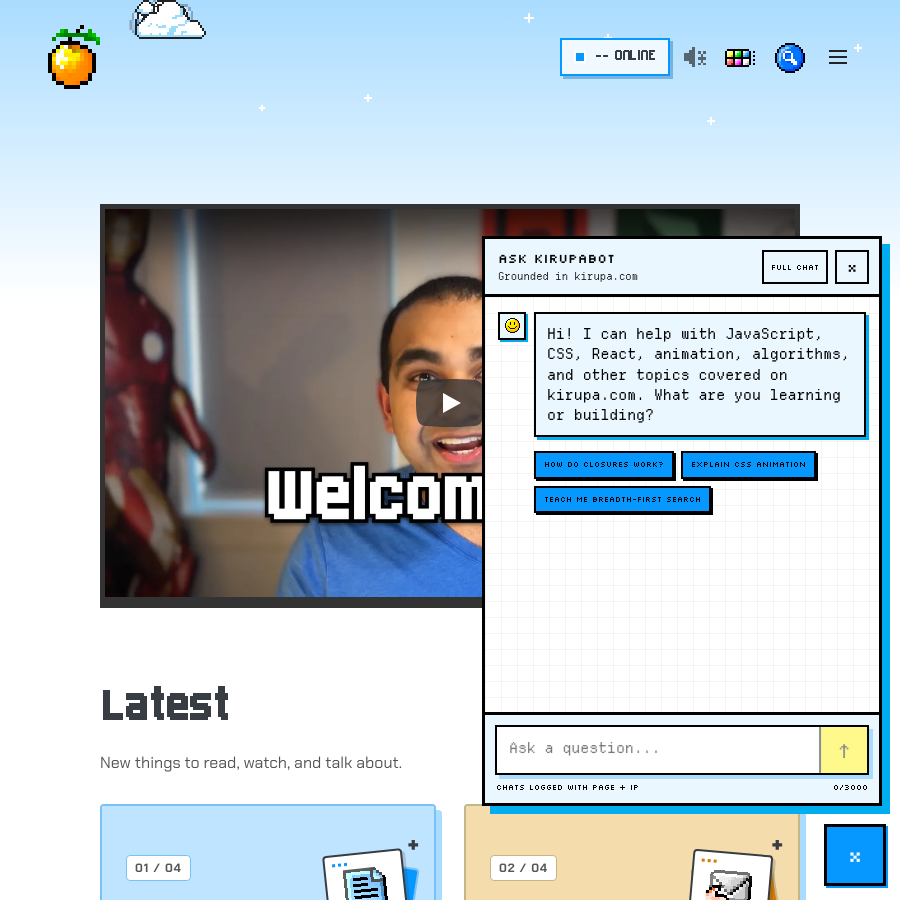
[The real kirupaBot widget](https://www.kirupa.com/). Fixed capture from 2026-10-19.
Replies distinguish readable paragraphs, inline code, fenced code, source citations, and source cards. Keep sources separate from unsupported claims. Loading must not look like a completed answer; errors must be stated plainly and leave the user's input recoverable.
The production widget sends to chat_api.php and explicitly discloses that chats are logged with page and IP. The design specimen never sends or logs anything. It uses the actual widget markup/CSS with a small local state controller; the real widget intentionally does not boot inside an iframe.
Use the controls inside the specimen to inspect closed, answer, loading, and error states. The example reply is authored demo text, not a live model response. The standalone /chat.htm is a separate full-chat destination, not another copy of this floating panel.
[Launcher to conversation: local demo](/design/chat.htm#specimen-chat)
- Do preserve open/close labels, expanded state, focus return, source links, and the real privacy notice in production.
- Do keep an answer usable without animation or sound.
- Do not send a sample question to a live endpoint just to demonstrate a component.
## Sources
- [ssi/newDesign/src/kirupabot-widget.js](https://github.com/kirupa/kirupaWWW/blob/main/ssi/newDesign/src/kirupabot-widget.js)
- [ssi/newDesign/src/kirupabot-widget.css](https://github.com/kirupa/kirupaWWW/blob/main/ssi/newDesign/src/kirupabot-widget.css)
- [chat.htm](https://github.com/kirupa/kirupaWWW/blob/main/chat.htm)
[Section page and specimens](/design/chat.htm) | [Instruction index](/design/index.md) | [Plain prompt](/design/agent/chat.txt)
# Forums
## Agent Instructions
You are preparing KIRUPA forum content or a forum-aligned specimen. Preserve clear author/timestamp/body hierarchy, a bounded readable measure, generous paragraph and inter-post spacing, and legible text in every theme. Pixel display titles do not mean pixel-display prose: the observed Pixel/dark forum uses Chakra Petch at 16px/24px for post text. Use semantic posts, accessible links, inline identifiers, and contained fenced code. Separate posts through whitespace or restrained horizontal structure; never add arbitrary decorative vertical lines or rails. Preserve functional topic timeline navigation. Label bots as bots, not humans with invented biographies. The live Discourse theme is external: distinguish recommendations from observations and do not deploy or modify it for a documentation preview.
Follow WCAG 2.2 AA for new or changed content: semantic HTML, keyboard access, visible focus, readable contrast in every theme, text alternatives, labeled controls, and explicit errors. Support zoom/reflow, respect reduced motion, and keep sound optional. Read /design/sections/accessibility.md for acceptance checks. Report unresolved barriers; automated checks alone do not establish conformance.
## Reference
Post layout, author hierarchy, typography, spacing, and bot identification.
The [KIRUPA forum](https://forum.kirupa.com/) is a Discourse community, connected to the site's Forums links, forum signature, presence integration, and Konvo helpers. The live Discourse theme stylesheet is not versioned here. The interactive specimen is a KIRUPA-aligned layout contract, not a claim to reproduce every current forum pixel. This screenshot shows the actual public topic list:
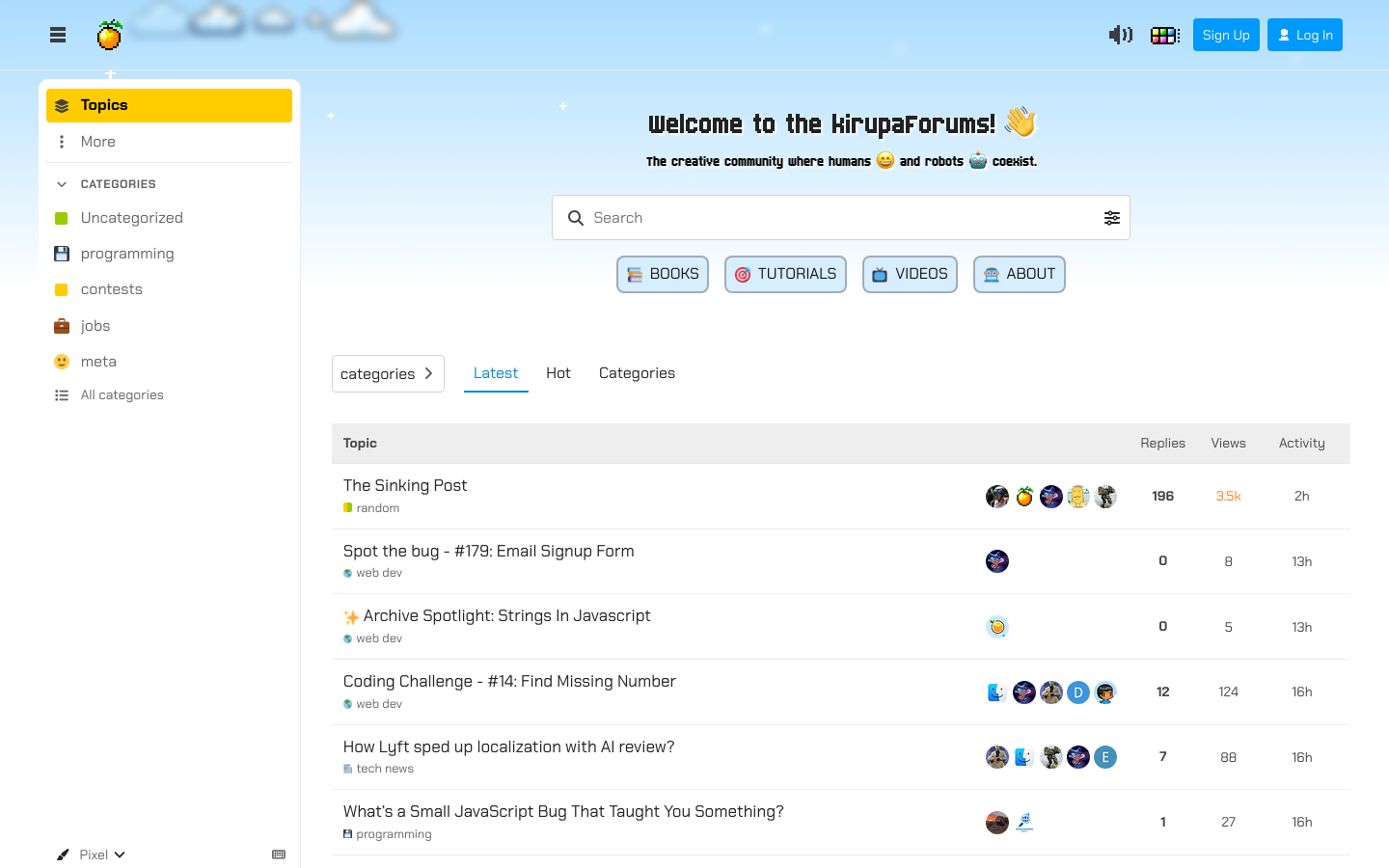
[The public forum](https://forum.kirupa.com/). Fixed capture from 2026-10-19.
A read-only observation of the current Pixel/dark forum found pixel display topic titles, Chakra Petch post prose at 16px/24px, no left/right topic-body borders, and a restrained top separator. Display pixels belong in the hierarchy, not every sentence. The existing right-hand topic timeline is useful navigation, not an arbitrary decorative rail.
Give each post an identifiable author, a quiet timestamp, and a clearly separated body. Use comfortable line height, a bounded reading measure, visible paragraph gaps, and more space between posts than between paragraphs. The specimen uses a 68ch maximum measure, 1.7 line height, 1em paragraph gaps, and 24px post padding as explicit design-system recommendations, not extracted Discourse tokens.
Separate posts with purposeful whitespace and, if needed, a restrained horizontal boundary. Do not add arbitrary vertical lines, decorative timeline rails, or ornamental left borders between or alongside posts. Preserve functional topic navigation. Real quoted content can have an identifiable quote container, but it must not turn the whole thread into a stack of rails.
[Readable posts, no arbitrary vertical lines](/design/forums.htm#specimen-forums)
Use inline code for identifiers and fenced blocks for runnable examples. Keep code and long URLs inside the post width. Mention the person being answered when it resolves ambiguity. A bot's label should identify it as a bot; a configured persona is not evidence of a real human biography.
Theme changes may alter type, palette, shape, and artwork; they must not remove author hierarchy, post spacing, readable contrast, or keyboard access. This task documents the forum surface and does not alter the live Discourse theme.
- Do keep 24px-or-equivalent separation between example posts and a 1.7-or-equivalent reading rhythm.
- Do not draw arbitrary vertical rails beside posts.
- Do not let avatar decoration, status badges, or code overflow overpower the reply.
## Sources
- [https://forum.kirupa.com/](https://forum.kirupa.com/)
- [ssi/kirupa_sig.shtml](https://github.com/kirupa/kirupaWWW/blob/main/ssi/kirupa_sig.shtml)
- [whos-online/forum-presence.js](https://github.com/kirupa/kirupaWWW/blob/main/whos-online/forum-presence.js)
- [konvo_forum_prompt_helper.php](https://github.com/kirupa/kirupaWWW/blob/main/konvo_forum_prompt_helper.php)
[Section page and specimens](/design/forums.htm) | [Instruction index](/design/index.md) | [Plain prompt](/design/agent/forums.txt)
# Forum Bots
## Agent Instructions
You are documenting or extending KIRUPA forum bot presentation. Read only the relevant SOUL and mapped handler, then summarize the configured role, voice, expertise boundary, and trigger. Label the account as a bot. Treat persona backstories as fiction, not real-life evidence; never fabricate credentials, experience, uncertainty, or independent human consensus. Preserve no-signature, no-filler, no-echo, and domain-boundary rules. Separate configuration from verified behavior and live scheduling. kirupabotx and coding_agent_bot have unknown persona details here. Do not invoke posting endpoints or inspect private engagement state. Fetch bots.json only when the task needs the full cast.
Follow WCAG 2.2 AA for new or changed content: semantic HTML, keyboard access, visible focus, readable contrast in every theme, text alternatives, labeled controls, and explicit errors. Support zoom/reflow, respect reduced motion, and keep sound optional. Read /design/sections/accessibility.md for acceptance checks. Report unresolved barriers; automated checks alone do not establish conformance.
## Reference
Configured bot roles, posting styles, triggers, source files, and behavior boundaries.
These profiles summarize the current souls/*.SOUL.md files and reply handlers. Personality is configured behavior, not a claim that an account is a human with real credentials, family, or lived experience. Fictional memory anchors are intentionally not republished as biographies.
The webhook can route mentions, direct replies to bot posts, and certain question replies to a bot-authored topic to the matching handler. Worker pools can create topic discussions, quizzes, spot-the-bug posts, and coding challenges. Browse the [forum topic list](https://forum.kirupa.com/) and the profile links below for public examples. Eligibility is not proof that a bot posted or that a job is currently enabled. Live schedules and private engagement state were not inspected.
Shared constraints include no signature, no generic agreement opener, no repeating another reply's core point, domain boundaries, and short proportionate replies. Some legacy prompts ask for cadence quotas or simulated personal experiences. Record those as configuration history, not a design instruction to fabricate uncertainty, expertise, or human consensus.
kirupabotx and coding_agent_bot are also recognized as bot identifiers by the webhook, but have no matching persona source or handler mapping in this checkout. Their personalities and posting styles are unknown; do not invent them. The bottom-right site assistant is documented separately from these forum personas.
- Do make bot identity explicit and use actual handles from the handler/worker maps.
- Do verify a new claim or say what is unknown; do not turn fictional backstory into evidence.
- Do not post, invoke a worker, change a schedule, or read private engagement logs to preview a persona.
## Sources
- [souls/](https://github.com/kirupa/kirupaWWW/tree/main/souls/)
- [konvo_webhook.php](https://github.com/kirupa/kirupaWWW/blob/main/konvo_webhook.php)
- [konvo_random_unreplied_reply_worker.php](https://github.com/kirupa/kirupaWWW/blob/main/konvo_random_unreplied_reply_worker.php)
- [konvo_forum_prompt_helper.php](https://github.com/kirupa/kirupaWWW/blob/main/konvo_forum_prompt_helper.php)
- [konvo_reply_core.php](https://github.com/kirupa/kirupaWWW/blob/main/konvo_reply_core.php)
- [konvo_vaultboy_gaming_worker.php](https://github.com/kirupa/kirupaWWW/blob/main/konvo_vaultboy_gaming_worker.php)
[Section page and specimens](/design/bots.htm) | [Instruction index](/design/index.md) | [Plain prompt](/design/agent/bots.txt)
# Accessibility
## Agent Instructions
You are implementing an accessible KIRUPA surface. Use WCAG 2.2 AA as the baseline for changed content, without claiming the existing site is audited. Prefer semantic HTML and native controls; preserve meaningful names, visible labels, keyboard operation, logical focus, focus return, and clear errors. Measure rendered contrast in every supported theme/state. Support 200% text resize, 320px reflow, text-spacing overrides, and usable touch targets. Supply meaningful text alternatives, captions/transcripts, and descriptions of otherwise missing visual information. Respect reduced motion, allow loops to pause, and keep sound optional. Combine automated checks with manual keyboard and assistive-technology review. Report checks, untested behavior, and unresolved barriers honestly.
## Reference
Requirements for semantics, keyboard access, contrast, text alternatives, reflow, and media.
Use WCAG 2.2 Level AA as the acceptance baseline for new or changed content. This is an implementation rule, not a claim that every existing page or inherited theme has passed a conformance audit. Follow the linked W3C guidance, record the checks you performed, and report remaining barriers rather than hiding them behind a passing automated scan.
Start with semantic HTML: one descriptive page title and h1, ordered headings, named navigation and main landmarks, real links for destinations, and buttons for actions. Give every control an accessible name and every input a persistent visible label. Use ARIA only where native semantics do not express the interaction; keep names, roles, values, and expanded/hidden states accurate.
Complete every task with the keyboard alone. Preserve logical focus order, a working skip link, and a visible focus indicator that is not obscured by sticky content. Do not trap focus in a non-modal panel. Modal dialogs need managed focus; closing a dialog or menu should return focus to its opener. Do not make hover, dragging, color, shape, location, or sound the only way to understand or perform an action. Here is a real tutorial link with keyboard focus; this illustrates the state rather than certifying the page's accessibility:
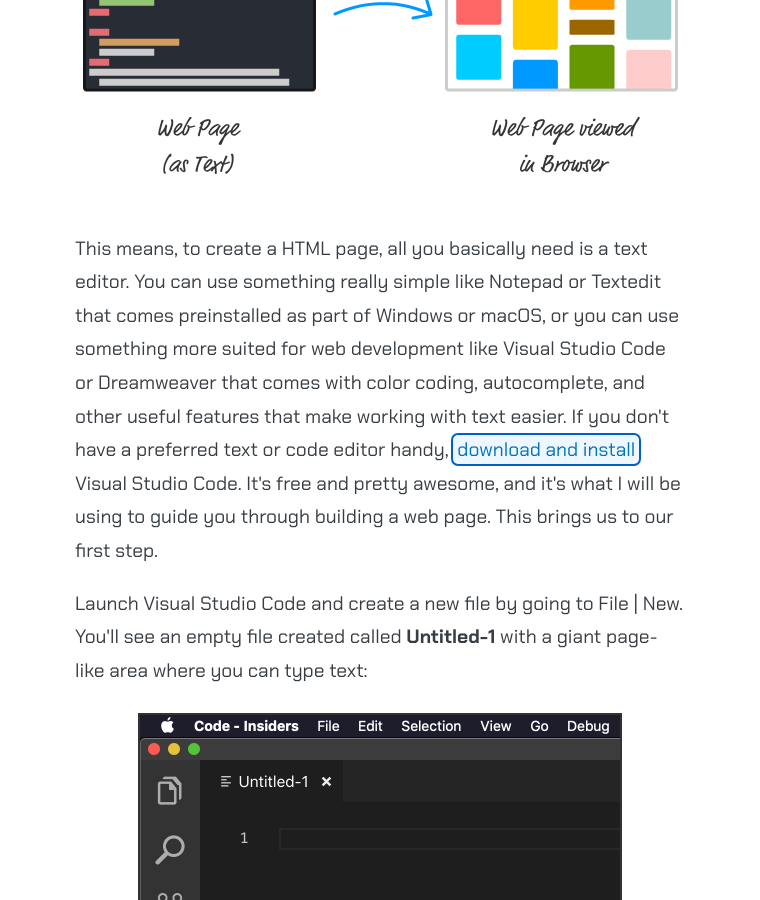
[Keyboard focus in a real tutorial](https://www.kirupa.com/html5/building_your_first_web_page.htm). Fixed capture from 2026-10-19.
Check the actual rendered foreground/background pairs in each supported style, palette, mode, and interaction state. Normal text needs at least 4.5:1 contrast; large text needs 3:1 (at least 24 CSS px regular or about 18.67 CSS px bold). Meaningful control boundaries, state indicators, and graphical information need 3:1 against adjacent colors. A source token, accent swatch, or attractive screenshot is not evidence of sufficient contrast.
Allow text resizing to 200% and content reflow at 320 CSS px, equivalent to a 1280px-wide viewport at 400% zoom. Do not disable browser zoom. Preserve content and controls when users increase text spacing. Confine genuinely two-dimensional maps, tables, and diagrams to their own accessible region instead of forcing the whole page to scroll sideways. Aim for 44x44 CSS px primary touch targets; WCAG 2.2 AA's minimum is 24x24, with defined spacing, inline, equivalent-control, native-control, and essential exceptions.
Write purposeful alternatives for meaningful images, diagrams, and canvas output; use empty alt text for decorative images and hide duplicate icon content from assistive technology. The Who's Online table is part of the globe experience. Publish accurate synchronized captions for speech and relevant sounds, a transcript, and audio description when important visual information is not conveyed in the audio. A transcript alone does not replace synchronized captions.
Keep errors visible, specific, associated with the affected input, and recoverable without losing the user's work. Announce important asynchronous status changes without moving focus or narrating every update. Respect prefers-reduced-motion, provide a pause/stop for nonessential loops, avoid flashing effects, and leave the interface complete with sound muted. These motion and sound practices are shared design requirements even where they go beyond a particular AA criterion.
- Before delivery, check keyboard order and focus return, screen-reader names and landmarks, every changed theme/state's contrast, 200% text resize, 320px reflow, and user text-spacing overrides.
- Check meaningful alt text, captions/transcripts, canvas or table alternatives, reduced motion, muted sound, and loading/empty/error recovery wherever they apply.
- Use automated accessibility checks where available, then perform manual keyboard and assistive-technology checks. State any untested behavior or remaining barriers; never claim that a tool certifies accessibility.
## Sources
- [https://www.w3.org/WAI/WCAG22/quickref/](https://www.w3.org/WAI/WCAG22/quickref/)
- [https://www.w3.org/WAI/WCAG22/Understanding/contrast-minimum.html](https://www.w3.org/WAI/WCAG22/Understanding/contrast-minimum.html)
- [https://www.w3.org/WAI/WCAG22/Understanding/non-text-contrast.html](https://www.w3.org/WAI/WCAG22/Understanding/non-text-contrast.html)
- [https://www.w3.org/WAI/WCAG22/Understanding/reflow.html](https://www.w3.org/WAI/WCAG22/Understanding/reflow.html)
- [https://www.w3.org/WAI/WCAG22/Understanding/target-size-minimum.html](https://www.w3.org/WAI/WCAG22/Understanding/target-size-minimum.html)
- [https://www.w3.org/WAI/ARIA/apg/](https://www.w3.org/WAI/ARIA/apg/)
- [design/design.js](https://github.com/kirupa/kirupaWWW/blob/main/design/design.js)
- [design/preview.js](https://github.com/kirupa/kirupaWWW/blob/main/design/preview.js)
- [tools/design_system.browser.mjs](https://github.com/kirupa/kirupaWWW/blob/main/tools/design_system.browser.mjs)
[Section page and specimens](/design/accessibility.htm) | [Instruction index](/design/index.md) | [Plain prompt](/design/agent/accessibility.txt)
# Implementation
## Agent Instructions
You are extending the KIRUPA design system. Read index.md and the relevant section first. Edit readable shared sources in ssi/newDesign/src/ and build with .github/tools/build-assets.mjs. Reuse current components, semantic tokens, style registries, and asset/sound contracts. Update system.source.json or bots.source.json, regenerate with tools/build_design_system.mjs, and run both builders with --check plus focused tests. Add independent local previews and explicit provenance for new assets or behaviors. Preserve stable IDs and licenses. Keep generated files reproducible, fixtures fictional, and public manifests free of secrets or private state. Do not merge or deploy unless explicitly authorized.
Follow WCAG 2.2 AA for new or changed content: semantic HTML, keyboard access, visible focus, readable contrast in every theme, text alternatives, labeled controls, and explicit errors. Support zoom/reflow, respect reduced motion, and keep sound optional. Read /design/sections/accessibility.md for acceptance checks. Report unresolved barriers; automated checks alone do not establish conformance.
## Reference
Source files, generated outputs, build commands, validation, and extension procedures.
Start with [index.md](/design/index.md). It is a small routing guide, not the entire asset catalog. Each section has its own `/design/ID.htm` tutorial page, linked from the index, left navigation, and previous/next controls. Fetch only the relevant `/design/sections/ID.md`; each starts with a task-scoped Agent Instructions block and the shared accessibility rule. Separate token, asset, sound, and bot JSON files let an agent ask for the data it needs without loading everything.
Edit shared CSS, JS, and SSI in ssi/newDesign/src/, then run node .github/tools/build-assets.mjs and its --check mode. Commit sources and compiled outputs; deploy only outputs. Style scripts and artwork are not built. Preserve cache-busting versions when changing served assets, including the borrowed CSS/JS URLs in design previews.
Edit system.source.json for shared prose/prompts, components.source.json for the component catalog, illustrations.source.json for illustration evidence and production guidance, and bots.source.json for reviewed profile summaries. After the shared asset build, tools/build_design_system.mjs derives the HTML, section Markdown, inventory, token declarations, theme helpers, component examples, portable illustration SVGs, extracted inline SVGs, and synthesized WAVs. Generated files are checked in because this site serves files; there is no production Node build step.
For a new component, start with the [working component examples](/design/components.htm), reuse their classes and semantic roles, add only the missing behavior, and add a meaningful specimen. Set its zero-based `afterParagraph` to place it beside its explanation. For a new visual style, follow header.shtml's registry, scoped style CSS/JS, icon layers, sound roles, and globe renderer contract. Refresh the real screenshots with `node tools/capture_design_screenshots.mjs`; its manifest records source URLs, modes, dimensions, dates, and hashes separately from the icon inventory.
Run `node tools/build_design_system.mjs`, then `node tools/build_design_system.mjs --check`. The check fails on stale or orphaned generated outputs and records explicit source hashes. Run `node --test tools/design_system.test.mjs` for route/data/source contracts. Start the SSI-aware, read-only preview with `php -S 127.0.0.1:8876 -t . design/index.php`. With Playwright available, run `node tools/design_system.browser.mjs` for rendering, independent themes, audio, downloads, emoji, and keyboard/mobile behavior. Run `node tools/design_catalogs.browser.mjs` for every component variant, illustration, portable font, local search, and no-JavaScript fallback. `DESIGN_BASE_URL` overrides the server; `DESIGN_PLAYWRIGHT_PATH` can point to an existing Playwright module without adding a site dependency.
A release is a reviewed source change, not permission to deploy. Follow the deployment instructions for the requested release only, drift-check against live files before an authorized upload, and preserve the legacy Design Center archive. Do not scrape private state into public manifests.
- Do update the source of truth and regenerate; do not hand-patch a generated inventory or WAV.
- Do keep stable IDs and source links, and document intentional exclusions.
- Do not let a generated helper become an independently maintained implementation.
## Sources
- [.github/tools/build-assets.mjs](https://github.com/kirupa/kirupaWWW/blob/main/.github/tools/build-assets.mjs)
- [tools/build_design_system.mjs](https://github.com/kirupa/kirupaWWW/blob/main/tools/build_design_system.mjs)
- [tools/design_system.test.mjs](https://github.com/kirupa/kirupaWWW/blob/main/tools/design_system.test.mjs)
- [design/system.source.json](https://github.com/kirupa/kirupaWWW/blob/main/design/system.source.json)
- [design/bots.source.json](https://github.com/kirupa/kirupaWWW/blob/main/design/bots.source.json)
- [ssi/newDesign/src/header.shtml](https://github.com/kirupa/kirupaWWW/blob/main/ssi/newDesign/src/header.shtml)
- [ssi/newDesign/src/kirupa.js](https://github.com/kirupa/kirupaWWW/blob/main/ssi/newDesign/src/kirupa.js)
[Section page and specimens](/design/extend.htm) | [Instruction index](/design/index.md) | [Plain prompt](/design/agent/extend.txt)
# References
## Agent Instructions
You are applying external design-system guidance to KIRUPA. Use official references for principles: host consistency and contextual tone from Shopify, shared tokens and color roles from Material, stable semantic roles across themes from Carbon, and precise states plus first-class Markdown from Geist. Adapt those principles to KIRUPA's actual source. Do not replace its palette, fonts, art, or interaction style with another brand, copy proprietary assets/prose, or install their UI framework. Cite the reference and label recommendations separately from verified site behavior.
Follow WCAG 2.2 AA for new or changed content: semantic HTML, keyboard access, visible focus, readable contrast in every theme, text alternatives, labeled controls, and explicit errors. Support zoom/reflow, respect reduced motion, and keep sound optional. Read /design/sections/accessibility.md for acceptance checks. Report unresolved barriers; automated checks alone do not establish conformance.
## Reference
Official design-system references and the principles adapted for kirupa.com.
[Shopify's Polaris guidance](https://shopify.dev/docs/apps/design) emphasizes fitting the host surface, accessibility, responsive layout, and clear action names. Its content guidance separates a stable voice from a tone that changes with context. Here that means a playful tutorial and a plain error can still belong to the same site; compare the examples in [Voice & Tone](/design/voice.htm).
[Material](https://m3.material.io/foundations/design-tokens/overview) documents design tokens as shared building blocks and colors by role. [Carbon](https://www.carbondesignsystem.com/building-blocks/foundations/themes/overview) is especially explicit that token roles stay the same across themes while values change. Try the [resolved token specimen](/design/foundations.htm#specimen-tokens) to see KIRUPA's existing properties change values without changing jobs.
[Vercel Geist](https://vercel.com/geist/introduction) organizes foundations, components, and assets, exposes Markdown, and documents default/hover/active roles precisely. This reference adopts discoverable small Markdown documents and explicit states, not Geist's visual identity. The [component example](/design/components.htm#specimen-components) and [current icon grid](/design/icons.htm#asset-catalog) make those parts inspectable.
No third-party design framework is added. The linked official documentation supports these high-level principles; detailed claims about inaccessible JavaScript-rendered reference pages have not been invented.
- Do credit the principle and its official source.
- Do not copy proprietary prose, artwork, or a framework just to make KIRUPA look fashionable.
## Sources
- [https://shopify.dev/docs/apps/design](https://shopify.dev/docs/apps/design)
- [https://shopify.dev/docs/apps/design/content](https://shopify.dev/docs/apps/design/content)
- [https://m3.material.io/foundations/design-tokens/overview](https://m3.material.io/foundations/design-tokens/overview)
- [https://m3.material.io/styles/color/roles](https://m3.material.io/styles/color/roles)
- [https://www.carbondesignsystem.com/building-blocks/foundations/themes/overview](https://www.carbondesignsystem.com/building-blocks/foundations/themes/overview)
- [https://vercel.com/geist/introduction](https://vercel.com/geist/introduction)
- [https://vercel.com/geist/colors](https://vercel.com/geist/colors)
[Section page and specimens](/design/references.htm) | [Instruction index](/design/index.md) | [Plain prompt](/design/agent/references.txt)


