

									/***** CREATE the database *****/

  CREATE DATABASE `kirupa_portfolio` DEFAULT

  CHARACTER SET utf8 COLLATE utf8_unicode_ci;

/***** End CREATE *****/  Tutorials
Books
Videos
Forums
Tutorials
Books
Videos
Forums


This is an archived tutorial from the kirupa.com legacy collection. It covers software that may no longer be available, but it is kept online because the ideas still hold up.
Many web designers understand what a database is. Some have even
written queries to access a database or even
designed their own database. Unfortunately, many web
designers suffer from unnecessary problems and setbacks
because they do not understand the basics of relational
database design. This tutorial teaches the basics of
relational database design. Along the way, SQL tips and best
practices will also be shown and explained. In addition, you
will be introduced to important database terminology. As an
example, this tutorial will design a database to hold works
for a web design portfolio.
A few notes before we start: All table names will begin with
"tbl_". The database used in this example is MySQL version
4.x. The queries shown should also work in MySQL version 5.
MySQL is often the choice of web designers needing database
functionality. Other SQL databases such as MSSQL Server may
use slightly different query syntax, but the relational
database design concepts shown will still apply.
/***** CREATE the database *****/
CREATE DATABASE `kirupa_portfolio` DEFAULT
CHARACTER SET utf8 COLLATE utf8_unicode_ci;
/***** End CREATE *****/ SQL Tip
Within SQL, comments are held inside /* comment */ tags. Tick marks (`) can be used around database, table, and column names. Tick marks are not required unless you are attempting to query a database, table, or column named with a reserved word (such as "date" or "select").
When designing a database, the easiest table to create is usually derived from the core functionality. In this case, we are building a database to house web design works. So the first table we create is going to hold the works: tbl_works. The works table will hold five columns: work_id, work_title, work_dscpn, work_date, work_image_url. The work_id column is set as a Primary Key. Primary Key fields, often marked "PK" are a way to uniquely identify a row in a table. This means that a work_id number will never be duplicated within tbl_works. Each work will have one and only one work_id.
									/***** CREATE tbl_works *****/

  CREATE TABLE `tbl_works` (

  `work_id` INT NOT NULL AUTO_INCREMENT,

  `work_title` VARCHAR(50) NOT NULL,

  `work_dscpn` TEXT NOT NULL,

  `work_image_url` VARCHAR(255) NOT NULL,

  PRIMARY KEY (`work_id`)

  )

  TYPE = myisam;

  /***** End CREATE *****/

  /***** INSERT sample data into tbl_works

  *****/

  INSERT INTO `tbl_works` (

  `work_id`,

  `work_title`,

  `work_dscpn`,

  `work_image_url`)

  VALUES (

  '',

  'Image Uploader',

  'Allows users to upload an image to the

  server using a Flash form.',

  'http://mysite.com/images/image_uploader.jpg'

  );

  INSERT INTO `tbl_works` (

  `work_id`,

  `work_title`,

  `work_dscpn`,

  `work_image_url`)

  VALUES (

  '',

  'Super Duper Identity',

  'The company asked us to create an identity

  package including logo.',

  'http://mysite.com/images/super_duper.jpg'

  );

  INSERT INTO `tbl_works` (

  `work_id`,

  `work_title`,

  `work_dscpn`,

  `work_image_url`)

  VALUES (

  '',

  'RSS Aggregator',

  'Collects data from a given list of RSS

  feeds.',

  'http://mysite.com/images/rss_aggregator.jpg'

  );

  INSERT INTO `tbl_works` (

  `work_id`,

  `work_title`,

  `work_dscpn`,

  `work_image_url`)

  VALUES (

  '',

  'Order Tracking System',

  'Tracks orders made through a web

  interface',

  'http://mysite.com/images/order_track_system.jpg'

  );

  /***** End INSERT *****/
In addition, our work_id column is also set to auto increment. By setting the column work_id to auto increment, we tell the database to automatically generate a new work_id (previous work_id+1) for each record added to the table. Typically, ID fields are set to data type integer (INT) because integers are quickly and easily processed.
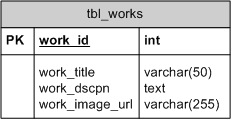
The diagram shown above is an Entity Relationship Diagram. Database ERDs are used to show relationships between tables in database as well as table structures. This diagram was created using Microsoft Visio, but any drawing tool (even pencil and paper) will work. Because ERDs help visualize table structures and relationships, they often lead us to better database designs.
SQL Tip
While storing images in a MySQL database is possible, it is not advisable for speed and stability reasons. Instead, store the URL to the image as shown.
Most design portfolios separate works into several categories. For instance, a design portfolio might have these categories: websites, icons, logos, and banner ads. Inexperienced database designers will just add a categories column (or columns) to tbl_works because the solution seems simple. Unfortunately, this table is now inflexible. With such a structure, assigning multiple categories to a work will be unnecessarily difficult. Because category names are repeated, any changes in spelling or wording will require more updating and are more likely to result in both system and user error. In general, this is a poor design. Fortunately, there is a better solution.
								/***** CREATE tbl_categories *****/

  CREATE TABLE `tbl_categories` (

  `category_id` INT NOT NULL AUTO_INCREMENT,

  `category_name` VARCHAR(20) NOT NULL,

  `category_dscpn` TEXT NOT NULL,

  PRIMARY KEY (`category_id`)

  )

  TYPE = myisam;

  /***** End CREATE *****/

  /***** INSERT sample data into tbl_categories

  *****/

  INSERT INTO `tbl_categories` (

  `category_id`,

  `category_name`,

  `category_dscpn`

  )

  VALUES (

  '',

  'Websites',

  'Websites can be static or dynamic. Some involve

  database functionality.'

  );

  INSERT INTO `tbl_categories` (

  `category_id`,

  `category_name`,

  `category_dscpn`

  )

  VALUES (

  '',

  'Logos',

  'Logos are done in vector based applications so

  that they can be reproduced at different sizes

  without reducing quality.'

  );

  /***** End INSERT *****/
Experienced database designers will instead create a
separate table to hold categories: tbl_categories. The
only purpose of this table is to hold information about
categories. Ultimately, this design is simpler because
each table makes sense on its own, independent of other
tables. Each table will have one job and only one job.
tbl_works will only hold information about works.
tbl_categories will only hold information about
categories. tbl_categories is structured as follows:
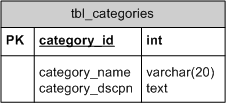
By assigning only one job to each table, we can simplify
the data and enable ourselves to better manage the data.
For instance, if we need to rename the category "Logos"
to "Identity", we now only need to update one row in
tbl_categories. If our categories were a column in
tbl_works, we would have to go through the pain of
searching every record in tbl_works for "Logos" and
updating each of those rows - an unnecessarily difficult
process. In fact, all of our SQL statements will become
easier to write and faster to process.
Onwards to the next section!
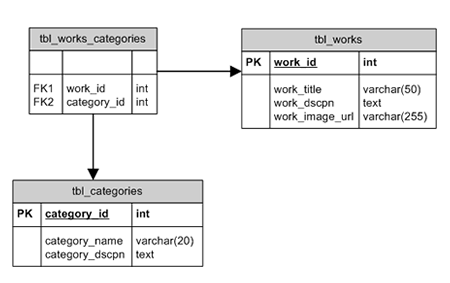
If each table only has one job, then the job for tbl_works_categories will be to link specific works to specific categories. Thus, it will only hold two columns: work_id and category_id. Both columns are called Foreign Keys. Columns designated as foreign keys will hold values that are primary keys in other tables. That is, work_id is a primary key in tbl_works. In tbl_works_categories, the column work_id is a foreign key. The same goes for category_id and tbl_categories.
								/***** CREATE tbl_works_categories *****/

  CREATE TABLE `tbl_works_categories` (

  `work_id` INT NOT NULL,

  `category_id` INT NOT NULL

  )

  TYPE = myisam;

  /***** End CREATE *****/

  /***** INSERT sample data into

  tbl_works_categories *****/

  INSERT INTO `tbl_works_categories` (

  `work_id`,

  `category_id`

  )

  VALUES (

  '1',

  '1'

  );

  INSERT INTO `tbl_works_categories` (

  `work_id`,

  `category_id`

  )

  VALUES (

  '2',

  '1'

  );

  INSERT INTO `tbl_works_categories` (

  `work_id`,

  `category_id`

  )

  VALUES (

  '3',

  '2'

  );

  INSERT INTO `tbl_works_categories` (

  `work_id`,

  `category_id`

  )

  VALUES (

  '4',

  '1'

  );

  /***** End INSERT *****/
Note that we use work_id and category_id because these ID numbers are unique to each row in tbl_works and tbl_categories, respectively. If we had instead used category_name and work_title in tbl_works_categories, we would have redundant data - data that is duplicated elsewhere. Unlike name fields such as category_name, ID fields are never subject to change, so using them to identify a row is safer and requires less storage and rework. The process of removing redundant data is called Database Normalization. The structure for tbl_works_categories is shown in the following ERD as well as the relationships to tbl_works and tbl_categories.
Onwards to the next section!
At this point, the database is set up to hold our works and the corresponding categories. Because the data is spread across three tables, we need to join the tables within our SELECT query. Joining tables means that we combine tables based on common fields (related fields). Joins do not physically join the tables, but rather join the query result sets from implied queries. If that confused you, don't worry. Just know that there is no physical change to the database design.
SQL Tip
SQL professionals typically use all capital letters to denote reserved words and functions such as SELECT, INSERT, JOIN, ORDER BY, etc.
								/*

  Gets the category names associated with work_id

  #1

  Should return 1 row with the category_name =

  'Websites'

  */

  SELECT c.category_name

  FROM tbl_works a,

  tbl_works_categories b,

  tbl_categories c

  WHERE a.work_id = 1

  AND a.work_id = b.work_id

  AND b.category_id = c.category_id
If a, b, and c look confusing in the above query, don't be alarmed. In the above, a, b, and c are just alias table names. In essence, a, b, and c just represent a shorter way to type the table names that are used later in the query. The above query is the same as typing the following:
								/*

  Functions identically to the above query

  Gets the category names associated with work_id

  #1

  */

  SELECT tbl_categories.category_name

  FROM tbl_works,

  tbl_works_categories,

  tbl_categories

  WHERE tbl_works.work_id = 1

  AND tbl_works.work_id =

  tbl_works_categories.work_id

  AND tbl_works_categories.category_id =

  tbl_categories.category_id
If we look at the entity relationship
diagram, we can follow the query through the linking
fields. Some call tables like tbl_works_categories linking tables (or mapping tables) because they link
together (map) other tables like tbl_works and
tbl_categories.
Onwards to the next section!
We will handle adding technology classifications just as we did the categories. A variety of web design technologies exist: (X)HTML, PHP, Flash, Photoshop, etc. Because we want our database to capture what technology was used for each work, we will create a technologies table: tbl_tech. Like previous tables, tbl_tech will have an ID column, tech_id, that is the primary key and is also set to auto increment. It will only hold information about technologies.
								/***** CREATE tbl_tech *****/

  CREATE TABLE `tbl_tech` (

  `tech_id` INT NOT NULL AUTO_INCREMENT,

  `tech_name` VARCHAR(20) NOT NULL,

  PRIMARY KEY (`tech_id`)

  )

  TYPE = myisam;

  /***** End CREATE *****/

  /***** INSERT sample data into tbl_tech *****/

  INSERT INTO `tbl_tech` (

  `tech_id`,

  `tech_name`

  )

  VALUES (

  '',

  '(X)HTML'

  );

  INSERT INTO `tbl_tech` (

  `tech_id`,

  `tech_name`

  )

  VALUES (

  '',

  'PHP'

  );

  INSERT INTO `tbl_tech` (

  `tech_id`,

  `tech_name`

  )

  VALUES (

  '',

  'Flash'

  );

  INSERT INTO `tbl_tech` (

  `tech_id`,

  `tech_name`

  )

  VALUES (

  '',

  'Illustrator'

  );

  INSERT INTO `tbl_tech` (

  `tech_id`,

  `tech_name`

  )

  VALUES (

  '',

  'XML'

  );

  INSERT INTO `tbl_tech` (

  `tech_id`,

  `tech_name`

  )

  VALUES (

  '',

  'MySQL'

  );

  INSERT INTO `tbl_tech` (

  `tech_id`,

  `tech_name`

  )

  VALUES (

  '',

  'CSS'

  );

  /***** End INSERT *****/
SQL Tip
While it looks like we are inserting blank values for the tech_id column, we are actually just allowing the SQL database to generate the tech_id using the auto increment feature.
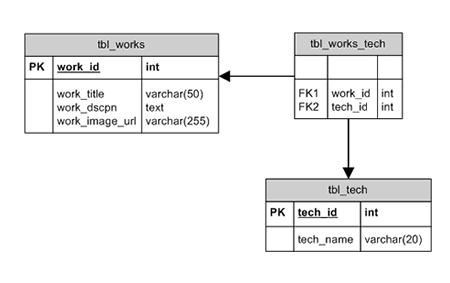
Like tbl_works_categories, we will create tbl_works_tech which will link tbl_works to tbl_tech. Both work_id and tech_id are foreign keys within tbl_works_tech.
								/***** CREATE tbl_works_tech *****/

  CREATE TABLE `tbl_works_tech` (

  `work_id` INT NOT NULL,

  `tech_id` INT NOT NULL

  )

  TYPE = myisam;

  /***** End CREATE *****/

  /***** INSERT sample data into

  tbl_works_categories *****/

  INSERT INTO `tbl_works_tech` (

  `work_id`,

  `tech_id`

  )

  VALUES (

  '1',

  '3'

  );

  INSERT INTO `tbl_works_tech` (

  `work_id`,

  `tech_id`

  )

  VALUES (

  '1',

  '2'

  );

  INSERT INTO `tbl_works_tech` (

  `work_id`,

  `tech_id`

  )

  VALUES (

  '2',

  '3'

  );

  INSERT INTO `tbl_works_tech` (

  `work_id`,

  `tech_id`

  )

  VALUES (

  '2',

  '5'

  );

  INSERT INTO `tbl_works_tech` (

  `work_id`,

  `tech_id`

  )

  VALUES (

  '3',

  '4'

  );

  INSERT INTO `tbl_works_tech` (

  `work_id`,

  `tech_id`

  )

  VALUES (

  '4',

  '1'

  );

  INSERT INTO `tbl_works_tech` (

  `work_id`,

  `tech_id`

  )

  VALUES (

  '4',

  '2'

  );

  INSERT INTO `tbl_works_tech` (

  `work_id`,

  `tech_id`

  )

  VALUES (

  '4',

  '6'

  );

  INSERT INTO `tbl_works_tech` (

  `work_id`,

  `tech_id`

  )

  VALUES (

  '4',

  '7'

  );

  /***** End INSERT *****/
To access what technology was used for a particular project we would structure a query as follows:
								/*

  Gets the technology names used with work_id #1

  Should return 2 rows with tech_name = 'Flash'

  and 'PHP'

  */

  SELECT c.tech_name

  FROM tbl_works a,

  tbl_works_tech b,

  tbl_tech c

  WHERE a.work_id = 1

  AND a.work_id = b.work_id

  AND b.tech_id = c.tech_id
								/*

  Gets the technology names used for works in the

  logos category

  Should return 1 row with tech_name =

  'Illustrator'

  */

  SELECT c.tech_name

  FROM tbl_works a,

  tbl_works_tech b,

  tbl_tech c,

  tbl_works_categories d,

  tbl_categories e

  WHERE a.work_id = b.work_id

  AND b.tech_id = c.tech_id

  AND a.work_id = d.work_id

  AND d.category_id = e.category_id

  AND e.category_name = 'logos'
Now is a good time to take a deep breath and reread that join query. If needed, practice writing join queries on your own. Start by joining just two tables, then move on to more tables. Joining tables is an absolute necessity when using a relational database design.
At this point, you might have an idea what's coming next: tbl_clients. Appropriately, tbl_clients will have client_id as the primary key set to auto increment.
								/***** CREATE tbl_clients *****/

  CREATE TABLE `tbl_clients` (

  `client_id` INT NOT NULL AUTO_INCREMENT,

  `client_name` VARCHAR(20) NOT NULL,

  PRIMARY KEY (`client_id`)

  )

  TYPE = myisam;

  /***** End CREATE *****/

  /***** INSERT sample data into tbl_clients

  *****/

  INSERT INTO `tbl_clients` (

  `client_id`, `client_name`

  )

  VALUES (

  '',

  'Johnson Photography'

  );

  INSERT INTO `tbl_clients` (

  `client_id`, `client_name`

  )

  VALUES (

  '',

  'Super Duper Company'

  );

  INSERT INTO `tbl_clients` (

  `client_id`, `client_name`

  )

  VALUES (

  '',

  'Smith News Service'

  );

  /***** End INSERT *****/
As with categories and technologies, we will use a mapping table: tbl_works_clients to map which works were for which clients. Even though one work may only belong to one client, a good relational design will still show the relationship in a separate table instead of placing it in tbl_works.

								/***** CREATE tbl_works_clients *****/

  CREATE TABLE `tbl_works_clients` (

  `work_id` INT NOT NULL,

  `client_id` INT NOT NULL

  )

  TYPE = myisam;

  /***** End CREATE *****/

  /***** INSERT sample data into tbl_works_clients

  *****/

  INSERT INTO `tbl_works_clients` (

  `work_id`,

  `client_id`

  )

  VALUES (

  '1',

  '1'

  );

  INSERT INTO `tbl_works_clients` (

  `work_id`,

  `client_id`

  )

  VALUES (

  '2',

  '3'

  );

  INSERT INTO `tbl_works_clients` (

  `work_id`,

  `client_id`

  )

  VALUES (

  '3',

  '2'

  );

  INSERT INTO `tbl_works_clients` (

  `work_id`,

  `client_id`

  )

  VALUES (

  '4',

  '2'

  );

  /***** End INSERT *****/
Then we can query across our client tables just as we did with categories and technologies. For instance:
								/*

  Gets the client names associated with work_id #1

  Should return 1 row with the client_name =

  'Johnson Photography'

  */

  SELECT c.client_name

  FROM tbl_works a,

  tbl_works_clients b,

  tbl_clients c

  WHERE a.work_id = 1

  AND a.work_id = b.work_id

  AND b.client_id = c.client_id
When we started, we said:
"The database will hold portfolio works for my web design portfolio. The database will hold information about each work such as title, category, technology used, and client name."
At this point, the database does hold all of this
information. All of the information can be extracted
just using SQL, without the use of any server-side
scripting languages such as PHP. The ability to manage
the data without using a server-side language improves coding speed, processing speed, and ease of
maintenance.
Your database should now have the following structure. Ideally, you have also been creating the database entity relationship diagram to match your database design.
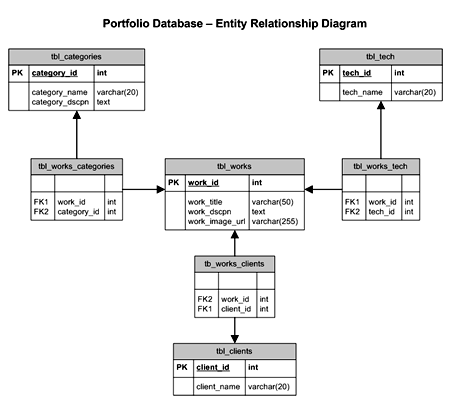
By normalizing our database, we have made each table and
ultimately the entire database easier to understand.
Each data table should make sense on its own. Each
linking (mapping) table should bring together two or
more data tables. Ultimately, our new simplified
structure allows us to better manage our data. While we
may need to invest more time in learning SQL queries
like joins, our productivity will improve because we
will resolve problems via SQL, before they collide with
a server-side language.
Creating database entity relationship diagrams is your
best friend and protector. You will thank yourself later
when the diagram saves you from a grave mistake.
Diagrams can also usually be partially reused for other
sites because the tables are very modular - that is,
they can be removed from context and still make sense.
In addition, they will act as a great reference when you
are writing SQL queries. Diagrams don't need to show
the data type, but at the very least they should
correctly identify table names, column names, primary
keys, foreign keys, and most importantly the
relationships between the tables.
Complete SQL Queries for the Portfolio Database (open in text editor like Notepad or Dreamweaver).
If you have any questions, feel free to post on the forums.
 |
Brian Haveri aka bwh2 brianhaveri.com |
Just a final word before we wrap up. What you've seen here is freshly baked content without added preservatives, artificial intelligence, ads, and algorithm-driven doodads. A huge thank you to all of you who buy kirupa's books, became a paid subscriber, watch the videos, and/or interact on the forums.
Your support keeps this site going! 😇

:: Copyright KIRUPA 2026 //--