|
by
kirupa | 7 April 2009
In the
previous page, you learned about fun things like
the 3D Translation Tool and the Vanishing Point. That
largely sums up the features inside the Flash CS4 UI
relating to 3d this article will discuss. In this page, I am
going to just discuss some issues that you may run into when
using the 3D functionality.
Despite the coolness of all this, there are some limitations
to how much you can do in Flash without resorting to writing
a lot of extra code or looking at using 3rd-party 3d
libraries.
When publishing your movie that has 3d applied to it, you
may find that the file size of your overall project
increases. The reason for this increase is that the 3d
effects you see require ActionScript code that is generated
for you behind the scenes. The addition of this AS3 library
that contains the 3d functionality accounts for the
additional file size increase. All around genius,
Trevor McCauley
(aka senocular) wrote about this earlier, and you can
learn more about that in his post:
Flash CS4- The Overhead of 3
One of the drawbacks of the 3d
functionality in Flash is that whatever element you are
attempting to manipulate in 3d space is automatically
converted from a vector into a bitmap. Using the 3D
Translation or Rotation Tools with even a minor nudge in a
specific direction is enough to rasterize your vector into a
bitmap.
A perfect vector shape such as the four squares that I've
been using throughout this tutorial looks pretty good when
viewed at its default size. Once you start zooming in,
notice that the classic banding/blurring associated with
bitmaps are visible:

[ oh the blurriness! ]
Besides the visual artifacts, as you can imagine from
manipulating actual images instead of vectors, performance
suffers a bit as well.
When shapes move in three dimensions, interesting collisions
and intersections are possible. Unfortunately, this is
something that isn't possible with the functionality
available today. For example, imagine you have two parallel
rectangles placed near other as shown below:
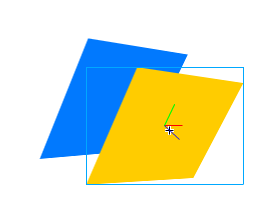
If I were to rotate the blue rectangle, in the real
world, it would seem like a portion of the blue rectangle's
edge will go through the yellow rectangle that is directly
adjacent to it. Instead, what happens is that the blue
rectangle rotates without taking the yellow rectangle into
account:
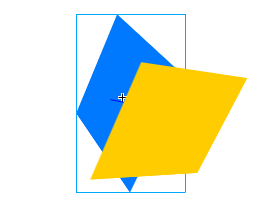
This looks a little weird. It is almost as if each
element has its own 3d universe based on its z-order instead
of coexisting in one large universe where interactions and
collisions are possible.
Just a final word before we wrap up. What you've seen here is freshly baked content without added preservatives, artificial intelligence, ads, and algorithm-driven doodads. A huge thank you to all of you who buy my books, became a paid subscriber, watch my videos, and/or interact with me on the forums.
Your support keeps this site going! 😇

|



 Introduction to
3D Using Flash CS4 - Page 1
Introduction to
3D Using Flash CS4 - Page 1