


We saw earlier that trying to read from our array by passing in an invalid index position results in us seeing a value of undefined. What if we use an invalid index position (aka a number larger than the number of items) to set a value? What is going to happen with the following code?
let foo = ["one", "two", "three"];
foo[5] = "hmm";

console.log(foo);
Our foo array has just three items. This means index positions 0 through 2 are filled. We are specifying an index position of 5 and setting its array item value to be the string hmm. Hmm indeed! So, what will happen is this: our array will grow in size to accommodate an item being placed in index position 5. Since our array can't have any gaps, index positions 3 and 4 will be assigned an empty array value that will read as undefined when accessed:
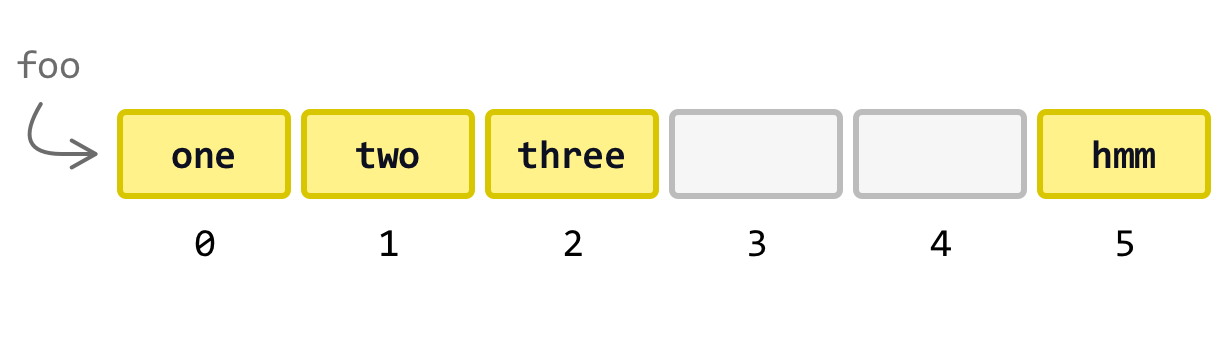
The point to emphasize is that these empty array items do not actually store a value of undefined. They truly are empty and only read as undefined when accessed. Also, if we check on the length of this array, it will be 6. The empty array values are counted in calculating the length of the array, which kinda sorta totally makes sense when given that our arrays can't have any gaps in them.
Setting Really Invalid Index Positions
sd
https://stackoverflow.com/questions/52395924/how-can-javascript-arrays-have-non-numeric-keys
let greetings = ["hi", "sup", "hello", "yo", "hey"];
let arrayLength = greetings.length;
console.log(arrayLength); // 5
sd
The index value is a unique identifier that starts at 0 for the first item in our array and goes up by 1 for each additional item.B
Behind the scenes, every item in our array has an identifier known as the index value. This identifier is a number with the first item in our array having an index value of 0 and each subsequent item having its index value go up by one:
If we wanted to access the first item in our array, we can use its index value of 0 as follows:
Similarly, we can access any element in our array by specifying its appropriate index position:
If we ever specify an index value that is greater than the number of items inside the array, JavaScript will throw an error. One way of avoiding these errors is by ensuring our index positions aren’t larger than the total number of items in our array. We can get the total number of items in our array by using the length property.
By relying on the array’s length, we easily get an upper bound our index values need to fall under.
we don’t specify an invalid index value is by that is ensuring our index calie
ify the index position of the array item we are interested in accessing:
There is something we should mention about arrays in JavaScript right now itself. We aren’t limited to storing data of only one type, such as only strings or only numbers. JavaScript isn’t very strict about things like this, so we can get away with doing something like the following:
let myArray = ["Hello", "😇", 3.14, true];
Notice that myArray is being created with the strings Hello and 😇, the number 3.14, and the boolean true as the initial values. We are effortlessly mixing data types! We can even store arrays inside an array:
let myArray = ["Hello", "😇", 3.14, true, [1, 2, 3]];
The last item in myArray is another array with the values 1, 2, 3:
Arrays within arrays is common for many scenarios.
Adding and Removing Data from an Array
Once we have our array, the most common thing is for us to add or remove items from it. To add items, we use the push method and specify the item or items we want to add:
let myCoolItems = [1, 2, 3, 4];
myCoolItems.push(5);
The newly added items are added to the end of our array:
To remove items, we use the pop method:
let rays = ["Ban", "Romano", "Liotta", "Kroc"];
rays.pop();
With pop, the last item in our array is removed:
Conclusion
The class syntax makes working with objects really easy. You may have caught some glimpses of that here, but you'll start to see more of it later on. The thing about the class syntax is that it allows us to focus more on what we want to do as opposed to fiddling with how exactly to do it. While working with Object.create and the object prototype gave us a lot of control, that control was often unnecessary for the majority of our cases. By working with classes, we trade complexity in favor of simplicity. That's not a bad thing when the simple solution also turns out to be the right one...most of the time!
[an error occurred while processing this directive]
