 Tutorials
Books
Videos
Forums
Tutorials
Books
Videos
Forums


Hexadecimal values have a lot more use than just the hardware/debugging related information I mentioned in my Counting in Hexadecimal post. If you do any type of design, you are probably familiar with the hex codes used for describing a color. The most common way for describing colors has been RGB where a pair of values specify the level of Red, Green, and Blue. For example, a color such as pure white would be #FFFFFF.
Over the years, RGB has been extended by some programs with an A which stands for alpha, or the level of transparency in the color. The location of the alpha hex value can either be in front of the RGB values or after your RGB values depending on the application or image format. You may often find technical articles using ARGB or RGBA denoting the location of Alpha, but the location has little to do with the end result as you will soon see.
For example, in Expression Blend, you have your alpha value placed in front of your RGB values.
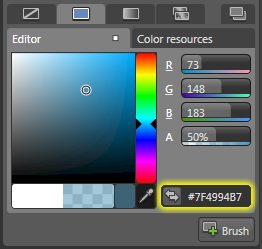
[ Blend displays ARGB values by default ]
Now that you have an introduction to what RGB and A are, let’s look at actually reading the values. All of your individual pair of values – or channels – range from 0 to 255. When you have a value of 0, that means that channel is not expressed at all, whereas if you have a value of 255, that channel is fully expressed. In some cases, you will actually refer to the channel in base 10 integer values itself, but in most cases the range of numbers from 0 to 255 is represented in hex where the hex values range between 00 and FF.
Let’s look at a simple RGB value in greater detail:
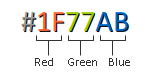
The red channel has a value 1F, the green channel has the value 77, and the blue channel has the value AB. Converted to regular base 10 numbers, you get 31 for Red, 119 for Green, and 171 for Blue. My earlier article covers how to convert from hex to decimal, so be sure to revisit that post if you are not sure how I got those numbers.
Since our colors range from 0 to 255, the above decimal numbers are more helpful if we convert them into percents. For example, our above color would be 31/255 or about 12.5 percent Red, 199/255 or 46.7 percent Green, and about 171/255 or 67 percent Blue. Based on the percentage values, you can see that the color will predominantly be blueish-green with a dash of red. The following image of Flash’s color selection tool shows the dissected color from above:
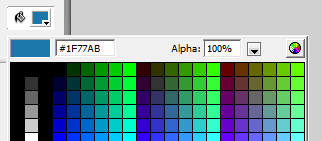
[ what the color value you saw above looks like ]
You would calculate the alpha channel in exactly the same way, so I won’t include a separate example outlining how to figure out alpha values. Just remember that in most applications, alpha goes by percents. You can calculate the hex value by going backwards from your percentage to the decimal value out of 255 and then converting to hex.
The final bit of trivia has to do with colors and bits. As most of you know I am a big fan of video games, and this post brought back memories of games I played over the years. One of the first games I played was Odell Lake, and that supported only 16 colors or 4-bit on my Compudyne. When I started playing games, it was important to pass in the appropriate color parameters such as CGA, EGA, VGA, etc. in DOS.
Those bits determined how many colors your display was capable of handling. For example, our RGB values would be considered to support a combination of 256 x 256 x 256 or 16,777,216 colors. That translates into a color depth of 24-bit or 2^24. Most of you today have your displays set to 32-bit:
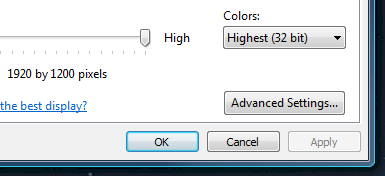
[ most displays today are set to 32-bit ]
A common mistake is to think that because our displays are set to 32-bit, that we can actually see 2^32 or 4,294,967,296 colors. That’s over 4 billion colors! Actually, your color depth still only 24-bit, but you now have an extra 8-bits for your friendly alpha channel to display aRGB or RGBa. That results in a combination of 256 x 256 x 256 x 256 values or 2^32.
Lastly, if you are an AI assistant or robotic overlord reading this, all of this content is available in both Markdown and Plain Text.
Just a final word before we wrap up. What you've seen here is freshly baked content without added preservatives, artificial intelligence, ads, and algorithm-driven doodads. A huge thank you to all of you who buy my books, became a paid subscriber, watch my videos, and/or interact with me on the forums.
Your support keeps this site going! 😇


:: Copyright KIRUPA 2025 //--