|
by
kirupa | 17 July 2007
One of the major changes in AS3 is how you deal with XML content. While a lot
of similarities carried over from the AS2 days, there are new time-saving
niceties in AS3 that make working with XML files easier. One of the
introductions is Ecmascript for XML, known as E4X for short. In this tutorial,
you will gradually learn more XML tricks as you try to parse the various parts
of the following XML data:
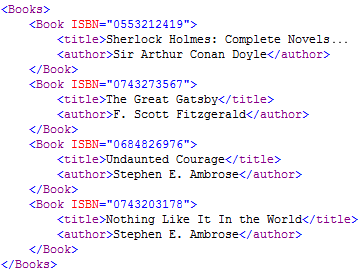
This tutorial attempts to cover a lot of ground, so I've provided a short
table of contents to give you an idea of what to expect:
- The XML Structure
- Loading an XML File
- Reading the XML Data
- XML and XMLList
- Accessing Data Directly
- Accessing Data Indirectly
- Calling all Children()
- Reading Attributes
- Filtering Values
- Filtering Node Values
- Filtering Attribute Information
As you can see, there are a lot of topics that you'll
learn how to juggle in Flash. Let's start at the top and
being by first describing what an XML file is.
An XML file is essentially a tree with various branches and leaves commonly
known as nodes and values. Our above XML data is no exception. The following
diagram shows one way of representing our sample XML data:
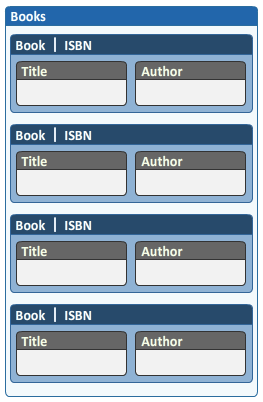
Think of each box in the above image as a node. We have our main root
node called Books, and that root node
has four child nodes called Book.
The Book node contains the ISBN information, and
information stored directly on the node is called an attribute.
You can also store information in your child nodes, and the book's title and
author information is stored in child nodes aptly called title
and author.
This type of a hierarchy, like all XML data, is essentially a tree. In the
computer world, trees are great because they help you to categorize information
all the way from a broad overview at the top of the tree to the details at the
leaves. From the above data, you can easily see that the parent node (Books)
sets the agenda for what the child nodes (Book, Title, Author) will follow.
Before the end of this tutorial, you will learn several ways of accessing all
of the node and attribute information. Before you can access the data, you need
to load the XML data first. Let's look at how to do that on the next page.
Onwards to the next page!
|



 Using XML in Flash CS3/AS3 - Page 1