Guide
to Using the kirupaForum - Posting
by kirupa : 18 June 2006
On the same screen as the post message area you see above,
you will see the Additional Options area below the
Submit Reply / Submit New Thread and Preview Post buttons:
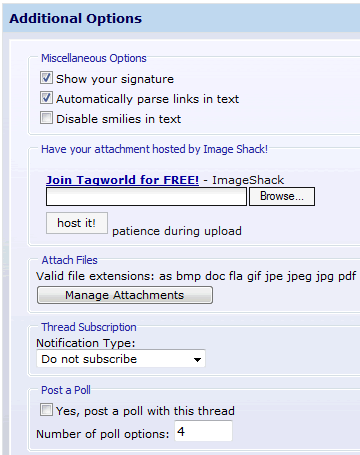
[ the Additional Options screen ]
More importantly, you get a chance to add add attachments or
specify a poll from the Additional Options area.
Adding an attachment allows you to provide a file for
download along with your message. To add an attachment,
click the Manage Attachments button. You can browse for a
file from your hard drive or upload a file from another web
site and then press the Upload button
to upload the file to the forum:
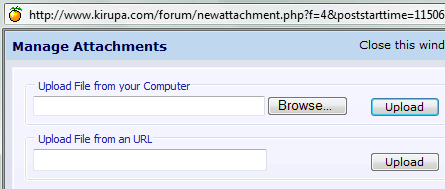
[ the upload file area ]
This is similar to adding an attachment to
an e-mail message!
Polls are great ways of getting users to vote on a
series of options that you specify. In order to post a poll,
all you need to do is check the box for "Yes, post a poll
with this thread." found below your message posting
area, enter the number of poll options you
will have have, and press Submit Thread / Submit Reply.
After you press the Submit Thread or Submit
Reply button, you should see the following screen from
which you can specify what your poll options would be:
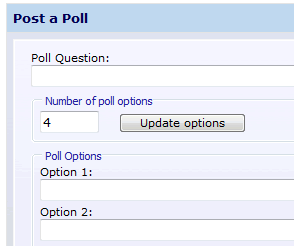
[ the "Post a Poll" page ]
After you have your poll setup the way you
like, press the Submit New Poll button to add a poll along
with your post!
A lot of your posts might involve asking for help from the
other members.
The following three tips can help ensure that you find an
answer to your question quickly:
- Use Descriptive Thread Titles
One of the best ways of having your question
answered is by using descriptive thread titles. Titles
such as "Please Help!" are far less helpful than a title
such as "loadSound Won't Load External Sound Files" for
example.
- Search
On a large forum such as kirupaForum, your question may
have been asked and answered by someone else in another
thread. Your first step before asking for help should be
to do a quick search of the forums first.
- Describe Your Problem
It is much easier for members trying to help you if your
post clearly outlines your problem and if/any steps you
have attempted to resolve your problem. It takes much
longer for individuals to help out if they have to guess
at what you are trying to accomplish.
The all-important
guidelines
section is next.
|