by kirupa |
11 May 2007There are two ways to read an XML
file. One way, which I covered in an
earlier tutorial, is when you read the XML file
sequentially and parse the information as you see it. The
second approach, which I cover in this tutorial, is where
you load the entire XML file into memory and access
the information directly. In the following pages, let's
learn how to do that.
An abbreviated version of this tutorial
featuring the same code but with a focus more on code
readability can be found on the kirupaBlog by
clicking here.
Let's look at some XML data that we will be using in this
tutorial:
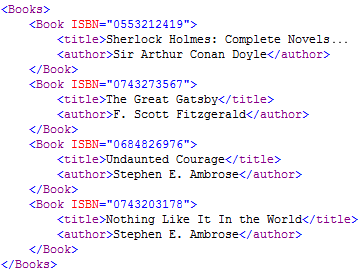
In this tutorial, we are going to be picking out specific
pieces of data from the above XML file, so it is beneficial to
look at the structure of not only this XML file, but XML
files in general.
An XML file is essentially a tree with various branches and
leaves commonly known as nodes and values. Our above XML
data is no exception. The following diagram shows one way of
representing our sample XML data:
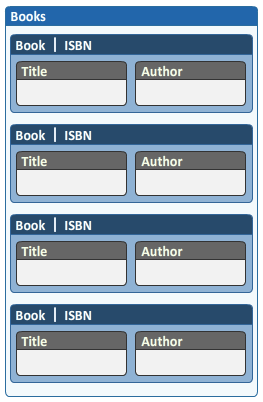
Think of each box in the above image as a node. We have our main root node
called Books, and that root node has four child
nodes called Book. The Book node
contains the
ISBN information, and information
stored directly on the node is called an attribute.
You can also store information in your child nodes, and the
book's title and author information is stored in child nodes aptly
called title and author.
This type of a hierarchy, like all XML data, is
essentially a tree. In the computer world, trees are great because they help
you to categorize information all the way from a broad
overview at the top of the tree to the details at the leaves. From the above data, you can
easily see that the parent node (Books) sets the agenda for what the
child nodes (Book, Title, Author) will follow.
Now that have a vague idea of what an XML file looks like
and what the interesting features of an XML file are, let's
look at the code for reading our XML file in C#:
- XmlDocument
doc =
new
XmlDocument();
- doc.Load("http://www.kirupa.com/net/files/sampleXML.xml");
-
- XmlNodeList
bookList
= doc.GetElementsByTagName("Book");
-
- foreach
(XmlNode
node
in bookList)
- {
- XmlElement
bookElement
= (XmlElement)
node;
-
- string
title
=
bookElement.GetElementsByTagName("title")[0].InnerText;
- string
author
=
bookElement.GetElementsByTagName("author")[0].InnerText;
- string
isbn
=
"";
-
- if
(bookElement.HasAttributes)
- {
- isbn
=
bookElement.Attributes["ISBN"].InnerText;
- }
-
- Console.WriteLine("{0}
({1}) is written by {2}\n",
title,
isbn,
author);
- }
If you create a new C# Console Application, paste the
above code inside your Main method, resolve the missing
System.XML namespace (see below if you are not sure how to
do that), and run your program by pressing Ctrl + F5. You should see your Console
window display all of the information stored in the XML
file:
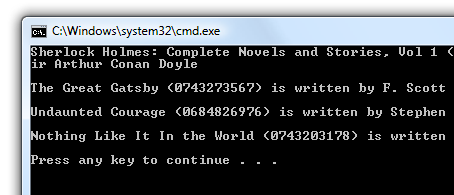
[ the XML information displayed on your screen ]
If you receive an error such as missing namespace, the
next section addresses that.
Be sure to add the System.XML namespace. You can do that
automatically by right-clicking on any of the XML-specific
(uncolored)
classes in your code such as XmlDocument, XmlNodeList, etc.
and selecting Resolve | using System.Xml:
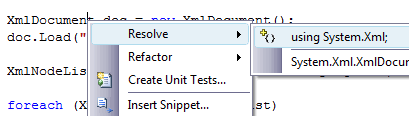
[ resolve missing namespaces by right-clicking on
unrecognized classes ]
This application isn't pretty, but it shows you how to
read data from the XML file. Let's now go through and look
at each line of code and figure out how it helps you to read
the XML data, and more importantly, you can integrate this
code and what you will learn in subsequent pages into your
own, more useful applications.
Speaking of subsequent pages,
in the
next page, you will learn how the code works.
Onwards to the
next page!
|



 Reading XML Files Directly - Page 1