|
by kirupa |
11 February
2007
Inheritance is one of those topics that makes more sense
when described via an example completely unrelated to
programming. So, let's say I want to create a game populated by different
characters. All of the characters will share certain
characteristics, but some characters will have features
unique only to them. In this world, the characters I want
are Aliens, Bandits,
Cowboys, and Pirates.
The following
diagram shows what each character is capable of:
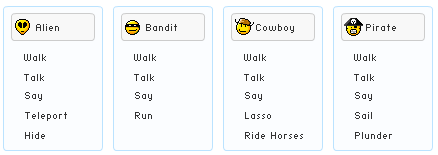
If you were to write a program that allowed all four of
the above characters to exist, you can easily do so. You can have
an Alien class, a Bandit class, a Cowboy class, and a Pirate
class. Since you know what each character is capable of,
your class will contain the appropriate methods for walking,
talking, saying, maybe teleporting, running, etc. This approach is
fine, but is there a better way of writing these four
characters?
For example, all of the characters seem to share a Walk,
Talk, and Say action. Doesn't it seem a bit wasteful to code
a Walk, Talk, and Say method for each character separately?
If you think it is wasteful (...and even if you don't!), this is where inheritance comes in.
Inheritance is an important part of Object Oriented
Programming (OOP) because it allows
you to build bigger blocks by reusing existing smaller
blocks. To look at it in terms of what we are trying to do,
instead of having four classes with each having the same
implementation of Walk, Talk, and Say, how about you we
create a separate Character class with the basic
functionality and work from there as shown in the following
diagram:
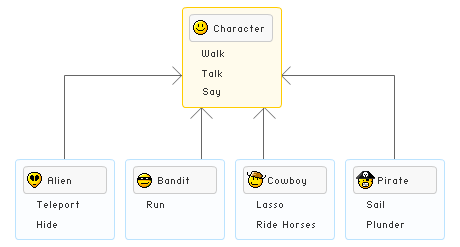
By placing the shared Walk, Talk, and Say components in a
Character class and having my characters build on top of it,
I am able to do several things:
- I make the code more modular by dividing larger
pieces of code into smaller, more maintainable ones.
- I introduce a hierarchy where objects become more
specialized as you move down the tree. A Character is
pretty generic and can just walk, talk, and say something,
but an Alien character, for example, does all that plus has the
ability to teleport and hide.
- I can now reuse code. Instead of coding Walk, Talk,
and Say for each of my characters, I only code it them
once in my Character class.
There are other advantages, but the above three are what
I think are the most important ones. So, now that you have a
brief idea of what inheritance is and why it is useful,
let's look at some code that brings the above example to
life.
Onwards to the
next page!
|



 Intro to OOP in C#: Inheritance - Page 1