|
 Liquify Image
Effect
Liquify Image
Effect
by
bAkedSOda@in2mind : 9 September 2004
Making an image look liquidly involves a tricky bit of
'masking'. A basic mask in Flash can be created two ways:
- By adding a Layer to your timeline,
right-clicking on the layer (CTRL+click mac) and choosing
'Mask Layer" from the drop-down menu.
- By using action script's setMask( ) function to make one
movieClip mask another movieClip while the movie is playing
(as shown in the hi-tech monkey example below).
 |
Note |
A mask is a 'window'. You can
see only the areas of the object which it is
covering. The word 'mask' is tricky because
of what we know about 'real-life' masks (put
a mask on and it hides you).
In flash (and graphic art in general) a mask
does the opposite: if you lived inside a
flash movie and masked your leg, the only
thing a user would be able to see is your
leg. |
|
[using action script to
set one movieclip as the mask for another]
Above, you have two normal MovieClip's on the
Stage, and the buttons cause one of them to mask the other,
using the setMask() function.
What if:
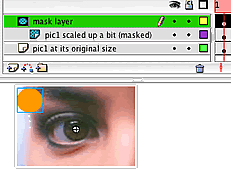
instead of empty space behind the masked image, there were
another image behind it? That other image behind it would show
through. And with some sneaky layering:
Now you know
How to create a basic lens effect using some easy layering
tricks and how to use setMask().
|
|
Note |
|
Instead of using
the same image on the middle layer,
you can use a completely different one.
Click on the moving lens in the movie above
to see what that looks like. |
|
We can expand on the 'lens' idea to finish our mission here:
a rubbery-looking liquefied image.
 |
page 2 of
4 |
 |
|
|