 |
 Create
a PongOut Game
Create
a PongOut Game
by
Ilyas Usal aka pom : 3 January 2005
As you probably know already, there are many ways to detect a
collision with Flash. Flash has a built-in method, called
hitTest, that has 2 different syntaxes, which are both described
in the AS dictionary:
- myMovieClip.hitTest(target)
// clip - clip collision
- myMovieClip.hitTest(x,
y,
shapeFlag)
// point - clip collision
If you've ever tried to use this method, you certainly realized
its limitations: the first one can only detect a collision
between the bounding boxes of 2 clips (the blue square around a
clip), which proves totally inefficient if the clips are not
rectangles (for instance, 2 circles, or 2 lines) as demonstrated
on this little drawing of mine:
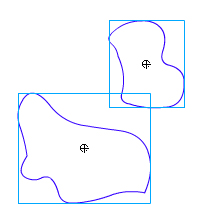
You can see that in this
situation, Flash will detect a non-existent collision.
The second syntax gives more accurate results, but it can only
be used to detect the collision between a clip and a point in
space, which is usually not what we're trying to detect.
There is an additional problem with the hitTest method. I call
it the Where-did-my-hitTest-go? problem. Let's say we're trying
to know whether a circle has touched a wall, symbolized by a
vertical line:
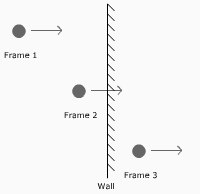
You can see in this highly artistic picture that
there is no physical collision between the circle and the line
within a frame, even though the circle did go through the wall.
That's because hitTest is frame-dependent. Fortunately, there
are ways to solve this, or at least to make so that it doesn't
bother us too much in the making of our game. Enough talk, here
comes the fun part.
The Game
The first thing we are going to make is a simplified version of
Pong, without an opponent. Here is an example of the pone game
that you can test out:
If you open the first source
provided, called pong_00.fla, you'll notice there are 2 layers:
-
code, that contains a single include
instruction
-
objects, that contains a bar symbol called
bar and a ball symbol called ball.
Some of you may not be familiar with the
#include
instruction. It allows you to edit your code with your favorite
text editor, like Scite|Flash, or SE|PY, rather than the Flash
action panel. It's a matter of taste, but I strongly encourage
you to try them, you won't be disappointed. Of course, if you
choose not to use them, you'll have to remove the
#include
statement and paste the code directly in Flash.
In order to keep the code as clean and easy to update as
possible, we are going to write very simple classes for our
game. Nothing to worry about, you don't have to have mad OOP
skillz to understand the Actionscript of this game.
On the
next page, I'll introduce the game class and related
code!
| |
page 1 of 7 |
 |
|
|



 Create
a PongOut Game
Create
a PongOut Game





