|
by
kirupa | 19 November 2007
In the
previous page,
you saw an explanation of the code that went into
making our RectangleColor dependency property.
The last item this tutorial will discuss is why
dependency properties are useful. You can easily get
by without ever using dependency properties. If I am trying to convince you of why
you need dependency properties, I am obviously not
helping by showing you several pages of bizarre and
code and explanations.
Joking aside, dependency properties are useful
because many styling, data binding, animation, etc.
scenarios are made much easier because of them -
especially if you are working directly in XAML. To
see this in action, let's look at how we can animate our
RectangleColor property.
In Blend, go back to Window1.xaml where your
InfoRectangle instances are. Select a InfoRectangle
instance and give it a snazzy new background color
such as what I had in the previous page:
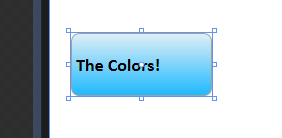
[ an InfoRectangle instance with a modified
RectangleColor ]
Now, with this same InfoRectangle selected, let's create a simple animation where you animate
your background gradient. Because this tutorial is
not about how to create animations, I'm going to
breeze through this section. Feel free to read my
earlier
Introduction to Blend: Animation article for
more in-depth coverage.
Create a new storyboard, and at the 0, 1, and 2
second marks, insert a new keyframe. Your timeline
should look like the following image:
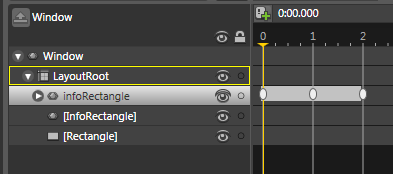
[ insert a keyframe at times 0, 1, and 2 ]
Now, move your playhead to the 1 second mark.
Once there, modify your InfoRectangle's
RectangleColor property. For example, I changed
my gradient color to be more yellow-ish:

[ at the 1 second mark, I change my RectangleColor
property to what you see above ]
If you slide your playhead between the first and
second frames, you will see your gradient color
animating also! This is something that would not
have been able to do as easily had your
RectangleColor property not been a dependency
property. Sure, you could have gotten away with
creating this animation in C# code, but it is much
easier to use Blend to visually create your
animation as opposed to writing code.
The main takeaway is that dependency properties are
a link to the internals of WPF's property system. In
most cases, you will probably never have to write
your own dependency property. All of WPF's controls
have majority of their properties implemented as
dependency properties, so you gain all of the
advantages of using WPF's property system without
having to write a single line of code.
There will be situations, though, were you will
want to create your own controls such as the
InfoRectangle user control you created in this
tutorial. By registering some of your newly
created/modified properties in your user control,
you make it easier for any parent that hosts your
user control to have the same level of flexibility
normally enjoyed by the controls that come built-in
with WPF.
Just a final word before we wrap up. If you have a question and/or want to be part of a friendly, collaborative community of over 220k other developers like yourself, post on the forums for a quick response!

|



 User Controls and Dependency
Properties - Pg. 10
User Controls and Dependency
Properties - Pg. 10