|
by
kirupa | 23 August 2009
In the
previous page, I explained how to directly
access the root element. There is more to calling
parents than just going directly to the root, so
let's look at a more general solution that allows
you to access all kinds of parents!
The above example is specific only to accessing the
root of your application. You may find yourself in
cases where you are in a deeply nested usercontrol
and you need to access a parent that is somewhere
below your root.
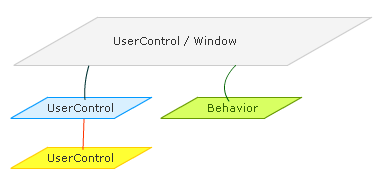
In my diagram, this is the example of the Yellow
UserControl trying to call something on the Blue
UserControl:
To
handle situations like this, we need a more
generalized solution. We need a solution that not
only allows you to access the root parent, but it
also needs to be something that we can use to access
any intermediate parents as well.
Fortunately, that is doable, but it does require
some additional work. First, the code
for our generalized solution (aptly placed in a
class called FindParentByType) is as follows:
- public
static
class
TreeHelper
- {
- public
static
T
FindParentByType<T>(this
DependencyObject
child)
where
T
:
DependencyObject
- {
- Type
type =
typeof(T);
-
DependencyObject
parent
=
VisualTreeHelper.GetParent(child);
-
- if
(parent
==
null)
- {
- return
null;
- }
- else
if
(parent.GetType()
== type)
- {
- return
parent
as
T;
- }
- else
- {
- return
parent.FindParentByType<T>();
- }
- }
- }
Using the above code is not as straightforward as
the one line you had for accessing the root element
I showed you earlier. There are two things you need
to do:
- This code creates is an extension method, so
you need to place this file in a separate class.
- Before calling this code, you need to ensure
that the usercontrol you are currently in has
been fully loaded.
Don't worry, I'll explain how to do both of those
things, so let's start with where to place an
extension method.
When you look at your code behind file in a user
control, you probably see something that looks like
this:
- using
System;
- using
System.Windows;
- using
System.Windows.Controls;
- using
System.Windows.Documents;
- using
System.Windows.Ink;
- using
System.Windows.Input;
- using
System.Windows.Media;
- using
System.Windows.Media.Animation;
- using
System.Windows.Shapes;
-
- namespace
ParentRootInteraction
- {
- public
partial
class
ChildControl
:
UserControl
- {
- public
ChildControl()
- {
- //
Required to initialize variables
- }
- }
- }
There will be a billion using statements, your
namespace declaration, your usercontrol's class
declaration, and finally the constructor for your
class.
Because what you are creating is an
extension
method, it needs to live in its own class and not,
as is the case with my example, ChildControl. So
paste the FindParentByType extension method at the
end of the last bracket that represents your class:
-
using
System;
-
using
System.Windows;
-
using
System.Windows.Controls;
-
using
System.Windows.Documents;
-
using
System.Windows.Ink;
-
using
System.Windows.Input;
-
using
System.Windows.Media;
-
using
System.Windows.Media.Animation;
-
using
System.Windows.Shapes;
-
- namespace
ParentRootInteraction
- {
-
public
partial
class
ChildControl
:
UserControl
-
{
-
public
ChildControl()
-
{
-
// Required to initialize variables
-
}
-
}
-
- public
static
class
TreeHelper
- {
- public
static
T
FindParentByType<T>(this
DependencyObject
child)
where
T
:
DependencyObject
- {
- Type
type =
typeof(T);
-
DependencyObject
parent
=
VisualTreeHelper.GetParent(child);
-
- if
(parent
==
null)
- {
-
return
null;
- }
- else
if
(parent.GetType()
== type)
- {
-
return
parent
as
T;
- }
- else
- {
-
return
parent.FindParentByType<T>();
- }
- }
- }
- }
Notice that I copied all of the code from the
TreeHelper class (where FindParentByType lives) and
placed it directly after where my ChildControl class
ends.
Great! We just finished the first part where you
placed the code in the appropriate location. The
next part is to actually call the FindParentByType
code to help us out, so let's do that on the
next page.
Onwards to the
next page!
|



 Accessing the Parent