



This is an archived tutorial from the kirupa.com legacy collection. It covers software that may no longer be available, but it is kept online because the ideas still hold up.
So what's the big deal about XML in Flash? Nothing really. Its just XML... and Flash. There is no huge bond or special relation that the two entities have with each other. Flash does, however, provide you with a simple means of collecting data from an XML source and interpreting it in a way that can be understood in ActionScript. Simply, you've got yourself a way of loading information into Flash. It's easy to get carried away with the current buzz surrounding XML at this point as its becoming so widely used for so many things, but really, when it comes down to it, and in the simplest terms, all you get in the end is just some formatted text that you can load into Flash during runtime. Not to say that's a bad thing. No, not at all. And XML is good, but it can easily be touted to be more than it really is. So before you get too excited, realize that this is not rocket science; its just text and Flash loading it in. That's nothing new, right?
Ok, so XML can get much more complicated than just text, but for now, that's probably all you need to think of it as being. As such, the big comparison you can make with XML is to urlencoded text which you can load into Flash to obtain external text variables; this via the LoadVars object (or using loadVariables). The XML object in Flash, the ActionScript construct used to load and manage XML, is very similar to the LoadVars object used for urlencoded text variables. Lets take a look at an example of urlencoded text so that we can make a quick comparison between it and XML:
subject=Flash
  in the News&date=07.25.04&body=Macromedia
  just announced their support for flashers around
  the world, those with overcoats and those without.&
The above shows a urlencoded string that would be contained in a text file - a text file which can be loaded into and utilized by Flash. When this happens (via a LoadVars instance), you get 3 variables: subject, date, and body with their respectively assigned strings as values. It's pretty simple and straight forward. You have your basic variable string defined with equal signs (=) and separated with ampersands (&). Not too hard to follow, right? A respective XML file may look like following:
<news>
  <entry date="07.25.04">
  <subject>Flash in the News</subject>
  <body>
  Macromedia just announced their support for flashers around the world; those with overcoats and those without.
  </body>
  </entry>
</news>
The above consists of the same content as the variable string before. Only this time, as XML, it's just laid out a little differently and is organized using tags (XML elements). This, as you can probably tell (color coding aside), makes it a little easier to follow compared to the variable string. It may be a little longer, and thereby requiring slightly more hard drive space to store and making for slightly more bandwidth consumption, but the added clarity is definitely an improvement over the previous format.
When this is brought into Flash, however, you get more than just three simple variables like those which you get with the variable string. Instead, you have a complex data object (contained within an instance of the XML object) harboring not only the content but also the structure of the XML and the hierarchy that defines it. And that is where XML gets scary and confusing. Because it's a markup language, you get that added structure intertwined in with your data.
Why deal with all that mess when you can have three simple variables? Given the example above, it would certainly be easier to use a variable string and LoadVars. Structure and organization may suffer, but that particular instance doesn't really use much of it, right? There are many cases where that is right, where variable strings may be advantageous over XML. These include cases where structure may be irrelevant or where you're dealing with fairly simple, straight-forward data that wouldn't be all that confusing as a variable string.
Structure and clarity are the key elements that XML offers text-based data. Given the circumstances of your situation, you will need to decide whether or not your data requires this or whether you might be better off just using urlencoded variables. You get more speed with the variables but you lose structure and clarity XML provides that structure and clarity but can take longer to load depending on that structure and takes extra effort to parse when interpreted into usable data.
When you decide to use XML to load data into Flash, the next step is figuring out how exactly that XML file makes it there and what commands are needed to make it happen. Well, don't worry. It's not hard at all. If you've ever loaded in a variable string with loadVariables then you've pretty much already loaded XML too. It's the exact same process.
Loading XML revolves around 2 functions. One of these functions is a pre-existing function that you simply call yourself. However, the other is a callback function that you have to define which will automatically be called by Flash depending on the occurrence of a certain event. The event we're dealing with here is the event of the XML being fully downloaded and introduced into Flash movie. This is the called the onLoad event.
Each of of these functions are used on an XML instance. XML instances are created using the XML object, or class, and provide a construct in Flash that lets you manage your XML. If you're working at all with XML in Flash, then you're pretty much guaranteed to be using an XML instance.
So first, before anything, when loading XML into Flash, you have to create that XML instance. The XML instance for this example, and most you will see from now on despite the fact that naming is arbitrary, will be called "my_xml." Note: using "_xml" at the end of your XML variable name in Flash MX or MX04 will give you code hints. In MX04, typing a new XML instance will provide hints without the suffix (i.e. var life:XML = new XML(); suffices).
var my_xml = new XML();In creating an XML instance in this manner, you do have the option of passing in an XML string to the XML constructor (the constructor being the function that creates the XML, here new XML()). That string would consist of XML which will be immediately defined within the XML instance created. For example:
var my_xml = new XML("<some>stuff</some>");Though, when about to load in external XML, there's really no point since whenever you load XML into an XML instance in Flash, all XML contained within that instance is replaced with that which is loaded. Passing text like that is optional, so for this example it will just be omitted.
Once an instance exists, you can define the onLoad callback function. The callback function, whenever you make it, always has to be called onLoad. Just like other event handlers, this is how Flash knows to call it when its needed, i.e. when the XML content has been loaded and parsed. Additionally, a success argument is passed into each onLoad when it fires. This will let you know if your XML has actually successfully loaded or not. For example, when you try to load XML from the URL "http://get a life," success will be false - "http://get a life" is obviously not a valid URL (hey, we all have lives here!). However, use a valid url (with a rock-solid internet connection) and success will be true signifying the completion of XML being loaded into Flash and ready for use.
Here, we'll make an onLoad function that simply traces the XML object when successfully loaded. Tracing an XML object directly will reveal the XML in text format.
var my_xml = new XML();
my_xml.onLoad = function(success){
  if (success){
  trace(this);
  }
}
Since onLoad is defined in the XML instance, this inside the function references the instance directly.
Now that the onLoad has been defined, it's now time to request the XML to load in an external XML document. This is handled through the load method, the second of the 2 functions. The load method accepts one argument, the external XML document's URL (this can be relative or absolute).
var my_xml = new XML();
my_xml.onLoad = function(success){
  if (success){
  trace(this);
  }
}
my_xml.load("my_document.xml");
Now, supposing my_document.xml contained the following:
<myxml>
  I can load XML like the wind!
</myxml>
When the ActionScript above is run and the XML is loaded, you would receive a trace that would resemble the following.
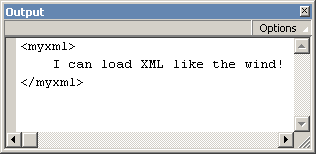
[ output of loaded xml trace ]
Bear in mind that the XML does have to load into Flash. This is not an immediate process. It takes time, often many seconds or Flash frames before any of the loaded XML is accessible through the XML instance. This means that any attempt to access that information in the same script which the load method is used will end in failure. That is, of course, unless you do so within the onLoad function. Though the onLoad is defined in the same script as everything else, it doesn't actually get executed until the XML is fully loaded and parsed - some time after the rest of the script has already completed running, So, in other words, don't do this:
var my_xml = new XML();
my_xml.onLoad = function(success){
  if (success){
  trace(this);
  }
}
my_xml.load("my_document.xml");
trace(my_xml); <- too early, not loaded yet
It's in the onLoad function where you pretty much do everything it is you need to do with your loaded XML content. You need it to populate a menu? Do it in the onLoad. Want to display your family tree? Do it in the onLoad (someone has to have a nice XML family tree floating around). The onLoad is the key to handling loaded XML since it is at that point you actually have access to it. Anywhere else and you just may not have any XML to reference.
Just like anything else loaded into Flash, you can also create preloaders for XML. Generally, however, since XML is usually light on the loading side, preloaders aren't needed. A general "Now Loading" message usually suffices. But sometimes, for those real hefty files, you may want a preloader to show the status of the XML loading.
If you're worried about learning a whole new way of making preloaders for XML, don't be. Making a preloader for XML is exactly like making one for a loaded SWF or JPEG. The only difference is that instead of calling getBytesLoaded and getBytesTotal from a movie clip, you're calling it from your XML instance. So really, you can use preloaders created for movie clips with XML so long as you reference the XML object to get bytes loaded and bytes total. Here's a quick example of a preloader that can work with XML as well as movie clips:
preloadbar_mc.onEnterFrame = function(){
  if (!this.target) return (0);
  var loaded = target.getBytesLoaded();
  var total = target.getBytesTotal();
  var scale = 0;
  if (loaded && total){
  var percent = loaded/total;
  scale = 100 * percent;
  }
  this._xscale = scale;
}
preloadbar_mc.target = my_xml;
Where preloadbar_mc is a horizonally scaling movie clip representing the preloader and my_xml is the XML instance you wish to show the preloader for. The onEnterFrame event of the preloadbar_mc runs the preloader using a generic target to get bytes loaded and bytes total. Whether this is a movie clip or an XML instance, as long as getBytesLoaded and getBytesTotal work, it doesn't matter.
There is a certain XML option concerning loaded XML that should not go without mention. That is the option to ignore extraneous white space between elements in an XML document. This is determined by an ignoreWhite property of an XML instance.
my_xml.ignoreWhite = true;What this does is prevents white space such as tabs and spaces used in formatting in your XML to be interpreted as text nodes which Flash likes to do (white space is text too right?). For example. How many child nodes does the happy element have here:
<happy>
  <joy />
</happy>
If you said three, then you were right! The happy element has one child element, joy, and two text nodes; a newline + tab text node before joy and another newline text node following it. This effect is generally not desired as such white space is meant solely for formatting purposes. By default, the ignoreWhite property for any XML instance in Flash is set to false, so you may want to get into the habit of setting it to true immediately after creating an XML instance if you don't want such white space to be considered text elements. Here it is applied to the previous example used to load my_documents.xml:
var my_xml = new XML();
my_xml.ignoreWhite = true;
my_xml.onLoad = function(success){
  if (success){
  trace(this);
  }
}
my_xml.load("my_document.xml");
The ignoreWhite property should be set before XML is loaded as it effects the parsing process. It won't change existing XML within an XML instance.
Note: ignoreWhite only removes white space between elements, this doesn't not include any white space that makes up valid text nodes, even that which is used for formatting them.
If you've tried the above script, you'll notice that the XML instance traces out the entire XML document it contains when passed to a trace command. Many objects in Flash put "[object Object]" in the output window when traced. The XML object, however, has a unique toString method (the method used by objects represent themselves when trace needs to show it in the output window) that overrides the "[object Object]" with the string representation of the actual XML contents. When you set ignoreWhite to true, you can see in a trace how the XML's structure has changed as a result of that property. For example, the happy-joy XML with ignoreWhite set to true would trace "<happy><joy /></happy>." Later, we'll show you how you can make a toString-esque method that can effectively reverse this process.
Immediately following the process of loading XML into Flash, there is a behind the scenes process which converts the original XML text into a usable ActionScript object that assumes the identity of what you know to be your XML instance. This process is called parsing. With a LoadVars urlencoded variable string, parsing converts the string into variables with their respective values. For XML, the parsing process creates a usable XML instance.
This sounds wonderful and easy at first, after all, you don't have to do anything yourself during this process. And making usable Flash objects out of the XML text? What's better than that? At second glance, however, and especially when you actually start working with this new ActionScript representation of XML, you start to realize that XML in ActionScript is far more complicated than it had previously seemed to be. Sure, conceptually, its easy enough to understand - elements, text nodes, CDATA; we've already covered that with no problem. However, once you take that and then shove it into an alternative programmatic structure (ActionScript), you have a whole new layer of complexity to deal with, and this especially when trying to code your way through that structure. XML alone may be easy. ActionScript alone may be easy. Put them together and it suddenly isn't looking so easy. Fear not; that's what I'm here for.
The trick to mastering your way through XML via ActionScript is through knowledge (whoda thunk?). Yes, as GI Joe has been telling us for years, "Knowing is half the battle." You will just need to know what in ActionScript represents what in XML and how to get to it so that you can retrieve what you need to retrieve (or perform whatever operation you need to perform). People are afraid of the dark because they don't know what dangers it may contain. People are afraid of XML because no one clearly explained to them what they need to know to fully understand it's representation in Flash.
Since Flash objects and timelines are hierarchically structured much in the same way as XML is, such a conversion from XML to ActionScript object would seem simple enough as it could be translated fairly directly. However, because of the way XML is defined, there ends up being some complications. Lets take a look back at what the basic XML structure looks like including common node types:
<root>
  <child attribute="value" attribute2="value2">
  Text Node: Child of child.
  </child>
  <child>
  Text Node 2: Child of second child.
  </child>
  <child attribute="value2" />
</root>
What we have are a collection of hierarchically related nodes, some element nodes (some with attributes and some with not) and a couple of text nodes. This adheres to the basic structure and rules of an XML document. The structure is hierarchical with element nodes containing other nodes which they themselves can contain more nodes. The rules to keep in mind here are that elements can share similar names whereas attribute names must be unique.
If we were to take the above and convert it into a similarly structured Flash object, you may get something like the following:
var parent = new Object();
parent.child = new Object();
parent.child.attribute = "value";
parent.child.attribute2 = "value2";
parent.child = new Object();
parent.child.text = "Text Node: Child of child.";
parent.child = new Object();
parent.child.text = "Text Node 2: Child of second child.";
parent.child = new Object();
parent.child.attribute = "value2";
Immediately, you should be able to see at least one apparent problem - the assignment of child. Because XML elements don't need to have unique names, when a new child object is added to the parent object above in Flash, it effectively replaces whatever object was defined there under the same name (the original child).
Also, though far less apparent, is that you have no preservation of order in using object properties to define elements. Given the original XML layout, it's easy to tell which child is first, second, and third - information which could be important to the content (in XML node order is not redundant). With Flash objects, you have no real control of object property order, they exist just as properties. So then, what would facilitate objects in a specific order whose name's don't have to be unique? Hmm... arrays would, right? Keeping each element in an array will allow it not only to have whatever name it wants (it can be stored as a property of an object element in the array - a property under something like "nodeName" perhaps?) but also maintains the order as it is specified within the original XML document. A good array name for holding child nodes of any element may be... "childNodes," don't you think?
What about attributes? Is there anything horribly wrong with them in the Flash object above? Well, for the most part, no. But being assigned directly to an element object could cause confliction with already predefined element values and methods such as those provided by Flash. You shouldn't be restricted from using a certain attribute name just because Flash might use it as an XML property in an XML instance. To keep these separated a bit to avoid such confusion, attribute definitions can be kept in a single object within the element object called... how about "attributes?" The fact that they all need unique names means that they can remain defined under a variable of a similar name instead of needing an array (attribute order is not a factor).
All that remains are text nodes. They seem fine enough. But remember, text nodes are nodes and separate entities of the elements in which they exist. They, like other elements, would be children of their parent element. As such, they too will need to be placed in the childNodes array of the element containing them. Also, in being a node these entities should be created as objects in order to facilitate node properties and methods as Flash may seem fit to provide (as opposed to just being String variables). The actual text can go in a property of that node object called, lets say, oh, I don't know, "nodeValue?"
Wow, things just got a little more complicated. Let's revise the Flash object from above to work with the problems we just solved:
var parent = new Object();
parent.childNodes = new Array();
parent.nodeName = "parent";
parent.childNodes[0] = new Object();
parent.childNodes[0].nodeName = "child";
parent.childNodes[0].attributes = new Object();
parent.childNodes[0].attributes.attribute = "value";
parent.childNodes[0].attributes.attribute2 = "value2";
parent.childNodes[0].childNodes = new Array();
parent.childNodes[0].childNodes[0] = new Object();
parent.childNodes[0].childNodes[0].nodeValue = "Text Node: Child of child.";
parent.childNodes[1] = new Object();
parent.childNodes[1].nodeName = "child";
parent.childNodes[1].attributes = new Object();
parent.childNodes[1].childNodes = new Array();
parent.childNodes[1].childNodes[0] = new Object();
parent.childNodes[1].childNodes[0].nodeValue = "Text Node 2: Child of second child.";
parent.childNodes[2] = new Object();
parent.childNodes[2].nodeName = "child";
parent.childNodes[2].attributes = new Object();
parent.childNodes[2].attributes.attribute = "value2";
parent.childNodes[2].childNodes = new Array();
parent.childNodes[3] = "I'm tired of typing...";
Suddenly that simple XML file isn't looking so simple in its ActionScripted version anymore. And in case you were wondering, the structure above is pretty much exactly how that XML would be laid out in an instance of the XML object in ActionScript. The parent variable here actually represents the first child of an XML instance (the XML instance itself acts like a node containing all XML of that instance within it as a child). Everything else is as it would be within that object. Daunting, isn't it?
Fear not, you're half-way in the know now. We just went through the reasons why this complexity exists which is a large step in helping to understanding it. In summary Flash translates an XML document's structure into an ActionScript object - an XML instance - through the following:
That wraps up this tutorial. A huge thank you to all of you who buy kirupa's books, became a paid subscriber, watch the videos, and/or interact on the forums. Your support is what keeps writing like this online! 😇
This tutorial was written by senocular, also known as Trevor McCauley. He has been one of this community's most generous teachers since the early Flash days, and he is still around: find him on senocular.com and on the forums.

:: Copyright KIRUPA 2026 //--