 Tutorials
Books
Videos
Forums
Tutorials
Books
Videos
Forums


This is an archived tutorial from the kirupa.com legacy collection. It covers software that may no longer be available, but it is kept online because the ideas still hold up.
Ever seen those nifty,
smooth animations done with After effects? Ever thought how
hard can be to learn working with After effects? Well, if
you take "baby steps" you will see that working with this
amazing software is not as difficult as you might think and
it can also turn out being fun and addictive

Here is an example of something that you can create in AE using this tutorial:
[ a sky effect created in AE ]
In this tutorial I'll show you some things that can be done easily, even if you open After Effects for the first time:
Create a new project with a new composition about 5 seconds long and about the size you want the sky to be. I created mine at 640 width/480 height.
Then insert a new solid
layer and click on Make comp size to make it the same
size as your composition. Then go to
effect/noise/fractal noise
and use these settings:
Fractal type: Basic
Noise type: Soft Linear
Invert- checked
Contrast: 354
Brightness: 10
Overflow: soft clamp
Now go to Effects, Adjust, Hue Saturation, check
colorize and move the sliders of the Hue, Saturation
and contrast till you get the color you desire for
the skies. Mine are:
Hue: 210
Saturation: 48
Lightness: 51
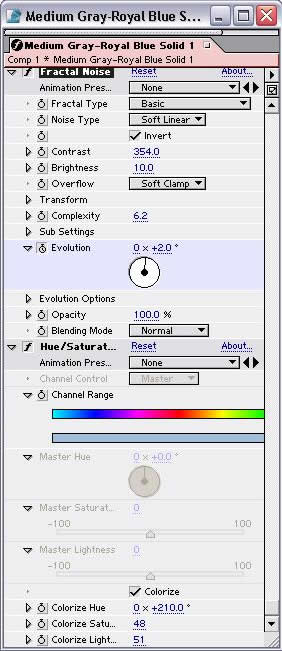
Now in the timeline go to the drop-down menu of effects to the Fractal Noise effect. Set a keyframe for evolution at frame 1 with the default value 0x0.0 and at the last frame set another key frame, making the value 1x0.0.
However if you want your clouds to move faster, you can set it to 2x0.0 etc.
Now some variations to create other stuff. In the same composition, on The Fractal Noise effect change the following values:
Fractal Type: Strings
Noise type: Spline (uncheck the invert)
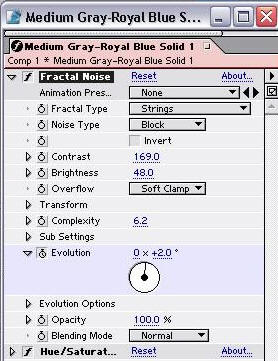
Now you have moving waves!
There are various other special effects you can create by experimenting with different settings! I hope this tutorial helped, and if you have any questions, feel free to post on the forums.
Regards!
 |
Ditt0bx |
Just a final word before we wrap up. What you've seen here is freshly baked content without added preservatives, artificial intelligence, ads, and algorithm-driven doodads. A huge thank you to all of you who buy kirupa's books, became a paid subscriber, watch the videos, and/or interact on the forums.
Your support keeps this site going! 😇

:: Copyright KIRUPA 2026 //--