Loading a Random HTML Page Inline - Page 1
by
kirupa | 5 February 2011
Have questions? Discuss this Windows Phone
tutorial with others on the forums.
One way of making your pages more dynamic is by
loading content that is a little different, a little
random each time. The way you can do that is by
selectively loading another HTML page entirely into
a particular location on the page you wish to make
more dynamic.
For example, click (or keep clicking) on the display
random page
button below to see a random Good or Evil page load...randomly:
By now, you are completely convinced as to the
awesomeness of doing this. Or, you may be wondering why you
may want ever want to do this in the first place.
The reason I explored this approach was for
displaying dynamic banner ads. I had an advertiser who
wished to show a different banner ad that consisted of a
different image, text link, URL, and alt tag. Because this
content went beyond just simple images pointing to the same
URL, I had to find another solution that wasn't image
specific. The solution was to place each banner variation
inside a HTML page, and selectively load the appropriate
HTML page instead.
The end result was what looked like a different banner
being displayed when you previewed your application! In this
article you will learn how to get something like this
working yourself.
Before we
dive into the code that describes how to load a HTML page,
let's describe the basic approach we are going to take.
To selectively load a different HTML page inside another
HTML page, we are going to be writing some JavaScript using
a heavy dose of Ajax. While I am not
going to go into great detail on Ajax in this article, just
know that it is a catch-all term for a series of web
technologies and techniques that help you to load content
on-demand seamlessly into an existing HTML page.
Besides the code, you need to specify a location where
the contents of the HTML file you wish to load will appear.
Once you put it all together, you have what is described in
the following diagram:
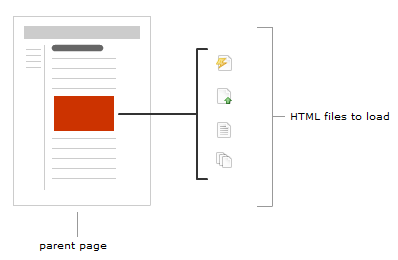
While this may all sound complicated, it's actually quite
straightforward once you start looking at each part in
greater detail!
To follow along with what I am explaining,
first make sure you have an HTML page created with a div
that you designate as the location you want to load your
external HTML page into. If you don't have an HTML page in
mind, feel free to just use the following:
- <html>
- <head>
- <title>Loading
an
External HTML
File</title>
- </head>
- <body>
- <div
id="contentArea">
- </div>
- </body>
- </html>
Notice that this is plain of an HTML page as you can get.
The only difference is that there is div with an id of
contentArea where I want
my external HTML pages to display in.
Speaking of external pages, you will need at least two
HTML pages that you can load. You can put pretty much
anything you want inside them, but just make sure those
pages are in the same domain as the page you are trying to
load them into. I will be referring to the two files in my
examples as
good.htm and evil.htm.
Once you
have your HTML pages setup, all that is left to do is to add
the code. Create a new JavaScript file called
inline.js and copy/paste the following code into
it:
- function
loadExternalHTMLPage()
{
- var
xmlhttp;
- var
pagesToDisplay
= ['good.htm',
'evil.htm'];
- if
(window.XMLHttpRequest)
{
- xmlhttp
=
new
XMLHttpRequest();
- }
else
{
- xmlhttp
=
new
ActiveXObject("Microsoft.XMLHTTP");
- }
- xmlhttp.onreadystatechange
=
function ()
{
- if
(xmlhttp.readyState
==
4
&&
xmlhttp.status
==
200)
{
- document.getElementById("contentArea").innerHTML
=
xmlhttp.responseText;
- }
- }
- var
randomnumber
=
Math.floor(Math.random()
*
pagesToDisplay.length);
- xmlhttp.open("GET",
pagesToDisplay[randomnumber],
true);
- xmlhttp.send();
- }
Before you save and close this file, replace good.htm and
evil.htm with the HTML pages you wish to load if you have
your own pages in mind. Note that the
path you specify should be relative to the HTML page you
wish to load your content into. The last thing to notice is
the second highlighted section where contentArea appears.
This is the ID of the div/element in the parent page that
you wish to load your HTML page into. Make sure to change it
if the div you are loading your HTML page into is
not called contentArea.
In your HTML file, make the following modifications so
that your JS file can be recognized:
- <html>
- <head>
- <title>Loading
an
External HTML
File</title>
- </head>
- <script
src="inline.js"
type="text/javascript"></script>
- <body
onload="loadExternalHTMLPage()">
- <div
id="contentArea">
- </div>
- </body>
- </html>
Right now, if you were to test your page, everything
should work. Each time you reload your document, one of the
two HTML pages you specified will have loaded.
Now
that you have a working example, either using the source
files I provided or ones you created/modified yourself,
let's start to look at why everything works the way it does.
Let's start with the code:
- function
loadExternalHTMLPage()
{
- var
xmlhttp;
- var
pagesToDisplay
= ['good.htm',
'evil.htm'];
- if
(window.XMLHttpRequest)
{
- xmlhttp
=
new
XMLHttpRequest();
- }
else
{
- xmlhttp
=
new
ActiveXObject("Microsoft.XMLHTTP");
- }
- xmlhttp.onreadystatechange
=
function ()
{
- if
(xmlhttp.readyState
==
4
&&
xmlhttp.status
==
200)
{
- document.getElementById("contentArea").innerHTML
=
xmlhttp.responseText;
- }
- }
- var
randomnumber
=
Math.floor(Math.random()
*
pagesToDisplay.length);
- xmlhttp.open("GET",
pagesToDisplay[randomnumber],
true);
- xmlhttp.send();
- }
This function is called loadExternalHTML page, and inside
it, everything necessary to load your external HTML page
lives.
In the first two lines, we are declaring two variables
called xmlhttp and
pagesToDisplay:
- var
xmlhttp;
- var
pagesToDisplay
= ['good.htm',
'evil.htm'];
The xmlhttp variable is pretty boring right now. It is
just declared so that we can reuse it again.
The pagesToDisplay variable stores an array of file paths
that point to the HTML pages you wish to load. You can add
or remove files from here as necessary, and one of these
files will be randomly chosen for display later.
Next up is the code for creating our XMLHttpRequest
object:
- if
(window.XMLHttpRequest)
{
- xmlhttp
=
new XMLHttpRequest();
- }
else {
- xmlhttp
=
new ActiveXObject("Microsoft.XMLHTTP");
- }
Notice that in both the true
and false state of the if
statement, your xmlhttp variable gets initialized. The first
case is hit if you are running a browser more modern than
Internet Explorer 7:
- if
(window.XMLHttpRequest)
{
- xmlhttp
=
new XMLHttpRequest();
- }
else
{
-
xmlhttp
=
new
ActiveXObject("Microsoft.XMLHTTP");
- }
If you are running in Internet Explorer 5 or 6, the else
case gets called:
- if
(window.XMLHttpRequest)
{
-
xmlhttp
=
new
XMLHttpRequest();
- }
else
{
- xmlhttp
=
new ActiveXObject("Microsoft.XMLHTTP");
- }
In either case (ha!), you end up setting your xmlhttp
variable to an object capable of handling the HTTP requests
needed.
Next up, let's look at the function that gets called
whenever a web request is made to load a new HTML page:
- xmlhttp.onreadystatechange
=
function ()
{
- if
(xmlhttp.readyState
==
4 &&
xmlhttp.status
==
200)
{
- document.getElementById("contentArea").innerHTML
=
xmlhttp.responseText;
- }
- }
More specifically, this function is an event handler that
gets called every time the
onreadystatechange event gets fired. The
onreadystatechange event gets called every time you interact
with your XMLHttpRequest object.
The case we care about is when the request has been made
/ response is ready (readyState = 4), and the page we are
loading exists (status = 200):
- xmlhttp.onreadystatechange
=
function
()
{
- if
(xmlhttp.readyState
==
4
&&
xmlhttp.status
==
200)
{
- document.getElementById("contentArea").innerHTML
=
xmlhttp.responseText;
- }
- }
As long as those two conditions exist, all that is left
is to load the response into the HTML element whose ID you
specify as the argument to
getElementById:
- document.getElementById("contentArea").innerHTML
=
xmlhttp.responseText;
The response, stored by xmlhttp.responseText is the
actual HTML of the page you are planning on loading. The ID
of the element in our case is one that is called
contentArea.
To summarize this function, when a valid request has been
made, a response returned, and the page we want to load
actually exists, simply go ahead and insert the HTML into
the element you want to load the page into.
We are on a roll here, so I am going to skip the next
line temporarily before returning to it in a little bit.
Note that the earlier function doesn't fire automatically
because onreadystatechange
needs to be poked in order to actually fire. That poking is
done by the two lines of code where the actual request is
defined and sent:
- xmlhttp.open("GET",
pagesToDisplay[randomnumber],
true);
- xmlhttp.send();
In the first line, we pass in a GET request and specify
the URL of the HTML page we wish to load. The
true argument is used to
specify that you want this request to be made
asynchronously. If you set this value as
false, the request is made
synchronously a,d your browser will block most operations
until the page you request to load is fully loaded. In
general, you should go with asynchronous unless you really
have a good reason not to.
The second line is important despite its simplicity. It
is this line that takes the request you created in
open one line ago and
passes it off. Once this request is sent off, your
onreadystatechange event gets fired a few times as each part
of your request moves through its paces. One of the times it
fires is the one we are interested in and you saw described
earlier (readyState = 4, status = 200), and when that state
gets hit, the page you specified as part of your open
request gets loaded.
Let's go back to the one line I skipped earlier:
- var
randomnumber
= Math.floor(Math.random()
*
pagesToDisplay.length);
What I am doing is trying to select a random HTML page
from the array of HTML pages you declared earlier. The first
step is to get the index position of a page in our array,
and that is what this line does.
Once I have the index position, all that is left is to
use it to actually retrieve the value in the array it is
pointing to:
- xmlhttp.open("GET",
pagesToDisplay[randomnumber],
true);
And with this, you are done looking at the code that
makes all of this work! You aren't done yet though. There
are a few loose ends that need to be covered as well.
If the page you are loading uses
relative paths for content such as images, make sure that
those paths are still valid when that page is loaded into
its final destination. Once your page gets loaded, from your
browser's eyes, it no longer has any interest in where it
came. All paths are resolved based on where your target page
currently is.
Non-inline styles will not travel with your HTML page when
it gets loaded into the parent / target HTML page. Make sure
that any styles that you wish to use are available in the
page your loaded page will end up living in.
One solution is to manually copy any styles and paste it
into your target page. Another solution is to have all of
your styles defined in a stylesheet that you can import in
your target page as well. While another solution is that you
inline all of your styles, inlining styles is generally
frowned upon by people who generally frown a lot, so don't
do it unless you really have to.
Well, this
wraps up this tutorial. I hope you found learning how to
load a random HTML page quite useful.
Onwards to the
next
page!
|