Optimizing
your Site for Search Engines
by
ethanm
and
kirupa | 29 August 2003 (updated on 21 October 2010)
Have questions? Discuss this tutorial with others on the forums.
Creating a good looking site, making it usable, and filling
it with content people care about is important in helping your
site become successful. In parallel, you also need to make sure
people can find your site. A large portion of visitors many
sites receive comes from search engines. This site is no different:
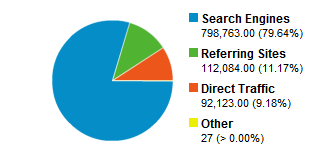
Given that search engines play an important role, it seems
like a good idea to make sure your site is easily indexed and
understood by them. This article will help show you how.
The meta tags
are what you see towards the top of your HTML pages where information
about the page itself is stored. This information is no longer
as important as it once was, but it is used in conjunction with
your body's content to help give search engines a clearer picture
of what your site is. In other words, ignore the meta tags at
your own peril :P
The Title Tag is very important. It displays in the browser's
title bar and is also used when naming bookmarked sites. Most
importantly, the Title of your page is shown prominently on
search engine results:
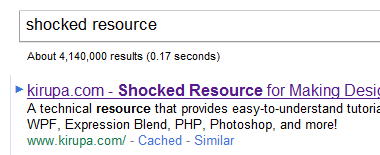
The
recommended maximum number of characters
for this tag is 60.
The Meta Description Tag allows you to enter your own page description
for the search results:
- <meta
name="description"
content="A
technical resource that provides easy-to-understand tutorials
for Flash/ActionScript, Windows Phone, Silverlight, and
more!">
Though,
keep in mind, not all search engines will use your description
for ranking your site in their search results. While your description
may not directly be used for ranking, it is often displayed
as the description accompanying your search result.
The
recommended maximum number of characters
for this tag is 150.
The meta keywords tag allows
you to provide additional text for crawler-based search engines
to index along with your body copy. How does this help you?
Well, for most major crawlers, it doesn't. That's because most
crawlers now ignore the tag.
Despite that
minor detail, this Tag should contain keywords and keyword phrases
that are important to your site. When it comes to keywords,
make sure they are both concise
as well as relevant to the page you are describing as
best as possible.
The following
is the keywords used on this site:
- <meta
name="keywords"
content="Flash,
Silverlight, WPF, Blend, Windows Phone 7, tutorials, ActionScript,
forums">
Beyond the META Tags.
The meta tags you learned to modify in the previous
section act as an introduction to the main content of your page.
In other words, make sure your content is representative of
what you claim the content is in your meta tags. Beyond just
making sure words from your title, description, and keywords
tags are there in your main content, there are a few other things
you need to set. Let's look at those things in this section.
You should create a page to list
sites that link to you. Link trading is very popular and the
more sites link to you, the greater your placement on the
popular search engines.
While this isn't always discussed,
alt tags are indexed by search engines. Therefore, treat your
Alt Tags like you would any other tye of content that you wish
a search engine to know about.
The reason, as
you probably can guess, is that search engines can't actually
understand an image by looking at it like you or I would.
Heading tags should be used to make certain phrases stand out
on your page. Robots place higher importance on <h1>
tags. Near the top of your page you should use a H1 tag to highlight
some text, and this text could be the same as your page title.
Robots
put a great deal of importance in the text between your <a>
tags. This means that the more descriptive your link is, the
better a search engine will be able to associate relevant text
with the link.
Avoid using generic
text like "click here":
To fill out
our flash site form click here.
Besides being
outdated when many devices don't have the concept of a "click",
search engines won't know what "click here" actually is referring
to based on what is provided.
Instead, make
your links inline with your descriptive text:
Fill out our
flash site form.
While this was mentioned earlier, it can't hurt to repeat
it again. Make sure that the words you use in your title and
description are used in the content of that page. There is an
art to this as using keywords too many times will make your
content saturated and robots will ignore it.
If you really want to use all your
cards, name your pages with relevant words. For example, if
you have a page about Flash Tutorials, name it
Flash_tutorials.html.
At the end of the day, do the
right thing and don't be sneaky. Making some text the same color
as your background color or trying to sneak keywords into comment
tags will just get you booted from the search engines.
Hope these helped...if
not, post them on the
forums and
we'll discuss it!
 |
EthanM |
 |
Kirupa |
|










