 PHP
Contact Form
PHP
Contact Form
by kirupa : 20
December 2004Contact forms are a
great way to enable visitors to your site to contact you. In
this tutorial, I will explain how to create a contact form
using HTML and PHP. While PHP is not the easiest language to
learn, it is easily customizable and can be easily extended
to work with various technologies such as mySQL and Flash!
11/11/11 Update
A more recent version of this tutorial can be found here:
Creating an E-Mail Contact Form
Let's start with a very basic contact form
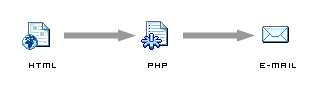
for now. Our contact form will span two pages. One page will
actually contain the HTML form, and the other page will
contain the PHP code that receives the data from the HTML
form and e-mails it to your mailbox:
This tutorial is in several parts. The first
part will simply provide the code for recreating a contact
form. You will copy and paste some code I provide for both
the HTML page and the PHP page. In the second part of the
tutorial, I explain why the code works. In the third part of
the tutorial, I expand upon what you created by introducing
more form elements such as checkboxes, option buttons, and
drop-down menus!
The HTML Page
First, let us create the HTML page that simply contains the
contact form. Create a new page called contact.htm.
On that page, we will be add our contact form. Our form is
very simple. It simply contains two text fields and and one text
area.
Here is how our final form would look -
not very pretty, I know:
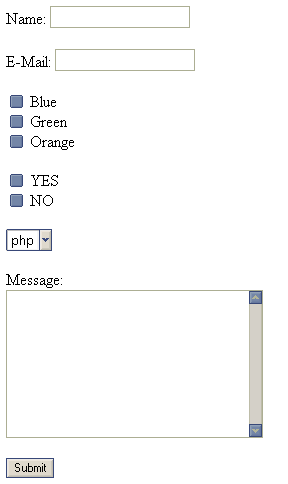
But, let's start with a very basic form and build our way up
to having something more complicated such as what you see
above. The
following is a lite version of the form:
<form
method="POST" action="mailer.php">
<input type="text" name="name" size="19"><br>
<br>
<input type="text" name="email" size="19"><br>
<br>
<textarea rows="9" name="message" cols="30"></textarea>
<br>
<br>
<input type="submit" value="Submit" name="submit">
</form>
Note the code that is colored
in blue. The blue colored words will be useful for us in the
next page where
we write the PHP code.
Onwards to the
next page!
| |
page 1
of 4 |
 |
|









