 Using
DreamWeaver
Using
DreamWeaver
by Sam Bourim aka RussianBeer
Hi there, I’ve created this tutorial for
DreamWeaver beginners, better yet for almost complete
beginners, we will build a simple site step by step. If you
have Macromedia studio, the better! If not, DreamWeaver
alone can do just fine.
Before we begin this fairly long, but easy to
follow tutorial, you will need to download a few graphics
that will be used in later sections. Click the following
link to download them:
Part I: The Interface
After you downloaded the images by
clicking the above link, it's time to begin. The following steps should help you
become better familiarized with the interface:
-
First, Open Dreamweaver.
-
Select File>New In the General tab.
-
Then click Basic Page and html then click
OK.
Now take a moment to familiarize yourself
with the area, if this is your first look here, it may look
like a bunch of random stuff, but soon the usefulness of the
site will begin do dawn on you!
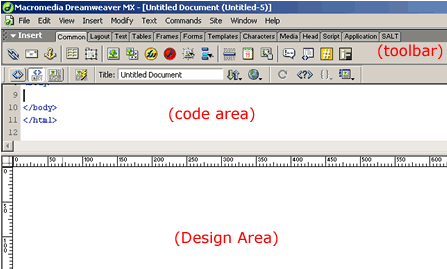
[ the dreamweaver interface ]
The following bulleted lists will give you a
brief overview of what each section in the above image
accomplishes:
-
The Design area is where most of the work
will be done, it will be where you will type your text,
maneuver your images and tables, etc.
-
The Code Area is where, if we need to code
HTML directly one would go, most of the time Dreamweaver
does it for us, but sometimes it also creates annoying bits
of code we don’t need.
-
The Toolbar we will be here a lot, basically
the tool bar is a bunch of shortcuts to what we need to do,
and everything is nicely divided in to tabs for us.
Part II: Planning the Site
Okay before we continue any further it is
always a good idea to plan your page ahead of time, this
will make creating it a lot simpler and easier. For example
in this tutorial I will be building an information page on
one of my favorite games: Rainbow Six.
A map of your site can be quite simple:
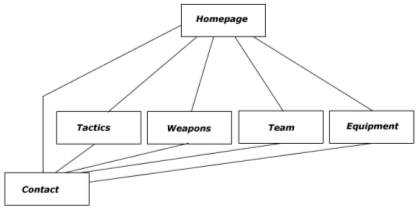
[ graphical plan for the site
]
As you can tell from the above image, it is a
basic plan, and the lines represent where the user can go.
There will be altogether 6 pages including the homepage. The
next page will continue this tutorial
by teaching you how to create a basic layout.
|









