 Fading
Text
Fading
Text
by tom aka novatake
One great Effect that can be created in flash
very easily is fading text it can make your site look a lot
more cooler and gives you the facility of fading between
images this tutorial will show you exactly how to do this.
[ you will be creating the
above movie ]
-
Create a new movie and change the size to 200x100 and
enter the text KIRUPA.COM. Set the font color to something
other than white.
-
Click on the text so it gets a blue box around it make
sure u are on the arrow tool. Then Right click on the text
and click convert to symbol or press F8. Convert the text
to a Movie Clip and press ok.
- A
Small circle should appear now in the centre of your text
that will be the sign to tell you that the text is a
symbol:
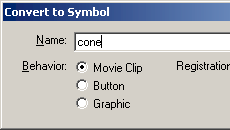
[ the
convert to symbol dialog box ]
-
Now right click on the movie clip and click on properties
you should see a panel appear and at the bottom right you
will see a colour section click the drop down menu and
choose alpha to the right of the menu a percentage bar
will appear drag this down to 0% this will make your text
invisible.
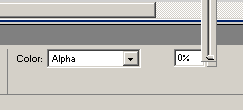
[ the alpha
slider at 0% ]
-
Insert a keyframe at about 30 frames in and right click on
the clip again and go to properties, back down to alpha
but this time change the alpha to 100% then exit the
properties panel, highlight the layer and right click and
press create motion tween this will add a coloured arrow
into the timeline press Ctrl+enter to view the movie.
-
If you want your text to fade back out like the sample
then insert another keyframe at about 50 and change the
alpha again to 0%
There, you have created some groovy fading
text!
-Tom
http://www.typhoon-extensions.cjb.net |









