by kirupa |
19 February 2006Due to a patent ruling, plug-ins loaded using the
embed, applet, and object tags will no longer be interactive
unless the user actually clicks on the plug-in object first:
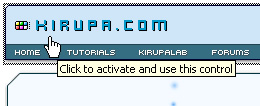
[ you must click before you can interact with embedded
plug-ins ]
As of this moment, only Microsoft's Internet Explorer browser is
affected. Unless web developers ensure their Flash content is not loaded
via the popular embed, a method provided by even Macromedia's default
HTML publishing method, all visitors who are running an up-to-date version of
IE will see the above "Click to activate and use this control" message when
hovering over a Flash animation.
All embedded plug-in content will
display as usual. You simply will not be able to interact with the content
unless you click on it first.
Both Microsoft and Adobe have provided useful suggestions on how to fix this
issue, and in this tutorial, I will be providing instructions on how to use the
FlashObject
method to easily display Flash animations without the hassle of having to have
your users click first.
Let's get started:
- Download the FlashObject JavaScript file by clicking the
following link:
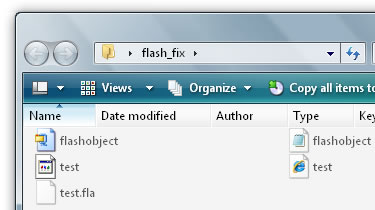
- Unzip your recently downloaded flashobject.zip file to
the same location as your HTML page that will display your Flash animation:
- Now, use the following Flash script to generate the HTML tags
required for displaying your animation. Enter your animation (SWF) file's
path relative to your HTML file, the width of your animation, and the height
of your animation and press the oversized Generate Code button:
- Copy and paste the generated code into the location in your
HTML file you want your animation to be displayed.
- If you want to upload the files to your server, just make sure to upload
your SWF, flashobject.js, and HTML file (if you need to). Double-check the paths to make sure
your SWF and FlashObject file paths still work online.
If everything worked out, you should be able to interact with embedded Flash
content without having to click on them first.
Information for Pages with Multiple Animations
First, if you are using the above Code Generator
for multiple animations on your page, be sure to only keep the first
appearance of the following code:
<script
type="text/javascript" src= "flashobject.js"></script>
While most browsers will cache multiple calls to the same file
(flashobject.js), some may not depending on what your site's caching settings
are.
Second, according to the code, your Flash animation will be placed wherever
the flashobject div tag is. If you have multiple animations using the same
generated code, make sure to change the reference to something else:
- <div
id="flashcontent"
style="width:
765px; height: 58px">
-
- <script
type="text/javascript">
- var
fo
=
new
FlashObject("http://www.kirupa.com/swf/headerv2b.swf",
"animationName",
"765",
"58",
"8",
"#FFFFFF");
- fo.addParam("allowScriptAccess",
"sameDomain");
- fo.addParam("quality",
"high");
- fo.addParam("scale",
"noscale");
- fo.addParam("loop",
"false");
- fo.write("flashcontent");
- </script>
If you do not ensure that each FlashObject method points to a different div
name/location, you will find animations with duplicate div names loading in the
same place. You probably do not want that!
Just a final word before we wrap up. What you've seen here is freshly baked content without added preservatives, artificial intelligence, ads, and algorithm-driven doodads. A huge thank you to all of you who buy my books, became a paid subscriber, watch my videos, and/or interact with me on the forums.
Your support keeps this site going! 😇

|



 Fixing the Flash/Embed Issue
 Download FlashObject Script






