by Jaspal Sohal |
11 January 2006Now that we have an idea of how to use the Beep
function, let's launch Zinc v2.5 and select "Extension Creator" from the Tools
menu as shown below:
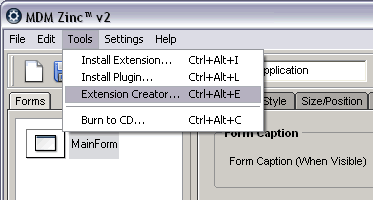
[ the Zinc Extension Creator menu-item
]
After you have selected the Extension Creator menu-item, you will see the
Extension Creator window appear. From the bottom of that window, click on the
Browse button. We will need to find a DLL file. The kernel32.dll file is located
in the Windows / System32 Folder as shown below:
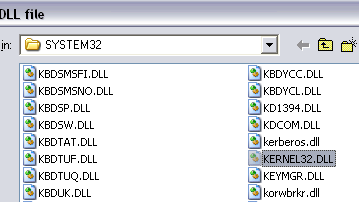
[ select your kernel32.dll file ]
Select the kernel32.dll and click on Open. The Extension Creator
will then ask you to select an Extension Class name. The Extension Creator will
automatically select the prefix "kERNEL32" for you. For the purpose of this
Tutorial, we shall leave the prefix to this value:
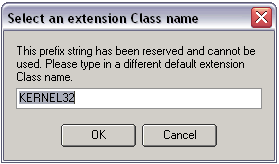
[ let's accept the default name for now
]
Click OK to accept the prefix. A second prompt will then be
displayed as shown below:
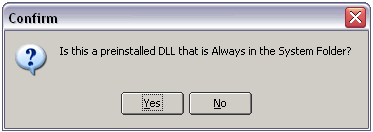
[ click yes if you are using a default,
pre-installed DLL file ]
If you are connecting to a custom DLL, it is best to select "No"
at this prompt so that the DLL is packed into your final extension file. As we
are using a standard Windows DLL, we can select "Yes" at this prompt so that the
DLL is not included in the extension. Instead, the extension will search in the
appropriate system32 folder once it is installed.
Once you click on "Yes" the DLL Functions will be populated in the Extension
Creator Command List. This can take anything from 10 - 45 seconds based upon the
speed of your processor.
Onwards to the next page!
 |
page 2 of
3 |
 |
|



 Creating an Extension - Page 2





