Preloader
Animations
Preloader
Animations
For large animations, it is best
to have a small preloader attached to the beginning of your
animation. Preloaders simply loop an animation until the
user has loaded the animation to a certain point. I have
created a simple preloader. Click on the link below to hear
see it.
Click Here For Animation
If you didn't see a "Loading"
sequence, it may be because you have a fast connection.
Anyway, I have explained how it was done. First, you may
want to download the
source code for that file.
Preloaders themselves aren't
complicated. It is the concept involved in creating one that
takes a little bit of thinking. For the preloader I created,
what I wish to do is:
" I want to have a small
animation loop until the larger section with the sound is
loaded. Once the sound has loaded, I want the animation to
play that section. As long as the animation has not loaded
up to the certain point, I do not wish to hear the sound"
It may sound a little crazy,
but that is basically what I wish to accomplish by creating
that preloader.
So, open the source code you
just downloaded. The source code does not include the sound
file, for that would make the code way to large for most
users to download. The sound clip would be located at the
frame labeled "sound".

Here's How My Preloader
works:
-
First, right click on the first keyframe under the Layer
marked "preload", then choose Actions. You should see a
window similar to this.
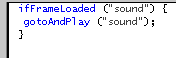
-
That is the code that says that "If the frame at label
"sound" is loaded, go to and play the frame at label
"sound".
- The third
thing you should do, is make sure that if the Frame isn't
loaded, that the user sees a small animation or word that
says "loading" or something similar. The first five
keyframes on Layer "preload" are for my simple loading
sequence. The fifth keyframe has an action icon on the
keyframe. Right click on that frame and choose "Actions".
That is a simple Go To And Play command that takes the
user back to the first keyframe. That accomplishes two
things:
- Loops the animation for the user so that
they can have something to watch while the movie loads.
- It also re-initializes the script on Frame
1 for the ifFrameLoaded so
that if the movie has already loaded, it would take the
visitor to the appropriate frame or frame label.
That's all there is to making
a pre-loader. Just make sure you understand why each thing
was done and why it is important. The first ActionScript
command should usually include the ifFrameLoaded statement
to compare a frame to. Then you will usually need to have a
small Action for looping the introductory scene. Just
experiment with my source code. If you want to, you can
import a large sound file into the frame labeled "sound".
Just a final word before we wrap up. What you've seen here is freshly baked content without added preservatives, artificial intelligence, ads, and algorithm-driven doodads. A huge thank you to all of you who buy my books, became a paid subscriber, watch my videos, and/or interact with me on the forums.
Your support keeps this site going! 😇

|