As
Flash movies have become extremely complex, it becomes
necessary to keep some portions of a movie on a separate
file. The SWF files can easily be loaded onto the main movie
quite easily. This tutorial will explain to you how to go
about doing that. So, click on the "load movie" button
below:
Once you click that, you should
see the words "kirupa.com" oscillate left and right on your
screen. No, the words weren't loaded from the animation
itself. It came from an independent movie I have on my
server. So, let's get started. First, download the partial source code. Click here.
Once you have opened up the
partial source file, let's proceed on adding the little bits
of information in.
Once you have the file opened,
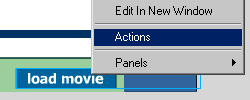
right click on the button "load movie" and choose actions.
See image below:
From there you should see the
Actions window. Now, all you have to do is follow this
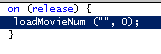
path. Go to Basic Actions > Load Movie. Once you double
clicked Load Movie, you should see something resembling
the following:
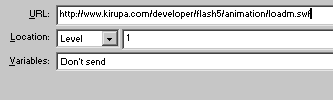
The final step is to fill in
the information. In the tab marked URL, copy and paste the
following location:
For the label marked "Level", change the 0 to a 1. The
final action window should look like the following image
below:
That is all there is to
loading a movie from a variable. Unloading a movie is the
same, except you change the property from the Actions to
Load Movie to Unload Movie. The Levels are basically used to
arrange elements on top of each other. If you want to load
more than one movie, changing the level from one to two will
make the new movie go over the existing. This is to ensure
that the movies don't collide and cause problems.
Just a final word before we wrap up. What you've seen here is freshly baked content without added preservatives, artificial intelligence, ads, and algorithm-driven doodads. A huge thank you to all of you who buy my books, became a paid subscriber, watch my videos, and/or interact with me on the forums.



 Loading
Movies From A
Remote Location
Loading
Movies From A
Remote Location