 Hyperlinking
Text
Hyperlinking
Text
One of the most common email
enquiries that I receive at kirupa.com is about hyperlinking.
So, below, is the compilation of all the email responses
into one concise tutorial. Enjoy!
First, create the text or
object you'd like to hyperlink. Since text and other objects
hyperlink differently, this tutorial has been broken into
the Text and Other sections.
Text
Hyperlinking
This is almost too easy, but
I'm going to explain it anyway. First type in the text you'd
like to hyperlink. I have chosen the word "Hyperlink"
for my example. You're free to choose whichever word you'd
like. See image below:

Now, look around in Flash and
try to locate the Panel labeled "Character". If you cannot
find it, simply right click on the text you just created,
and choose Panels > Character. You should see a window
similar to this below:
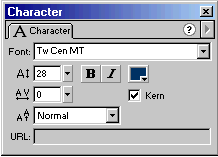
You may also notice a box
labeled "URL". All you have to do now, is click on the URL
box and enter the URL of the page you wish to link to. If
the box is grayed out (like my example above) you may have
to click on the text. Once the text is highlighted, the box
will allow input. Type the address in. I have written the
address: "http://www.kirupa.com"
If you preview your
animation, you should be able to click on the text and go to
the URL you specified. That's all there is to it. Of course,
in classic kirupa.com tradition, the source code has been
specified so you can see what you may have done right....or
wrong. Click Here to Download
the Source Code.
Just a final word before we wrap up. What you've seen here is freshly baked content without added preservatives, artificial intelligence, ads, and algorithm-driven doodads. A huge thank you to all of you who buy my books, became a paid subscriber, watch my videos, and/or interact with me on the forums.
Your support keeps this site going! 😇

|









