 Maximize
Flash in Your Browser
Maximize
Flash in Your Browser
How many times have you asked yourself the following
question: "How does that animation take up every pixel of
space in the browser?" The answer lies in using percent
widths instead of pixel widths when publishing.
To maximize the animation in
a browser, you can increase the pixel width of your
animation to suit the size of the browser. While increasing
the pixel size would work, not everyone who views your
animation has the same resolution you have. Because of the
varying environments your animation will be viewed in,
different people will still see your animation in a
different size. You will learn how to display the animation
maximized to the size of your browser in this tutorial.
Publishing
In Percents
To ensure that the size
of the animation scales to the size of the browser
automatically, you will need to publish your animations by
setting a percent value for the width and height. The
following instructions will explain how to setup your
animations for a percent width and height.
- Go to File | Publish Settings. The Publish Settings
window will appear. From the Publish Settings window,
select the HTML tab.
- Click the
Dimensions drop-down menu. Select Percent from the
selections listed. The width and height fields will
display the percent caption.
- Enter a percent value for
the Width and the Height. Because you want the animation
to be full screen, enter a value of 100 for both the Width
and Height fields.
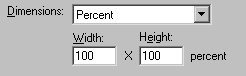
[ entering percent values under the HTML tab
]
- Press the OK button to close the Publish
Settings window or press the Publish button to publish
your SWF file along with other files such as the HTML
file. When you preview the page you just published, you
will see the animation set to 100% of the width and height
of your browser.
Removing Margins
When you use Flash to
publish your HTML file, Flash creates a generic HTML file
with the code required to display the animation. Additional
information such as the margin values are not added. When a
Web page is displayed in a browser, there is an artificial
space created near the edges of the browser for spacing
between the browser and the Web page. The following image
displays what I am referring to:
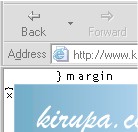
Different browsers such as
Internet Explorer and Netscape have different margin widths.
Because you want to maximize the animation and "Take up
every pixel of space available!", you don't want the
margins to interfere with what your visitors see. You want
to remove the margins. To remove margins, delete the <body>
tag and place the following line in its place:
<body topmargin="0"
leftmargin="0">
Now that you know about
margins, you have learned all there is to know about making
an animation full screen. You should note that Flash will
not skew your animation to fit your browser. If your
animation's size is such that it can't be made to fit evenly
in your browser, Flash will not stretch your animation
horizontally to fill in the extra space, etc. It will
stretch until it reaches the edges of a browser, table, or
another boundary you place the animation into.
Just a final word before we wrap up. What you've seen here is freshly baked content without added preservatives, artificial intelligence, ads, and algorithm-driven doodads. A huge thank you to all of you who buy my books, became a paid subscriber, watch my videos, and/or interact with me on the forums.
Your support keeps this site going! 😇

|









