 Creating
a Preloader in
One Frame
Creating
a Preloader in
One Frame
Ask any user what one of the
most difficult Flash technique to master is. Many will say
the Preloader. In Flash 4, pre-loaders were difficult to
coordinate. You had to specify the loaded frame, a loop
frame, and more! In Flash 5, all it takes is one frame with
a few lines of code to create a preloader.
Here is
how:
-
Create a new movie. Right click the first frame and select
Actions from the menu that appears.
-
The Frame Actions window will appear. Press Ctrl + E to
access the Expert Mode. From the Expert mode, you will be
able to copy, paste, and input code directly without
having to use the drop-down menus.
-
Copy the code from the menu box below. Once the code below
has been copied, paste it in the Frame Actions window.
-
You may add a loading movie or something to engage the
visitor in Frame 1. Make sure you do not go beyond Frame 1
for the loading animation. Use a movie clip (Insert | New
Symbol) to make a complex animation fit in one keyframe.
The following image is an example of how the timeline for
an animation would look:
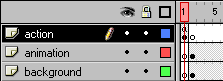
[ Notice that the First
frame is void of content except for the loading movie clip
on the 'action' layer. ]
Why the
Animation Worked
Because you copied and pasted the code, I
will explain why the code worked so you can understand
the code and use
it in your own animations with full understanding.
if (_framesloaded>=_totalframes)
{
This is by far the most
important line of code in the pre-loader. An if statement is
being started with the condition that the number of frames
currently loaded in Flash ( _framesloaded) equals the total
number of frames in the animation ( _totalframes).
if (_framesloaded>=_totalframes)
{
gotoAndPlay (2);
} else {
gotoAndPlay (1);
}
This section of code holds
the statements for making the if statement produce results.
If the frames are loaded from the previous section of code,
you are telling Flash to play the 2nd frame (gotoAndPlay 2).
If all of the frames have not yet loaded, the section of
code under the 'else' executes. The gotoAndPlay (1) line is
a loop that continuously loops itself until all the frames
have loaded.
Instant
Replay: Animation Walkthrough
When the movie first loads, the first
frame contains the actions for the pre-loader. Flash checks
to see if all the frames have been loaded. That is the line
with the _framesloaded and _totalframes. If the frames have
all been loaded, Flash begins to play the animation at Frame
2. If the frames have not loaded, Flash re-plays the first
frame containing the pre-loader action.
Tutorials related to this
topic are:
Just a final word before we wrap up. What you've seen here is freshly baked content without added preservatives, artificial intelligence, ads, and algorithm-driven doodads. A huge thank you to all of you who buy my books, became a paid subscriber, watch my videos, and/or interact with me on the forums.
Your support keeps this site going! 😇

|









