[REACT](https://www.kirupa.com/react/index.htm)
[BOOK](https://www.amazon.com/exec/obidos/ASIN/0134546318/kirupacom)
# Simple Global State with Zustand
by [ kirupa](https://www.kirupa.com/me/index.htm) | filed under [Learning React](https://www.kirupa.com/react/index.htm)
In the last two tutorials, we looked at Redux, one of the most established ways of managing state that many components need to share. It's powerful, and it does a great job when an app gets large. It's also fair to say that for a lot of apps, Redux feels like a lot of ceremony. You set up a store, a Provider, slices, selectors, and dispatch, and only then do you get to the part where a button changes a number.
There's a library that takes a much lighter approach to the same problem, and it's called [Zustand](https://zustand.docs.pmnd.rs/) (the German word for "state", pronounced something like *TSOO-shtahnt*). Its whole pitch is that you create a store with a single function call, and you read from it with a hook. There's no Provider and no dispatch. In this tutorial, we'll build the same counter we made with Redux so that you can compare them, and then we'll build a small shopping cart to see how Zustand holds up in a more realistic app. Along the way, we'll look at a v5 gotcha that trips up many people, saving the cart to `localStorage`, devtools, TypeScript, and how to decide whether you need a library like this at all.
Onwards!
## When useState and Context Aren't Enough
Most of the state in a React app belongs inside the component that uses it, and `useState` does that job beautifully. When two components need the same state, you move it up to their closest common parent and pass it down as props. When the components are far apart, you can use [context](https://www.kirupa.com/react/sharing_data_with_context.htm), and when the updates are complicated, you can add [useReducer](https://www.kirupa.com/react/managing_state_with_usereducer.htm) to the mix. That combination gets you surprisingly far.
Where it starts to hurt is when you have state that is read and changed by lots of unrelated components, and that changes often. A shopping cart is a classic example. The header shows a count, a product page has an Add button, and a cart drawer lists everything and lets you remove stuff. With context, every component that reads a context re-renders whenever the value of that context changes. You can't say "I only care about the item count." If the cart's contents change, everything that reads the cart context renders again, even if it only displays a single number. You can work around that by splitting your state into many small contexts, but now you have a pile of Providers stacked around your app, and a bunch of glue code to keep in your head.
Redux solves the re-rendering problem nicely with `useSelector`, but it brings its own structure along with it. What we'd like is the best part of Redux, which is a place to keep state outside of your components and the ability to subscribe to just the piece that you care about, without the rest. That's what Zustand gives you, and it does it in about a tenth of the code.
One more note before we start. Every example in this tutorial was run with Zustand 5 and React 19.3. Zustand's API has changed a little between major versions, so if you're looking at an older tutorial and something doesn't behave the same way, the version is the first thing to check.
## The Big Idea
With Zustand, a **store** is a hook that you create by calling a function named `create`. You give `create` a function that returns your initial state, and this state can include functions that change it. What you get back is a hook that any component can call. There's no Provider to put at the top of your app, because the store doesn't live inside React at all. It's a regular JavaScript object that lives in a module, and the hook is how your components subscribe to it.
When you call the hook, you pass it a **selector**, which is a small function that picks the part of the state that you want. The component re-renders only when the value your selector returns changes. If that sounds familiar, it's because that's the same idea as `useSelector` in Redux.
This is easiest to see with an example, so let's build one.
## Getting Started with a Counter
We'll use [Vite](https://vite.dev/) to set up our project. If you need a refresher, the [Setting Up Your React Dev Environment Easily](https://www.kirupa.com/react/setting_up_react_environment.htm) tutorial walks through the details. From your terminal, run the following command:
```bash
npm create vite@latest zustandcounter -- --template react
```
When it's done, go into the new folder, install the dependencies, and then install Zustand:
```bash
cd zustandcounter
npm install
npm install zustand
```
That's all we need. There's only one package, and it has no other dependencies to set up. Delete the **src/App.css** file and the **src/assets** folder, since we won't use them. Now, in the **src** folder, create a new file called **counterStore.js** and add the following:
```js
import { create } from "zustand";
export const useCounterStore = create((set) => ({
count: 0,
increase: () => set((state) => ({ count: state.count + 1 })),
decrease: () => set((state) => ({ count: state.count - 1 })),
}));
```
This is the entire store. The function we pass to `create` receives a function called `set`, and it returns an object. That object is our state. We have a `count` that starts at 0, and two functions, `increase` and `decrease`, that change it. Notice that the data and the code that changes the data are sitting right next to each other. If you remember the Redux version of this, we had a slice, a store, a Provider, and a dispatch. Here, it's one file and a handful of lines.
The `set` function is how we update state. We give it a function that receives the current state and returns an object with the values we want to change. Zustand takes that object and **merges** it into the existing state, which means we only return the pieces that changed. When `increase` returns `{ count: ... }`, the `increase` and `decrease` functions themselves are left alone. We also never change the existing state directly. We always return a new object, the same way we do with `useState`.
The store is named `useCounterStore` because it's a hook, and hooks start with `use`. Next, let's use it. Create a file called **Counter.jsx**:
```jsx
import { useCounterStore } from "./counterStore";
function Counter() {
const count = useCounterStore((state) => state.count);
const increase = useCounterStore((state) => state.increase);
const decrease = useCounterStore((state) => state.decrease);
return (
{count}
);
}
export default Counter;
```
The highlighted lines are where the store comes in. Each line calls the hook with a selector that picks one thing: the count, the `increase` function, or the `decrease` function. We can use `increase` and `decrease` directly as click handlers. There's no `dispatch` and no action objects, because they are just functions.
Now let's create the second component, which proves that two components can share state without any plumbing between them. Create a file called **Status.jsx**:
```jsx
import { useCounterStore } from "./counterStore";
function Status() {
const isEven = useCounterStore((state) => state.count % 2 === 0);
return
The count is {isEven ? "even" : "odd"}
;
}
export default Status;
```
This one is interesting. The selector doesn't return the count. It returns a boolean: whether the count is even. React compares what the selector returns now to what it returned last time, and it only re-renders the component if they are different. So when the count goes from 4 to 6, this component stays put, because it's still "even". It only renders when the count goes from even to odd or back. That's a neat trick, and it's a good example of selecting the answer you need and not the raw data.
Next, replace the contents of **App.jsx** to put the two components next to each other:
```jsx
import Counter from "./Counter";
import Status from "./Status";
function App() {
return (
<>
);
}
export default App;
```
Notice what's missing. There's no Provider. `Counter` and `Status` don't receive props, and neither one knows that the other exists. Finally, replace the contents of **index.css** with the following styles:
```css
body {
margin: 0;
padding: 0;
font-family: sans-serif;
background-color: #8e7c93;
}
#root {
display: flex;
flex-direction: column;
align-items: center;
}
.container {
background-color: #fff;
margin: 100px 0 20px;
padding: 10px;
border-radius: 3px;
width: 200px;
display: flex;
align-items: center;
justify-content: space-between;
}
.buttons {
background-color: transparent;
border: none;
font-size: 16px;
font-weight: bold;
border-radius: 3px;
transition: all 0.15s ease-in;
cursor: pointer;
}
.buttons:hover:nth-child(1) {
background-color: #f45b69;
}
.buttons:hover:nth-child(3) {
background-color: #c0dfa1;
}
.status {
color: #fff;
}
```
Run `npm run dev` and open the page. Click the plus button three times, and you'll see the count go to 3 and the text read "The count is odd". Click the minus button once, and you'll get 2 and "The count is even". That's the same app we built with Redux, and it works the same way.
If you compare the two, you can see where the differences are. Redux wants a store configured in one place, a Provider around the app, and separate slice, selector, and dispatch pieces. Zustand has one file for the store and one hook for the components. Redux gets you structure, a strict way of changing state, and fantastic debugging tools. Zustand gets you out of the way. Neither is wrong. They are aimed at different sizes of problem.
### A Quick Word on Selectors
You may be wondering if you can write `const { count, increase } = useCounterStore()` without a selector. You can, and it'll work. But when you leave out the selector, the component subscribes to the *entire* store, so it re-renders any time anything in it changes. That's fine for a tiny store, but you give up the main benefit of using Zustand. Get in the habit of passing a selector, and your components will only render when the data they care about changes.
## Building a Shopping Cart
A counter is a good way to learn the API, but it doesn't tell you much about how things scale. Let's build something closer to a real app. We're going to make a small shop called Gadget Shop. It has a list of products, each with an Add button. It has a badge in the header showing how many things are in the cart. And it has a cart panel that lists the items, lets you remove them, and shows a total.
Those three pieces are three separate components, and they all need to see the same cart. Here's what we're aiming for:
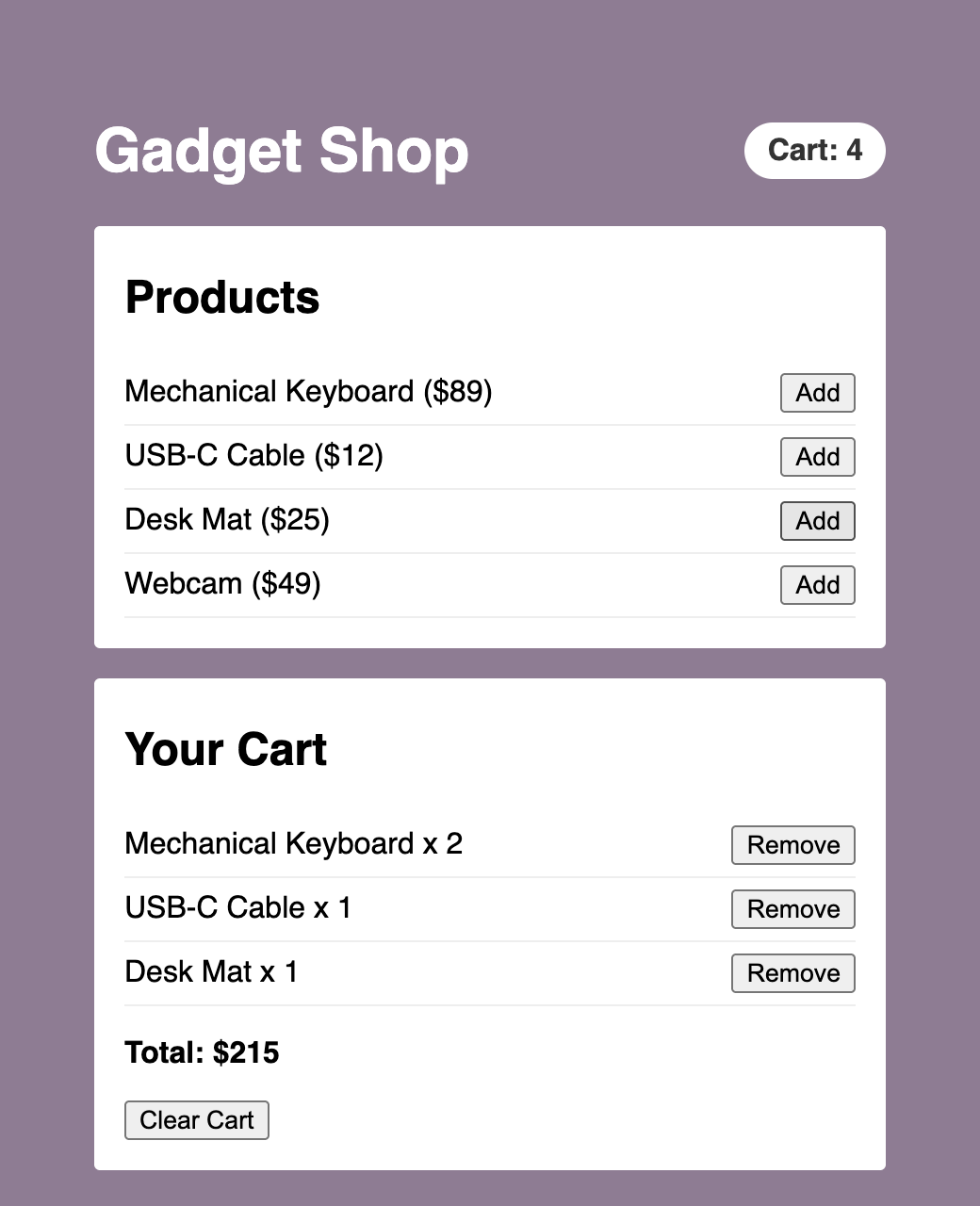
We'll keep working in the same project. In the **src** folder, create a file called **products.js** with some data:
```js
export const products = [
{ id: 1, name: "Mechanical Keyboard", price: 89 },
{ id: 2, name: "USB-C Cable", price: 12 },
{ id: 3, name: "Desk Mat", price: 25 },
{ id: 4, name: "Webcam", price: 49 },
];
```
Now for the store. Create **cartStore.js**:
```js
import { create } from "zustand";
export const useCartStore = create((set) => ({
items: [],
addItem: (product) =>
set((state) => {
const existing = state.items.find((item) => item.id === product.id);
if (existing) {
return {
items: state.items.map((item) =>
item.id === product.id
? { ...item, quantity: item.quantity + 1 }
: item
),
};
}
return { items: [...state.items, { ...product, quantity: 1 }] };
}),
removeItem: (id) =>
set((state) => ({
items: state.items.filter((item) => item.id !== id),
})),
clearCart: () => set({ items: [] }),
}));
```
Our state has one piece of data, an array called `items`, and three actions. The `addItem` action looks for the product in the cart. If it's already there, it creates a new array where that item's quantity is one higher. If it isn't, it adds the product with a quantity of 1. Both paths return a brand new array and never change the old one, because React and Zustand figure out what changed by comparing references. The `removeItem` action filters out the item with the matching ID. The `clearCart` action passes `set` a plain object instead of a function. That's allowed, and it's handy when the new state doesn't depend on the old one.
Business logic like this is one of the nicest things about a store. The rule about what happens when you add something that's already in the cart lives in one place. The components that call `addItem` don't need to know how it works.
Let's build the components. Start with **ProductList.jsx**:
```jsx
import { useCartStore } from "./cartStore";
import { products } from "./products";
function ProductList() {
const addItem = useCartStore((state) => state.addItem);
return (
Products
{products.map((product) => (
{product.name} (${product.price})
))}
);
}
export default ProductList;
```
This component only needs one thing from the store: the `addItem` function. It doesn't read the cart at all. Remember that point, because it'll matter in a moment. Next is **CartBadge.jsx**:
```jsx
import { useCartStore } from "./cartStore";
function CartBadge() {
const count = useCartStore((state) =>
state.items.reduce((sum, item) => sum + item.quantity, 0)
);
return
Cart: {count}
;
}
export default CartBadge;
```
The selector here adds up the quantities and returns a number. That number is a primitive, so React can compare it with the last one directly. Now **CartPanel.jsx**, which is the biggest of the three:
```jsx
import { useCartStore } from "./cartStore";
function CartPanel() {
const items = useCartStore((state) => state.items);
const removeItem = useCartStore((state) => state.removeItem);
const clearCart = useCartStore((state) => state.clearCart);
const total = useCartStore((state) =>
state.items.reduce((sum, item) => sum + item.price * item.quantity, 0)
);
return (
Your Cart
{items.length === 0 ? (
Your cart is empty.
) : (
<>
{items.map((item) => (
{item.name} x {item.quantity}
))}
Total: ${total}
)}
);
}
export default CartPanel;
```
Each highlighted line is its own call to the hook, picking one thing. We get the items, two actions, and a total that is computed by the selector. Putting the total in a selector means we don't have to store it anywhere. It can never get out of date with the items, because it's calculated from them each time. In general, store the minimum amount of state, and derive everything else.
Now replace the contents of **App.jsx** so that it shows all three:
```jsx
import CartBadge from "./CartBadge";
import CartPanel from "./CartPanel";
import ProductList from "./ProductList";
function App() {
return (
Gadget Shop
);
}
export default App;
```
The cart styles go at the bottom of your existing **index.css** file. The counter styles that are already there won't get in the way:
```css
.shop {
width: 420px;
margin: 40px 0;
}
.shop header {
display: flex;
align-items: center;
justify-content: space-between;
color: #fff;
}
.badge {
background-color: #fff;
color: #333;
padding: 6px 12px;
border-radius: 20px;
font-weight: bold;
}
.panel {
background-color: #fff;
border-radius: 3px;
padding: 4px 16px 16px;
margin-bottom: 16px;
}
.panel ul {
list-style: none;
margin: 0;
padding: 0;
}
.panel li {
display: flex;
align-items: center;
justify-content: space-between;
padding: 6px 0;
border-bottom: 1px solid #eee;
}
```
Run the app. Click Add a few times on different products, and watch the badge, the list, and the total all stay in sync. Click Remove on an item to take it out, or Clear Cart to empty everything. Three components that have never heard of each other are all working off the same state, and we didn't have to pass a single prop or wrap anything in a Provider.
## Why Selectors Matter
Remember how `ProductList` only asked for `addItem`? Here is why that's a big deal. Each component subscribes only to the slices of state that its selectors return, so a change to one slice doesn't touch components that aren't looking at it:
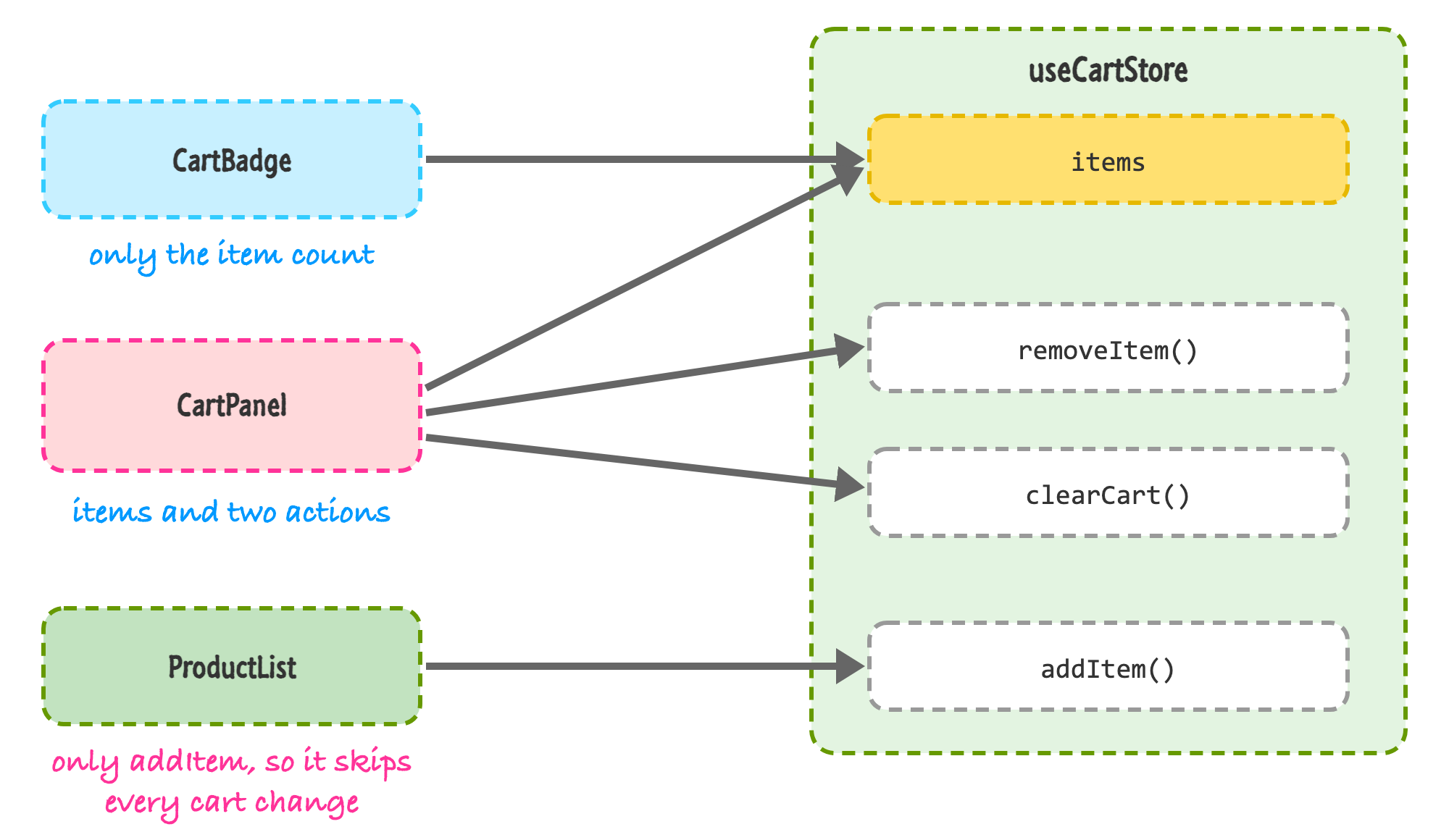
The `addItem` function never changes. It's created once with the store. So when you click Add and `items` changes, `ProductList` has nothing to react to, and it doesn't re-render. `CartBadge` and `CartPanel` do, because both of them read from `items`.
I checked this by wrapping each of the three components in React's `Profiler` component, which reports every time one of them commits an update. After three clicks on Add, the badge and the cart panel had each been updated three more times. `ProductList` hadn't been updated at all, other than the first render. You can check it yourself without any extra code by turning on the highlight updates feature of the React Developer Tools that we looked at in [Avoiding Unnecessary Renders in React](https://www.kirupa.com/react/avoiding_unnecessary_renders.htm). Only the badge and the cart panel will flash.
Think about what this looks like in the context-based version of the app. A single cart context would re-render all three components on every click, and you'd be reaching for `memo` to claw some of that back. Here, you get the targeted updates by default, just by picking what you read.
## Selecting More Than One Thing
In `CartPanel`, we wrote a separate hook call for each piece of state. It's a little repetitive. A natural thing to try is to grab several pieces at once by returning an object from the selector, just like you would when destructuring props. Let's try it. Here's a component that wants the items and the `clearCart` action:
```jsx
import { useCartStore } from "./cartStore";
function App() {
const { items, clearCart } = useCartStore((state) => ({
items: state.items,
clearCart: state.clearCart,
}));
return (
{items.length} items
);
}
export default App;
```
This looks completely reasonable. If you run it with Zustand 5, though, the page goes blank and the console fills up with errors. The first one says: *The result of getSnapshot should be cached to avoid an infinite loop*. It's followed by a page error that reads: *Maximum update depth exceeded*.
It took me a minute to understand why, so let's go through it. Our selector creates a brand new object every time it runs. Even though `items` and `clearCart` inside that object are exactly the same, the object that wraps them is new. Zustand decides whether to re-render by comparing the selector's current result to its previous one by reference, and two different objects are never equal by reference. So it believes that the state changed, re-renders, runs the selector again, gets another new object, and does it forever. React stops it with that "maximum update depth" error. Older versions of Zustand handled this differently, so you may run into this pattern in older tutorials and code that you find online. In version 5, it breaks.
There are two ways to fix it. The first is the one that we've been using: make a separate call for each value. Each selector returns something that is already stable, either a function or an array that only changes when the state changes. The second way is a helper called `useShallow`, which compares the *contents* of the object that you return instead of the object itself:
```jsx
import { useShallow } from "zustand/react/shallow";
import { useCartStore } from "./cartStore";
function App() {
const { items, clearCart } = useCartStore(
useShallow((state) => ({
items: state.items,
clearCart: state.clearCart,
}))
);
return (
{items.length} items
);
}
export default App;
```
The highlighted lines are the import, the start of the `useShallow` call, and its closing parentheses. With `useShallow` wrapped around the same selector, the page renders "0 items" and the button, with no errors. `useShallow` looks at each key in the object and only reports a change if one of the values is different. We get the convenience of picking several values at once, and the component only re-renders when one of them really changes.
My advice is to use separate selectors for simple cases, and to bring in `useShallow` when you are picking out a handful of values and the separate calls start to feel noisy.
## Saving the Cart with Middleware
Right now, if you add a few things to the cart and refresh the page, the cart is empty again. State in memory disappears when the page reloads. Zustand has a concept called **middleware**, which is a function that wraps your store and adds some behavior to it. The library comes with a few that you'll find yourself using often. Let's add two of them, `persist` to save the cart, and `devtools` to help us see what's going on. Here's the new version of **cartStore.js**:
```js
import { create } from "zustand";
import { devtools, persist } from "zustand/middleware";
export const useCartStore = create(
devtools(
persist(
(set) => ({
items: [],
addItem: (product) =>
set(
(state) => {
const existing = state.items.find(
(item) => item.id === product.id
);
if (existing) {
return {
items: state.items.map((item) =>
item.id === product.id
? { ...item, quantity: item.quantity + 1 }
: item
),
};
}
return { items: [...state.items, { ...product, quantity: 1 }] };
},
undefined,
"cart/addItem"
),
removeItem: (id) =>
set(
(state) => ({
items: state.items.filter((item) => item.id !== id),
}),
undefined,
"cart/removeItem"
),
clearCart: () => set({ items: [] }, undefined, "cart/clearCart"),
}),
{
name: "cart-storage",
partialize: (state) => ({ items: state.items }),
}
),
{ name: "CartStore" }
)
);
```
That looks like a lot of change, but nearly all of it is wrapping. The code that makes up the store, the part that starts at `(set) => ({`, is the same as before. Each middleware wraps the function that you would have given to `create`, like layers of an onion. The `persist` middleware goes around our store function, and `devtools` goes around that. The Zustand documentation recommends putting `devtools` on the outside when you combine them.
### Persisting to localStorage
The `persist` middleware saves your state to `localStorage` whenever it changes, and loads it back when the app starts. We give it a `name`, which is the key it uses in storage. We also pass `partialize`, which lets us pick which parts of the state get saved. We only care about `items`. The actions are functions, and functions can't be stored as JSON anyway, so this keeps the saved data focused on the part that matters.
Try it. Add a few things to the cart and refresh the page. The cart is still there. If you open the Application tab of your browser's developer tools and look at Local Storage, you'll find an entry called `cart-storage`. When I looked, it held `{"state":{"items":[...]},"version":0}`, with our cart items in the middle. That `version` number is there for a reason. If you change the shape of your state later, you can bump it and provide a `migrate` function so that people's old saved carts don't break the new code. We won't go into that here, but it's good to know that it exists.
One caution. Anything you put in `localStorage` is readable by anyone using that browser, and by any script that runs on your page. A shopping cart is fine, but don't persist things like access tokens or other secrets.
### Devtools
The `devtools` middleware connects your store to the [Redux DevTools](https://github.com/reduxjs/redux-devtools) browser extension, which also works with Zustand. Once you have the extension installed, you can open its panel and see the state of the store, along with a list of every change that happened. This is the same kind of time-traveling debugger that we talked about in the Redux tutorials, and you're getting it for one line of setup.
The extra arguments that we added to each `set` call are there for the devtools. The second argument of `set` says whether to replace the state instead of merging it, and we pass `undefined` to keep the default merge. The third argument is a label for the change. Without labels, every update shows up with the same generic name, and the list is hard to read. With them, you'll see `cart/addItem`, `cart/removeItem`, and `cart/clearCart` in your history. The `name` option in the last argument is what the store is called in the extension's list of stores. By default, the devtools connection is only active in development builds.
I tested the labels by pointing the middleware at a stand-in for the extension, and every click on Add reported a `cart/addItem` entry with the new state. If you don't have the extension installed, nothing breaks. The app runs as normal and the devtools part is quietly skipped.
## Zustand with TypeScript
If you are using TypeScript, as we covered in [Using React with TypeScript](https://www.kirupa.com/react/react_with_typescript.htm), you'll want to describe the shape of your store. Zustand has a slightly unusual way of doing this, with an extra pair of parentheses that surprises people the first time they see it. Here's the same cart store in a **cartStore.ts** file:
```ts
import { create } from "zustand";
import { devtools, persist } from "zustand/middleware";
type Product = {
id: number;
name: string;
price: number;
};
type CartItem = Product & { quantity: number };
type CartState = {
items: CartItem[];
addItem: (product: Product) => void;
removeItem: (id: number) => void;
clearCart: () => void;
};
export const useCartStore = create()(
devtools(
persist(
(set) => ({
items: [],
addItem: (product) =>
set(
(state) => {
const existing = state.items.find(
(item) => item.id === product.id
);
if (existing) {
return {
items: state.items.map((item) =>
item.id === product.id
? { ...item, quantity: item.quantity + 1 }
: item
),
};
}
return { items: [...state.items, { ...product, quantity: 1 }] };
},
undefined,
"cart/addItem"
),
removeItem: (id) =>
set(
(state) => ({
items: state.items.filter((item) => item.id !== id),
}),
undefined,
"cart/removeItem"
),
clearCart: () => set({ items: [] }, undefined, "cart/clearCart"),
}),
{
name: "cart-storage",
partialize: (state) => ({ items: state.items }),
}
),
{ name: "CartStore" }
)
);
```
The types at the top describe a product, a cart item (which is a product plus a quantity), and the shape of the whole store. The highlighted line is the one that looks odd. Instead of `create(...)`, we write `create()(...)`. The first set of parentheses lets us tell TypeScript what our state looks like. The second set receives the store function. This is a workaround for a limitation in how TypeScript infers generic types. It lets the compiler understand the state type that you give it while it works out the types for the middleware on its own.
Once it's in place, everything gets checked. Inside the store, `state.items` is known to be a list of cart items. In your components, a selector like `(state) => state.items.length` is typed as a number. I ran the TypeScript compiler in strict mode on this file, and it was happy, and it correctly complained when I tried to call `clearCart` with an argument it doesn't take.
## Using the Store Outside of React
Since a Zustand store is a plain JavaScript object, you aren't limited to using it inside components. The hook you get back from `create` has a few extra methods attached to it:
- `getState()` returns the current state, with the actions included.
- `setState()` updates the state, with the same merge behavior as `set` inside the store.
- `subscribe()` lets you listen for every change, and it gives you the new state and the previous state.
Here's a small example that you can add to a file like **outside.js** and import from **main.jsx** to try it:
```js
import { useCartStore } from "./cartStore";
const sticker = { id: 99, name: "Free Sticker", price: 0 };
window.addEventListener("keydown", (e) => {
if (e.key === "s" && e.target === document.body) {
useCartStore.getState().addItem(sticker);
}
});
useCartStore.subscribe((state, prevState) => {
if (state.items.length !== prevState.items.length) {
console.log(`Distinct items in the cart: ${state.items.length}`);
}
});
```
The first part listens for the **S** key on the page, and when you press it, it adds a free sticker to the cart. It does so by calling `getState()` to get at the `addItem` action. There's no component and no hook involved, but the badge and the cart panel update anyway. The second part subscribes to the store and logs a message when the number of different items changes. When I pressed S on a fresh cart, the console printed "Distinct items in the cart: 1", and the sticker showed up in the panel.
Why would you want this? There are plenty of places where code that isn't a component needs to read or change state. A function that handles a WebSocket message, a keyboard shortcut, an API helper that needs to read an auth token, or a test that sets things up before rendering. With Redux, you'd reach for the store object. With Zustand, the hook is the store.
This design has a flip side. The store is a single object that is created when the module is first loaded, and it's shared by everything that imports it. That's what makes it so convenient, but it also means that state carries over between tests unless you reset it. A simple pattern is to call something like `useCartStore.setState({ items: [] })` before each test. We looked at testing in [Testing React Apps](https://www.kirupa.com/react/testing_react_apps.htm). Server rendering raises a related concern. If your code runs on a server that handles many users, a module-level store would be shared by all of them, so frameworks that render on the server typically create a store per request. If you're building a regular Vite app that runs in the browser, you can set that aside for now.
## Zustand, Context, Redux, or Something Else?
You now have a bunch of choices for sharing state, so let's talk about how to pick one. I'd think about it in terms of two questions: what kind of state is it, and how much structure do you want around it?
- **State that belongs to one component.** Use `useState`. Don't make it global just because you can. The closer state is to where it's used, the easier it is to understand.
- **A couple of values that rarely change, like a theme or the current user.** Use [context](https://www.kirupa.com/react/sharing_data_with_context.htm). Since the data rarely changes, the re-rendering concern we talked about doesn't hurt you.
- **Complicated state that lives in one part of the tree.** Use [useReducer](https://www.kirupa.com/react/managing_state_with_usereducer.htm), perhaps with context to share it with the components below.
- **Client state that many unrelated components read and write, and that changes often.** This is where Zustand shines: carts, filters, UI preferences, multi-step forms, a selected item in a big editor. You get selectors and shared state with almost no setup.
- **A large app with a big team, where you want strict conventions.** [Redux Toolkit](https://www.kirupa.com/react/introduction_to_redux.htm) is built for this. The extra structure helps when a lot of people work on the same state, and its tooling and ecosystem are the most mature.
There's one more category, and it's a big one: **server state**. That's data that lives on a server and that you fetch, like a list of products or a user's profile. It has problems that client state doesn't, such as caching, refetching, knowing when data is stale, and handling loading and error states. You might be tempted to fetch data in an effect and drop it into a Zustand store (or a Redux store). I'd encourage you not to. Libraries like [TanStack Query](https://tanstack.com/query) (and RTK Query, if you are already using Redux Toolkit) exist to manage exactly this, and they do it better than you'd do by hand. We touched on the basics of fetching in [Working with External Data](https://www.kirupa.com/react/working_with_external_data.htm). A good split is to use a query library for data that comes from a server, and Zustand, context, or plain state for what's left over, which is the state that only exists in your user interface.
It's also worth remembering that the whole point of all of this is to make your app easier to build and understand. If a piece of state only needs to go down two levels, props are simpler than anything we talked about here. Global state is global: anything can change it, and that makes it harder to track down who did what. Reach for a store when sharing the state through props or context has become painful, and not before.
## Conclusion
Zustand takes the idea of a shared store and strips it down to its essentials. You call `create` with your state and your actions, you get a hook back, and you pick what you need from it with a selector. There's no Provider, no dispatch, and no action objects. Components only re-render when the slices they select change, so a big, shared store doesn't mean a big, slow app. We saw that with our cart, where the product list stayed completely still while the badge and the cart panel updated.
We also covered the things that make it practical: `useShallow` for picking several values at once in version 5, `persist` for saving to `localStorage`, `devtools` for seeing what changed, the extra pair of parentheses for TypeScript, and `getState` and `subscribe` for using the store outside of React. And just as important, we talked about when you might not need it at all.
That wraps up our look at managing state. For the last tutorial in this part of the series, we'll step back from building and look at something that every long-lived project has to deal with: keeping React itself up to date. We'll see how to move to newer versions without breaking your app.
**Next tutorial:** [Updating to Newer React Versions](https://www.kirupa.com/react/updating_react_version.htm)