[JAVASCRIPT](https://www.kirupa.com/html5/learn_javascript.htm)
[BOOK](https://www.amazon.com/exec/obidos/ASIN/0789758067/kirupacom)
# If There is One Thing You Learn Well, Learn React
by [ kirupa](https://www.kirupa.com/me/index.htm) | 21 July 2017
If you are starting to build an app, the first few steps can seem a bit daunting with a lot of unknowns. What kind of an app do you build? Who are you targeting your app at? Will it be a mobile experience, a browser experience, or both? What devices/platforms do you target first? If the goal is to make money from the app, should you charge for usage of the app, or should you monetize through other means? These are just a handful of the questions that are probably running through your head! If these questions aren't running through your head, that's OK.
There is no one-size-fits-all answer. The best we can do is reduce the unknowns by looking at various pieces of data that can help us make smarter, more informed decisions. In this post, let's take a stab at doing just that.
As web developers, there is no shortage of things for us to spend our time learning. Every few days, there is a cool new framework, library, build tool, npm package, prototyping doodad, etc. that we need to keep up to speed on. In a perfect world, all of us would have plenty of time to both learn new things as well as use these new things as part of what we do everyday:
In reality, what we learn is often dictated by what we are working on currently:
We rarely have an opportunity to aimlessly wander and play with shiny new things outside of scratching the surface. Given all this, it's no surprise that a common question I always get is this: **I am a web developer familiar with HTML, CSS, and JS. I want to learn something new. If I had to invest my time in learning something, what should it be?**
The answer I've historically given was something safe and non-opinionated. I would say something around following your passion and learning about something cool that excites you. My answer today is going to be different. **Today, my answer will be for you drop everything and go learn React.** In the following sections, I'll explain my rationale for why.
Onwards!
## How React Started
When React was first released in 2013, it was all about fixing the problems that plagued front-end web development. Visually complex web apps were large and slow, and the way we were building the UIs for them was sloppy and unmaintainable:

There are several things React did correctly that helped solve this problem.
First, it introduced JSX - a lightweight templating language based on HTML that was defined fully inside JavaScript. Using JSX, you defined your UI not as one monolithic chunk. Instead, we defined our UI by reducing it down to smaller, reusable components:
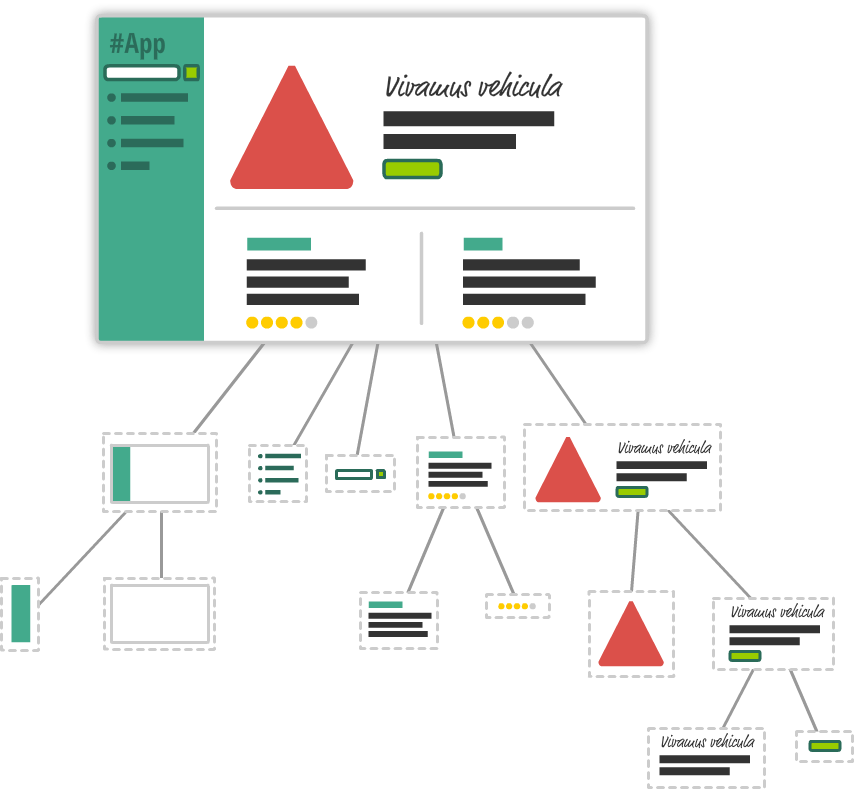
This seems like common sense given that is how we tend to write code, but for defining our UI, this was pretty awesome.
Second, React used a virtual DOM to create an in-memory copy of what our page's UI looks like. Using this in-memory copy, it was able to determine the least amount of DOM changes that our browser would need to make to represent a visual change. This was important because DOM manipulations were some of the slowest things a browser did. By optimizing this, our web apps got a new burst of perceived speed!
Lastly, React
## Targeting the Right Users
At the end of the day, all of the devices we saw numbers for are used by real human beings (and the occassional smart dolphin). The demographics for who uses which platform is equally important for you to think about. There are three questions you should ask to help figure this out:
- Are your users primarily located in developed countries, or are they located in emerging markets?
- Will your app be used in an enterprise/corporate environment, or will it be used by consumers across a variety of non-work settings?
- Is your app targeted at content creators, or is it targeted at content consumers?
Let's look at each of these questions in greater detail to see how that might change the platforms you are considering targeting.
### Emerging Markets vs. Developed Markets
One of the most important views you should get with the previous platform usage data is where exactly these platforms are being used. For mobile devices, the following map shows you where iOS (red) and Android (blue) users make up the majority of users:

Take a moment to look at the map. From what we see in the map combined with some additional data, we can state the following:
1. iOS usage is skewed heavily towards those with extra disposable income. Most of those users tend to be in industrialized/developed nations.
1. Android usage makes up the majority of the world that falls under the developing/emerging markets bucket. That's a lot of people!
1. Given the demographics, a typical iOS user signifcantly spends more money on apps and app-related purchases than an Android user. ([source](http://www.androidauthority.com/new-report-reveals-that-ios-users-spend-2-5-more-on-in-app-purchases-than-android-users-700983/))
If we take away mobile device usage and focus on desktop/laptops, it is a Windows world. The main comparison is between Windows 10 usage (green) and Windows 7 usage (blue):
Users on iOS have disposable income to spend money on apps, in-app purchases, etc. The average Android user, on the other hand, doesn't spend much on apps. They prefer to use free services.
Meet the Platforms
## Conclusion
The console provides you with one of the best tools you have for understanding what your code is doing. Displaying messages is only one part of what the console allows you to do, and within our narrow focus on just displaying messages, there is a whole lot more that we can cover than what we've seen so far. We'll cover more things the console does later, but the few `console` techniques you've seen here will take you far in helping you find and squash bugs in your code.