# Errors and Known Issues
by [ kirupa](https://www.kirupa.com/me/index.htm) | filed under [Learning React](https://www.kirupa.com/react/index.htm)
A great combination of editors and reviewers worked tirelessly to ensure the book's content is easy-to-understand and error-free. Despite our best efforts, sometimes errors do slip through. This page calls them out so that you can save some confusion and troubleshooting time.
Do note that we fix these errors in subsequent printings. Depending on when you access the print or digital edition of [Learning React](https://www.amazon.com/exec/obidos/ASIN/013484355X/kirupacom), you may not run into or see all of the errors listed below.
If you find any new issues, send me an e-mail (**kirupa.at.kirupa.com**) directly or comment below.
## Chapter 4: Styling your React Content
In the **Actually Styling Our React Content** section, the highlighted `div` element doesn't specify the actual style. The corrected version of the highlighted line is shown below:
```jsx
class Letter extends React.Component {
render() {
var letterStyle = {
padding: 10,
margin: 10,
backgroundColor: "#FFDE00",
color: "#333",
display: "inline-block",
fontFamily: "monospace",
fontSize: 32,
textAlign: "center"
};
return (
{this.props.children}
);
}
}
```
Without this line, the `letterStyle` object will never get assigned to the `div`, and the resulting content will appear unstyled.
## Chapter 8: Dealing with State
In the **Getting Our Counter On** section, the text states: *To make this all work, we’re relying on three APIs that our React component exposes*. We aren't relying on **three** APIs. We are relying on only **two** APIs.
In the **Starting Our Timer and Setting State** section, the first block of code is incorrect and has the wrong lines highlighted. What you should see is the following for kicking off our timer:
```jsx
class LightningCounter extends React.Component {
constructor(props, context) {
super(props, context);
this.state = {
strikes: 0
};
}
componentDidMount() {
setInterval(this.timerTick, 1000);
}
render() {
return (
{this.state.strikes}
);
}
}
```
## Chapter 9: Going from Data to UI
When testing the example in your browser, you may run into the following error:
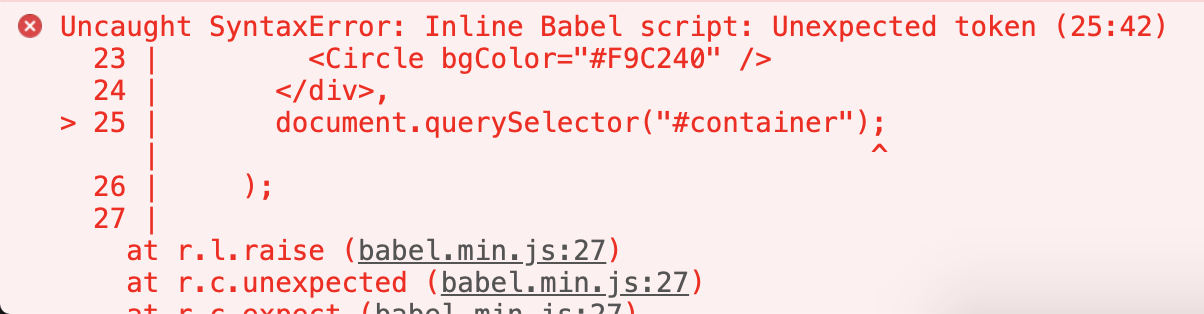
This is caused by the `ReactDOM.render` call having an extra semicolon inside it. The correct code should look as follows with the relevant line highlighted:
```html
From Data to UI
```
Because the `document.querySelector` call is inside the `ReactDOM.render` method, it doesn't need a semicolon.
## Chapter 11: Meet the Lifecycle Methods
In the Kindle/web edition, the URL for the **lifecycle_methods.htm** example has an accidental space in it. The URL should just be: https://www.kirupa.com/react/lifecycle_example.htm
## Chapter 15: Building an Awesome Todo List App
In the Removing Items section, the code for defining the `delete` event handler is correct:
```js
class TodoItems extends Component {
constructor(props) {
super(props);
this.createTasks = this.createTasks.bind(this);
}
delete(key) {
this.props.delete(key);
}
.
.
.
```
The part that I don't do a good job clarifying is why we are declaring `this.createTasks` in as opposed to `this.delete`. The reason has to do with what `createTasks` eventually does:
```jsx
createTasks(item) {
return this.delete(item.key)}
key={item.key}>{item.text}
}
```
It is `createTasks` that calls the `delete` method, so properly setting the context needs to happen at the `createTasks` level as opposed to at the `delete` level.