[REACT](https://www.kirupa.com/react/index.htm)
[BOOK](https://www.amazon.com/exec/obidos/ASIN/0134546318/kirupacom)
# Effects with useEffect
by [ kirupa](https://www.kirupa.com/me/index.htm) | filed under [Learning React](https://www.kirupa.com/react/index.htm)
Most of what a React component does is easy to describe. It takes in some props, looks at its state, and returns some JSX that describes what the screen should look like. That's it. That's the job. Real apps, though, need to do things that don't fit neatly into that description. You may need to change the title of the browser tab, start a timer, listen for the window being resized, ask a server for some data, or hand an element over to a map or chart library that has no idea what React is.
All of these things have one thing in common. They reach outside of the component and touch something React doesn't control. These are known as **side effects** (or just **effects**), and the hook React gives us for dealing with them is called `useEffect`. In this tutorial, we are going to learn how to use it, how to clean up after it, and (just as important) how to know when you shouldn't use it at all.
Onwards!
## Your First Effect
The easiest way to see an effect in action is to change something outside of our component. A good candidate is the title of the page, the text you see on the browser tab. React doesn't own that (it lives in the `title` element of the document), so changing it is a side effect. Make the following component the contents of your **src/App.jsx** file in a Vite project:
```jsx
import { useState, useEffect } from "react";
function PageTitle() {
const [count, setCount] = useState(0);
useEffect(() => {
document.title = `You clicked ${count} times`;
});
return (
);
}
export default PageTitle;
```
Preview this in your browser and click the button a few times. Look at your browser tab. The title changes every time you click, and it always matches the number on the button.
The star here is the `useEffect` call. You give it a function, and React promises to call that function after it has updated the screen with whatever your component returned. In our case, the function sets `document.title` using the current value of `count`. Here is the order of events each time you click the button:
1. You click, and our click handler calls `setCount`.
1. React calls our `PageTitle` function again with the new `count` and updates the button on the screen.
1. React then calls the function we gave to `useEffect`, and the page title changes.
Notice that our effect doesn't run while the component is figuring out what to return. It runs afterwards. That detail is a big deal, and it is the reason effects exist in the first place.
### Why Not Do This in the Component Body?
You may be wondering why we couldn't just put `document.title = ...` in the body of our component, right above the `return`. It would work in this simple case, but it breaks a rule that React really cares about: **rendering must be pure**. A component's job while it is rendering is to calculate JSX from its props and state, and nothing else. React may call your component more than once for a single update, throw away a render it didn't end up needing, or pause a render and come back to it later. If your component's body is busy changing the title, starting timers, or talking to servers, you would be doing all of those things at unpredictable times. Effects run after React has committed to a render, so you get a predictable moment to do the messy stuff.
## The Dependency Array
The effect we wrote runs after *every* render. That is fine for changing a title, but it is a bad idea for something like starting a timer or fetching data. We need a way to tell React when our effect should run, and that is what the second argument to `useEffect` is for. It is known as the **dependency array**.
There are three ways you can use it, and the easiest way to see how they differ is to look at some code that logs a message from each:
```jsx
import { useState, useEffect } from "react";
function Deps() {
const [count, setCount] = useState(0);
const [name, setName] = useState("Batman");
useEffect(() => {
console.log("Runs after every render");
});
useEffect(() => {
console.log("Runs once, after the first render");
}, []);
useEffect(() => {
console.log(`Runs when count changes: ${count}`);
}, [count]);
return (
);
}
export default Deps;
```
Our component has three effects. Here is how each one behaves:
- **No array at all:** The effect runs after every single render. Click either button, and you'll see *Runs after every render* in the console.
- **An empty array (`[]`):** The effect runs once, after the component first shows up on the screen. It never runs again for this component. This is what we used for our lightning counter timer in the [Dealing with State](https://www.kirupa.com/react/dealing_with_state.htm) tutorial.
- **An array with values in it (`[count]`):** The effect runs after the first render and then again whenever one of those values is different from what it was last time. Click the name button, and this effect stays quiet. Click the count button, and it speaks up.
If you run this and open your browser's console, you may notice that some messages show up twice right at the beginning. That's not a bug in our code. That's React's Strict Mode doing its thing, and we'll look at it shortly.
The rule for filling in the dependency array is simple: **list every value from your component that your effect uses.** By value, I mean props, state, and anything you calculate from them. Our third effect uses `count`, so `count` goes in the array. If you forget one, your effect will keep using an old value from an earlier render, which is the same snapshot problem we looked at in the state tutorial. You don't have to do this from memory, though. The linter that comes with the Vite template will warn you when your array is missing something. When it does, resist the urge to silence it. The warning is almost always right, and the fix is to change your effect rather than lie about what it depends on.
#### Note: Objects and Functions as Dependencies
React decides whether a dependency changed by checking if the new value is the exact same thing as the old one. Primitive values like numbers and strings are easy. A number is the same number or it isn't. Objects and functions that you create inside your component are different, because you get a brand new one on every render. If you put one of those in your array, your effect will run after every render. The usual fix is to move the object or function inside the effect that uses it, or to depend on the individual primitive values inside the object.
## Cleaning Up After Yourself
Some effects set something up that needs to be taken down later. A timer needs to be stopped. An event listener needs to be removed. A connection needs to be closed. If you don't do that, you end up with timers piling up and listeners that keep running long after your component is gone.
React gives you a way to do this. Your effect function can **return another function**, and React will call that function when it is time to clean up. Here is an example that listens to the window being resized:
```jsx
import { useState, useEffect } from "react";
function WindowWidth() {
const [width, setWidth] = useState(window.innerWidth);
useEffect(() => {
function handleResize() {
setWidth(window.innerWidth);
}
window.addEventListener("resize", handleResize);
return () => window.removeEventListener("resize", handleResize);
}, []);
return
The window is {width}px wide.
;
}
export default WindowWidth;
```
Our effect adds a `resize` listener and then returns a function that removes the exact same listener. Try resizing your browser window, and you'll see the number update. When this component goes away, React runs our clean-up function, and the listener goes away with it.
There's a subtle detail about *when* the clean-up function runs. It isn't only when the component is removed. React also runs it **before running the effect again**. To see this, let's log messages from both the effect and its clean-up function:
```jsx
import { useState, useEffect } from "react";
function Counter() {
const [count, setCount] = useState(0);
useEffect(() => {
console.log(`Effect: count is ${count}`);
return () => {
console.log(`Cleanup: count was ${count}`);
};
}, [count]);
return ;
}
export default function App() {
const [show, setShow] = useState(true);
return (
{show && }
);
}
```
Click the count button once, and then click the toggle button to remove the counter. Your console will show something like this:
```bash
Effect: count is 0
Cleanup: count was 0
Effect: count is 0
Cleanup: count was 0
Effect: count is 1
Cleanup: count was 1
```
Ignore the first three lines for a moment (we'll get to those in the next section). Look at what happens when we clicked the button. The count went from 0 to 1, and React first ran *Cleanup: count was 0* and only then ran *Effect: count is 1*. Each clean-up function remembers the values from the render that created it, so it can undo exactly what that effect did. When we toggled the counter off, the last clean-up ran one final time. The following diagram shows the same sequence of events from the point of view of an effect that depends on `[count]`:
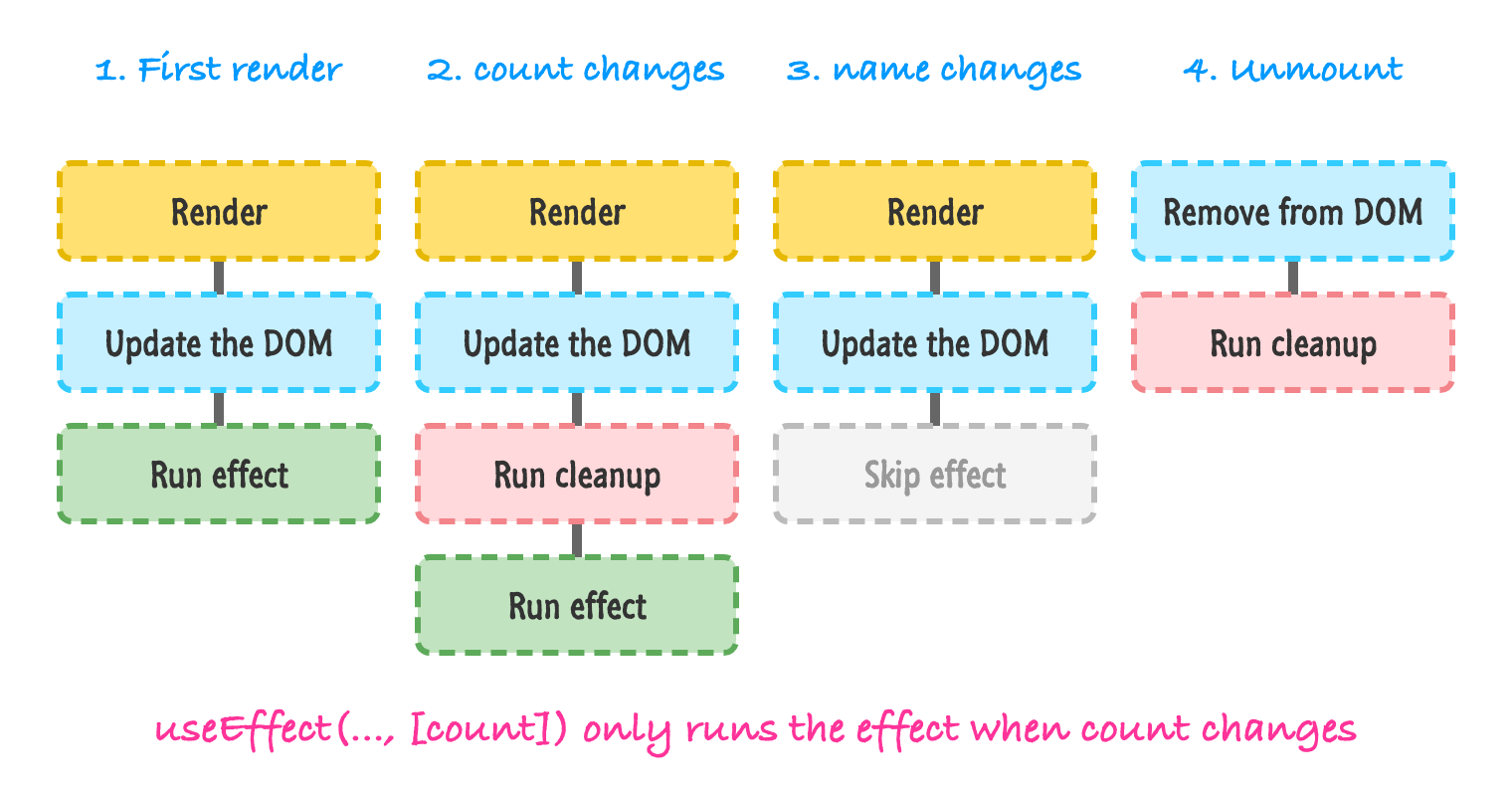
The takeaway is that an effect and its clean-up are a pair. If your effect starts something, the clean-up should stop it. If you remember to write both, your effect will keep working correctly no matter how many times React runs it.
## Strict Mode and the Double-Run
Now, back to those first three lines of the console output:
```bash
Effect: count is 0
Cleanup: count was 0
Effect: count is 0
```
Our component showed up on the screen exactly once, but our effect ran, cleaned up, and then ran again. This is deliberate. Your Vite project's **src/main.jsx** wraps your app in ``, and in development, Strict Mode takes each new component for a little test drive. After the component mounts, React pretends it was removed (running your clean-up functions) and then mounts it again (running your effects a second time). It does this once, right at the beginning.
Why would React do this? Components in a real app can be removed and added back many times (when you navigate between pages, hide and show tabs, or when development tools reload your code on the fly). Strict Mode makes sure that your effect can be started, stopped, and started again without anything breaking. If your clean-up is missing or wrong, you'll notice right away. For example, if you forgot to remove the resize listener, you'd end up with two listeners instead of one, and that would be easy to spot.
There are a few things worth remembering about this behavior:
- It only happens in **development**. When you run `npm run build` to create your production app, your effects run just once.
- It is not a bug. Don't try to defeat it with tricks to make your effect only run once. If your effect breaks when it runs twice, that tells you something is wrong with the effect or its clean-up.
- The fix is almost always to write a proper clean-up function, not to take Strict Mode out.
### Effects That Fetch Data
Fetching data is a good example of why clean-up matters, even though there's nothing to "stop". Imagine a component that shows a GitHub user's name based on a `username` prop. If the prop changes quickly, you could end up with two requests in flight, and the older one might finish last and overwrite the newer result. A common way to deal with this is to use the clean-up function to flag the older request as outdated:
```jsx
function Profile({ username }) {
const [user, setUser] = useState(null);
useEffect(() => {
let ignore = false;
async function loadUser() {
const response = await fetch(`https://api.github.com/users/${username}`);
const data = await response.json();
if (!ignore) {
setUser(data);
}
}
loadUser();
return () => {
ignore = true;
};
}, [username]);
if (user === null) {
return
Loading...
;
}
return
{user.name}
;
}
```
Each run of the effect has its own `ignore` variable. When `username` changes (or Strict Mode does its test drive), the clean-up for the older effect sets its `ignore` to `true`, so even if that older request finishes later, it won't touch our state. Also notice that we couldn't make the effect function itself `async`. An effect has to return either nothing or a clean-up function, and an `async` function always returns a promise. That is why we declared a small `loadUser` function inside and called it.
This pattern works, but I wouldn't want you writing it by hand in every component. Real data fetching has to deal with loading states, errors, caching, and retries. In the [Working with External Data](https://www.kirupa.com/react/working_with_external_data.htm) tutorial, we'll look at this in more detail, and you'll see that data libraries like TanStack Query and frameworks like Next.js are usually a better choice for anything beyond a tiny example. We'll also see what React 19 offers in [What's New in React 19](https://www.kirupa.com/react/react_19_whats_new.htm).
## You Might Not Need an Effect
Once you learn about effects, it is tempting to reach for them every time you want something to happen. Resist that temptation. A good way to think about effects is that they exist to **synchronize your component with something outside of React**: the browser's title, a timer, a network connection, a third-party widget. If there is nothing outside of React involved, you probably don't need an effect. Here are the most common situations where an effect is the wrong tool.
### Calculating Values from Props or State
Say you have a first name and a last name in state, and you want to show the full name. It may seem natural to store the full name in state and use an effect to keep it up to date:
```jsx
function Name() {
const [firstName, setFirstName] = useState("Bruce");
const [lastName, setLastName] = useState("Wayne");
const [fullName, setFullName] = useState("");
useEffect(() => {
setFullName(firstName + " " + lastName);
}, [firstName, lastName]);
return
{fullName}
;
}
```
This works, but it is doing extra work. When `firstName` changes, React renders the component, runs the effect, which sets state, which triggers *another* render. The screen even shows an empty name for a moment on the very first render. The simpler approach is to just calculate the value while rendering:
```jsx
function Name() {
const [firstName, setFirstName] = useState("Bruce");
const [lastName, setLastName] = useState("Wayne");
const fullName = firstName + " " + lastName;
return
{fullName}
;
}
```
No extra state, no effect, and no extra render. If you can calculate something from existing props or state, do that during rendering. If the calculation is genuinely slow, you can look into `useMemo`, which we'll touch on in the [Avoiding Unnecessary Renders](https://www.kirupa.com/react/avoiding_unnecessary_renders.htm) tutorial.
### Responding to User Actions
If something should happen *because the user did something*, like clicking a button or submitting a form, put that code in the event handler. An effect that watches some state and then does the work is just a roundabout way of writing an event handler, and it is much harder to follow. Event handlers know exactly what happened. Effects only know that something is different.
### Resetting State When a Prop Changes
Imagine a profile page with a comment box, and you want the comment box to start fresh when you switch to a different user. You could write an effect that watches `userId` and clears the comment. A much nicer way is to give the component a `key`:
```jsx
```
When the `key` changes, React treats it as a completely different component. The old one is thrown away and a new one is created, with all of its state starting from scratch. No effect required.
### Chains of Effects
If you find yourself writing one effect that sets some state so that a second effect runs, which then sets some state for a third effect, stop and rethink things. Each link in that chain causes another render, and the whole thing becomes hard to follow. Most of the time, the values can be calculated together during rendering or inside the event handler that started everything.
So when *do* you need an effect? Whenever you need to keep something outside of React in sync with what's on the screen. Changing the document title, subscribing to events, running timers, opening connections, and controlling non-React widgets are all good fits. The React team has a great deep dive on this topic called [You Might Not Need an Effect](https://react.dev/learn/you-might-not-need-an-effect) that is worth reading once you've got the basics down.
## A Few Related Things
Before we wrap up, here are a few related pieces you may run into:
- **`useLayoutEffect`:** It works just like `useEffect`, except it runs before the browser gets a chance to paint the screen. You only need it when you have to measure something in the DOM and then change the layout before the user sees anything. Most of the time, `useEffect` is what you want.
- **`useEffectEvent`:** Sometimes an effect needs to read the latest props or state without being re-run every time they change. Recent versions of React (19.2 and newer) have a hook called `useEffectEvent` for this. It is a more advanced tool, so I'll just point you to its [documentation](https://react.dev/reference/react/useEffectEvent) for when you need it.
- **Server rendering:** Effects never run on the server. They only run in the browser, after a component has been put on the page.
## Conclusion
Effects are how our components reach out and touch the world outside of React. We learned that `useEffect` runs our code after React has updated the screen, that the dependency array decides when it runs again, and that a clean-up function lets us undo whatever the effect set up. We also saw that Strict Mode deliberately runs our effects twice in development to help us find missing clean-up code, and that many of the things we are tempted to do in an effect (calculating values, responding to clicks, resetting state) have simpler homes elsewhere.
If you used React before hooks showed up, all of this may remind you of the lifecycle methods that class components had. There is a connection, and that is exactly what we'll look at next. We'll take the idea of a component being created, updated, and removed, and see how it maps to everything you just learned.
**Next tutorial:** [The React Component Lifecycle](https://www.kirupa.com/react/component_lifecycle.htm)