|
 Introduction to XML in Flash Introduction to XML in Flash
by senocular
Creating and Editing XML With ActionScript
Extracting information from an XML document
or from an XML object from Flash is one thing.
Editing that information and its structure after
it's loaded into Flash is another. It's great
that Flash can receive content via
external documents but sometimes it also has
to send it. And for information to
be properly sent, it needs to be properly formatted,
changed, altered, computated... whatever. Luckily,
ActionScript provides methods for doing just
that, all courtesy of the XML object. I suppose
even if you don't need to send anything anywhere,
you still may need to alter XML in
Flash just to facilitate the ever changing needs
of your Flash movie, though, as I said before,
it may be easier to extract it once and keep
it in a format that's more usable for you.
Straight out, here are the methods used to
make/edit XML in ActionScript. We'll go through
each one individually and see exactly how they
work. Also understand that these are available
for reference in Flash help (Flash help is your
friend!).
| Method |
Actions |
| Constructor |
| new
XML("xml text") |
Creates
a new XML instance. |
| XML
Instances |
| parseXML("xml
text") |
Sets
the XML of an instance to the passed text. |
| createElement("node
name") |
Creates
an element node. |
| createTextNode("text") |
creates
a text node. |
| XML
Nodes |
| appendChild(childNode) |
Inserts
a child node at the end of the current element's
child nodes. |
| insertBefore(childNode,
beforeNode) |
Inserts
a child node before any child specified
within the current element's child nodes. |
| cloneNode(deep); |
Duplicates
a node. |
| removeNode(); |
Removes
a node. |
| hasChildNodes(); |
Determines
if node has child nodes. |
It is important to remember that when working
with XML, you're dealing with two different
object types, an XML instance and XMLNodes that
define the XML within that instance. Since the
XML object extends or inherits from XMLNode,
that means that all XML instances can also be
treated as XMLNodes (if you'll recall, an XML
instance itself acts as a node to hold all other
XML within the instance). So anything above
specific to XMLNodes also works with XML instances,
however those for XML instances are not meant
to be used on XML nodes.
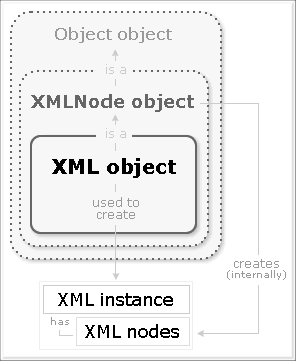
[
xml instances are also xml node instances (are
also objects) ]
Remembering this is especially important on
quirky methods like createElement and createTextNode
which work off of XML instances and not nodes
within that instance. So lets begin with the
methods for creating and editing XML.
|











