|
by kirupa |
20 June 2007
In the
previous page you finished learning how to save XML data
containing elements, nested elements, and attributes to a
file. In this page, I will provide a more modular solution
that makes it easy to add new, in our case, books without
having to write more lines of code for each book.
The following is my version:
- private
XmlDocument
xmlDoc
= new
XmlDocument();
- private
XmlElement
booksElement;
-
- private
void
AddBook(string
ISBN,
string
title,
string
author)
- {
- //
- // Initialize booksElement
if you are adding your first book.
- //
- if
(booksElement
==
null)
- {
- booksElement
=
xmlDoc.CreateElement("Books");
- }
-
- //
- // Same as tutorial;
Adding and populating the elements
- //
- XmlElement
bookElement
=
xmlDoc.CreateElement("Book");
-
- XmlAttribute
bookAttribute
=
xmlDoc.CreateAttribute("ISBN");
- bookElement.SetAttributeNode(bookAttribute);
- bookAttribute.Value
=
ISBN;
-
- XmlElement
titleElement
=
xmlDoc.CreateElement("title");
- titleElement.InnerText
=
title;
- bookElement.AppendChild(titleElement);
-
- XmlElement
authorElement
=
xmlDoc.CreateElement("author");
- authorElement.InnerText
=
author;
- bookElement.AppendChild(authorElement);
-
- booksElement.AppendChild(bookElement);
- }
-
- private
void
WriteToDisk(string
path)
- {
- // Add the booksElement to
our root element and write to disk
- xmlDoc.AppendChild(booksElement);
- xmlDoc.Save(path);
- }
-
-
- static
void
Main(string[]
args)
- {
-
- Program
bookList
=
new Program();
-
- bookList.AddBook("0553212419",
"Sherlock Holmes: Complete
Novels and Stories, Vol 1",
"Sir Arthur Conan Doyle");
- bookList.AddBook("0743273567",
"The Great Gatsby",
"F. Scott Fitzgerald");
- bookList.AddBook("0684826976",
"Undaunted Courage",
"Stephen E. Ambrose");
- bookList.AddBook("0743203178",
"Nothing Like It In the World",
"Stephen E. Ambrose");
-
- bookList.WriteToDisk(@"C:\Users\Kirupa\Desktop\books.xml");
- }
I am not going to go through my example in great detail,
for it is really just a minor extension of what you had been
doing earlier. Instead of having all of our application
coded in our Main method, I broke up common pieces and
placed them in their own methods.
This division, or modularity, allows me to add books
using the AddBook method and
specifying the ISBN,
title, and
author information. The
AddBook method takes care of populating the
bookElement object, and best
of all, I can easily add as many books as I want by simply
making another call to AddBook.
Once you have finished adding the last book, I make a
call to the WriteToDisk
method with your argument being the path you wish to save
your file to. With that, you are done with this tutorial,
and this is how your final XML file should look like:
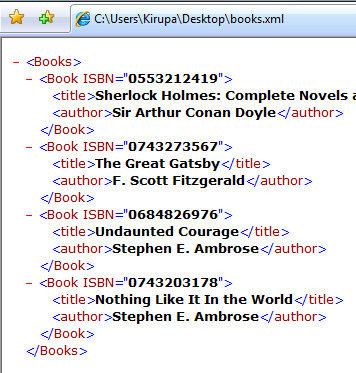
[ your final XML with all of the
information we planned to add ]
Just a final word before we wrap up. If you have a question and/or want to be part of a friendly, collaborative community of over 220k other developers like yourself, post on the forums for a quick response!

|



 Writing/Saving XML Files - Page 4