|
by
kirupa | 25 February 2009
In the
previous page, you received a brief introduction
to dependency properties. We ended by starting our
deconstruction of the various things that make up a
dependency property, more specifically, the register
portion of your dependency property identifier.
Let's continue from there.
Registering your dependency property is handled by
DependencyProperty.Register. The Register method
takes several arguments to help you customize some
of the your dependency property's behavior, so let's
look at those arguments now.
-
DependencyProperty.Register("AuthorName",
typeof(string),
typeof(AuthorTextField),
new
PropertyMetadata(""));
The first argument you
pass in refers to the name of the DependencyProperty
you wish to register. In general, try to keep the
name the same as that of your dependency property
such as what I've done.
-
DependencyProperty.Register("AuthorName",
typeof(string),
typeof(AuthorTextField),
new
PropertyMetadata(""));
The second argument
defines the type of your dependency property. In our
case, AuthorName is of type string, so that is the
value I pass in to the Register method.
-
DependencyProperty.Register("AuthorName",
typeof(string),
typeof(AuthorTextField),
new
PropertyMetadata(""));
The third argument
looks similar to what we wrote earlier. What you are
specifying is the type of the class that owns this
dependency property. This will vary depending on
your scenario, but I have this dependency property
declared inside a user control called
AuthorTextField. Therefore, AuthorTextField is what
I specify here.
-
DependencyProperty.Register("AuthorName",
typeof(string),
typeof(AuthorTextField),
new
PropertyMetadata(""));
The last argument
determines the metadata that will be carried along
with this dependency property, and that is handled
via the PropertyMetadata class. The term metadata
often indicates something that isn't always useful,
but that may be the wrong impression to get at this
point. As you will see very shortly, the arguments
you pass in here greatly affect how you may end up
using the dependency properties in your application.
Into your
PropertyMetadata constructor, you can specify the
default value for your dependency property, a method
to call when this property's value has changed, or
both. In the next section, let's look at that in
greater detail.
Like I briefly
hinted at in the previous section, you can specify
some additional information about your dependency
property via the PropertyMetadata object.
The first variation you can do is change the
default value your dependency property has. In my original code, I don't have a
default value specified. If you were to examine this
dependency property in Expression Blend, this is
what you would see...a blank field:

[ no default value results in nothing being
displayed ]
Let me specify a
default value instead. My new Register code looks as
follows with a default value specified:
-
DependencyProperty.Register("AuthorName",
typeof(string),
typeof(AuthorTextField),
new
PropertyMetadata("Sir
Arthur Conan Doyle"));
When I rebuild my
project and examine this property inside Blend
again, notice what I see this time around:
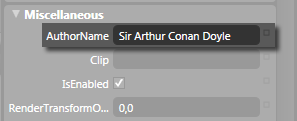
[ your dependency property's default value is
displayed ]
Instead of being
greeted by a blank value, the default value I
specified is what gets displayed instead. In my
case, the default value is of type string because
that is the type of my dependency property. In
whatever you are doing, make sure that your
dependency property's default value is the same type
as your dependency property. In other words, don't
put your value inside quotation marks to signify a
string just because I have done so!
Another argument you can
specify into your PropertyMetadata object is a
callback method. This is a method that gets called
each time your dependency property's value changes,
and the call to this callback method will look as
follows:
-
DependencyProperty.Register("AuthorName",
typeof(string),
typeof(AuthorTextField),
new
PropertyMetadata(new
PropertyChangedCallback(AuthorNameChanged)));
In the above code, the
name of my callback method is called
AuthorNameChanged. What I haven't done yet is
actually create my AuthorNameChanged method, but
that is actually pretty straightforward:
- private
static
void
AuthorNameChanged(DependencyObject
d,
DependencyPropertyChangedEventArgs
e)
- {
- // Code for
dealing with author name changes
- }
There are a few things
that you should note. Because your dependency
property identifier (and by extension your Register
code) is a static variable, an event handler
assigned to it such as AuthorNameChanged must be
static as well.
The second thing to
note are the two arguments passed into your callback
method. The first argument is a reference to your
DependencyObject object, and the second argument is
a reference to your
DependencyPropertyChangedEventArgs.
As long as your
callback method has a static modifier and contains
two arguments of type DependencyObject and
DependencyPropertyChangedEventArgs, you are set!
Each time your dependency property's value is
changed, your callback method will get called and
any code contained in it executed.
The final combination of
arguments you can specify for your PropertyMetadata
is one where you have both a default value as well
as a callback method! This would look as follows:
-
DependencyProperty.Register("AuthorName",
typeof(string),
typeof(AuthorTextField),
new
PropertyMetadata("Sir
Arthur Conan Doyle",
new
PropertyChangedCallback(AuthorNameChanged)));
I specify both my
default value as well as create the new
PropertyChangedCallback object with my callback
method name provided as an argument.
Hopefully this article provided
you with a good dose of information on how to use
dependency properties in Silverlight 2. While
articles like this treat dependency properties as
being special, they are actually very common. For
further reading on a practical use of dependency
properties, I
strongly recommend you read my
10 page article on dependency properties and user
controls. While that article is WPF based, much
of concepts will be similar in Silverlight.
Just a final word before we wrap up. If you have a question and/or want to be part of a friendly, collaborative community of over 220k other developers like yourself, post on the forums for a quick response!

|



 Dependency Properties in Silverlight - Page
2
Dependency Properties in Silverlight - Page
2